

Your Browsing History


Kyle B.
Joined on 03/08/06
0
0
product reviews
- 17
Pretty good, but only with DD-WRT
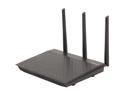
ASUS RT-N66U N900 Dual-Band WiFi Gigabit Router
Pros: It's a simultaneous dual-band router, which is nice when you still have devices that only work on the 2.4 GHz band. A lot of access points will only run one band at a time, even if it's capable of both. It's got a good range. My previous access point had trouble reaching from the basement to the second floor, but with this one I get a good (or at least good enough) signal throughout the house. Installing DD-WRT is possible, but it's harder than it should be, especially for a router that advertises it.
Cons: The stock firmware is flaky. It goes out to lunch a lot and you have to reboot it to get it working again. The configuration interface is too limited. For example, dnsmasq (the DHCP server and DNS relay that it uses) has an option to assign a specific name to a specific IP address, but there's no way to get that option through the user interface. On top of that, the interface is slow and cumbersome, like they spent more time trying to make it pretty than they spent making it functional. Despite its claims, the wifi speed tops out at around 45 Mpbs or so.
Overall Review: It's a good router, but only if you replace the firmware. After I put DD-WRT on it, it's worked like a charm. The wireless performance is good enough I find, and it's about as good as I would expect. The computers in my network that need a fast connection are all wired.
5/10/2016See more detail
Broken, and so was the RMA replacement.
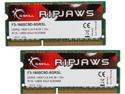
G.SKILL Ripjaws Series 8GB (2 x 4GB) 204-Pin DDR3 SO-DIMM DDR3L 1600 (PC3L 12800) Laptop Memory Model F3-1600C9D-8GRSL
Pros: The RMA process was fairly simple, and the replacement was prompt, if useless.
Cons: Both DIMM's failed memtest. And I don't mean they reported errors, I mean memtest hit some exception and couldn't even *start*. I tested them on another laptop (from a different manufacturer) to make sure that it wasn't something odd about mine, and the other laptop just ignored it, like it wasn't even plugged in. I got an RMA replacement, and the replacement fails with exactly the same behavior. I'd send it back again, but after a few rounds of this, the cost of shipping would exceed the cost of buying another brand.
Overall Review: This isn't the first time I've had to send a GSkill DIMM back for a replacement, although it is the first time that the replacement was bad.
5/10/2016See more detail
Does exactly what it says.
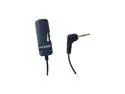
KOSS VC20 3.5mm Connector Volume Control
Pros: The volume knob feels pretty solid. It's just stiff enough to make fine adjustments easy, without any slop or wobble to it. There's no drop in audio quality that I can detect.
Cons: The cable is longer than I'd like. I needed an inline volume control, not an extension cord. I just left the twist-tie on to keep it bundled up.
Overall Review: It would be nice if there was a model with the same volume control but a cable that's a just few inches long.
7/16/2021See more detail
Hands down the best case I've ever used
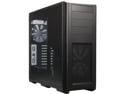
Phanteks Enthoo Pro Series PH-ES614P_BK Black Steel / Plastic ATX Full Tower Computer Case
Pros: First, installing stuff into this case was a breeze. It a good size, and the space is allocated very well to avoid being cramped. It's got enough grommets and straps for cable management, and they're placed about where I needed them. The backplates for PCI cards are easy to access. That's a pet peeve for me on so many cases I've tried, but this case gets it right. The drive carriages are excellent, and the drive bays are generous and then some. It's got seven 3.5" bays, three 5.25" bays, and a couple of mount points for 2.5" drives. The 3.5" and 5.25" bays have a really good tool-less design -- you can slide a new drive in or out in a matter of seconds. On top of that, it comes with a very generous supply of spare screws, in a compartmentalized container to keep stuff organized. Much nicer than the box and/or bucket of screws and spacers that most of us have. The cooling arrangement is about the best I've ever seen. My system draws about 450 watts under a full load. Even on a hot day, nothing in it ever goes above about 70 C, and the fans are never louder than a whisper. And a quiet whisper at that.
Cons: As a really minor point, if you've got drives in the 2.5" bays really tightly together -- like, two 2.5" drives mounted in a single 3.5" bracket -- the SATA power cables can be a little tight against the right side of the case. It's still manageable, but another quarter inch of space between the drive bays and the right panel would have been nice. On one of the 5.25" bays, then pins to hold the drive in don't latch properly, so I do have to use screws to hold the optical drive in. The screws are still really easy to access, though, so that's more of an oddity than a problem.
Overall Review: This has replaced the (now discontinued) Antec 1200 as my new favorite case. It's a little easier to work with than the Antec, it cools at least as well, it's quieter, and it's half the cost.
7/16/2021See more detail
Mostly works, but occasional problems at boot time
![ORICO 4 Bay External Hard Drive Docking Station USB 3.0 to SATA I/II/III for 2.5''/3.5'' HDD SSD with Hard Drive Clone Function Slope Design Support UASP [4 x 20TB]-6648US3](https://c1.neweggimages.com/ProductImageCompressAll125/1B0-0003-000F8-01.jpg)
ORICO 4 Bay External Hard Drive Docking Station USB 3.0 to SATA I/II/III for 2.5''/3.5'' HDD SSD with Hard Drive Clone Function Slope Design Support UASP [4 x 20TB]-6648US3
Pros: Easy to set up. Plug it in, plonk a drive into the top, and off you go. With a few rotational hard drives, the dock is about as fast as an internal SATA controller would be.
Cons: Every so often, when the computer boots up, it doesn't see the drives plugged into the dock. I have to either disconnect and reconnect the USB cable or power cycle the dock to use it. Mostly happens when booting into Windows, but I've seen it happen once in Linux. USB 3.0 tops out at 5 gbit/s, so it would be a bottleneck if you plug an SSD into it. Moreso if you had more than one SSD.
Overall Review: Overall, this is a good choice if you want to add storage to a system that doesn't have enough internal bays or connectors.
5/22/2021See more detail
Solid performance, good bang for the buck, but a terrible case
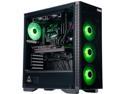
ABS Gladiator Gaming PC - Intel i7 10700F - GeForce RTX 3070 - 16GB DDR4 3000MHz - 1TB M.2 NVMe SSD - EVGA CLC 240MM AIO
Pros: Excellent performance as a gaming rig. I don't have a 4K monitor, but I can turn everything else all the way up on any game I've tried, and it runs smoothly. Under a full CPU and GPU load, the whole thing stays cool -- no overheating or thermal throttling. See "cons" about the resulting noise, though. It's pretty power-efficient when it's idle -- it draws around 50-60 watts. Under load, it draws around 400-450, which is about what I'd expect from it. Most of the hardware works on Linux without issue. The bluetooth adapter is the only thing that doesn't, but I don't have much use for bluetooth on a desktop gaming system.
Cons: The case is pretty bad. First, the case fans are loud -- really loud. I've used quieter vacuum cleaners. And as far as I can tell, they spin at full volume no matter what sort of load the computer is under. You'll want to invest in a good pair of noise-cancelling headphones if you don't already have one. Second, there's not enough expansion room for PCI boards or disks. The motherboard only has one available PCI-E slot -- I think it has three total, but the GPU takes one and is large enough to block a second. And, that third slot is right against the various switch and USB connectors, so you couldn't put a double-width card into it. Also, while I've seen some cases before that made it hard to get a screwdriver to the screws holding the PCI boards, this is the first time I've seen a case where it was actually *impossible*. There's about an inch of metal holding the glass side panel on, and the GPU itself is tall enough that you can't get a screwdriver in there at all -- not even at an angle. You can't fit an offset screwdriver either. If you ever want to replace that GPU (or the motherboard), you'll probably need to take a hacksaw to the case to get it out. The case also doesn't have nearly enough room for disks -- it's got two 3.5" bays on the bottom, and a place to attach two 2.5" disks to the side. No 5.25" bays at all. With how bloated games are nowadays, you're going to need more than the 1TB drive that it comes with, and it's a lot more cost-effective to get a bunch of small drives than a few big ones. What's really weird about that is that there's a lot of empty space in the front of the case. It could easily fit another six, maybe even eight 3.5 inch bays, and still have room left over for for an optical drive.
Overall Review: I'd recommend this as a good system for its cost, if you've got a high noise tolerance, and if you're willing to transplant it into a new case when you need to upgrade anything. It would be nice if there was an option to skip the keyboard and mouse. They very shiny, but I've already got a keyboard and mouse, so they're just an extra cost without any real use for me.
5/19/2021See more detail
seller reviews
- 3
Arrived on time and as expected
No news is good news, as they say. The cables I ordered arrived on time and appear to work as expected.
On-time
Delivery
Product
Accuracy
Customer Service
Satisfactory
12/24/2024See more detail
The item I ordered arrived promptly and works as described.
On-time
Delivery
Product
Accuracy
Customer Service
Satisfactory
9/19/2023See more detail
Late delivery, wrong item, and customer service is worse than unresponsive
I've seen bad customer service and customer support before. This goes beyond bad and into Kafkaesque. To start with, the item never shipped for well over a month. No updates to the tracking number, no updates, just radio silence. It only shipped when I went and contacted the seller. And then when it did ship, they shipped the wrong item. When I filed a claim with Newegg, there was silence for two weeks until Newegg apparently took over the claim and sent me an RMA number. Then, an hour after receiving that RMA number, I got an update that the RMA number had been rejected because an HDMI switch is, and I quote, a "consumable item." Now I have to wait *another* two weeks for another claim to process. It's bad enough to systematically bungle every step of shipping. It's worse to just stay quiet in the apparent hope that I'll get discouraged and go away. It's MUCH worse when they then actively try to block me from getting a refund.
On-time
Delivery
Product
Accuracy
Customer Service
Satisfactory
6/12/2020See more detail