
Your Browsing History


Joel C.
Joined on 07/16/04
0
0
product reviews
- 8
Nice, not perfect
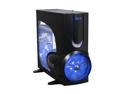
XCLIO A380BK Fully Black SECC 1.0mm thickness ATX Full Tower Computer Case
Pros: It is a cool looking case. The huge fans look awesome, the blue LEDs are everywhere, and the acrylic window is big. There are fan controls, which is nice, and the front door is relatively sturdy and held shut by a magnet, which is neat. The case is VERY roomy, and I've had no trouble fitting everything in, even a huge huge heatsink. The price was good, too, but I got it on sale for a hectodollar. It's sturdy, too...the metal is pretty thick. It's pretty quiet. The loudest thing in my case is the heatsink.
Cons: I don't really like the tool-less construction. The PCI and PCI-E cards, for instance, are not held in by thumbscrews, but a retainer clip that holds them all in simultaneously. It is flimsy, and when you lift it up to put a new card in, all your cards shift. The plastic rails for the DVD drives and such are visible when you open the front door of the case, and they are bright yellow. The case shape makes it hard to install everything, because the sides are not flat and you can't lay it flat on one side. As you put parts in, the weight distro changes and it will rock back and forth. The fans are big and push a good bit of air, but the velocity is low. Thus, my mobo is running a bit warmer than I like (it stays around 45C). Remember that heat transfer from moving air is based mostly on the convection coefficient, which is a function of air velocity, not volume. There's no way to turn off the LED's, so if you sleep in a room with this thing, good luck.
Overall Review: Intel Q6600 Quad-core 4GB G-skill DDR2 6400 CHIMEI CMV 221D Black 22" 5ms DVI Widescreen LCD Monitor GIGABYTE GA-P35-DS3L LGA 775 Intel P35 ATX Intel Motherboard Rosewill RP550V2-S-SL 550W SLI Ready-ATX12V V2.01 Power Supply XFX PVT80GGHD4 GeForce 8800GTS XXX 320MB
12/28/2007See more detail
Good, needs a tweak or two
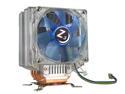
Rosewill RCX-Z3 92mm Ball CPU Cooler
Pros: Despite a current mobo temp of 41C and a room temp of 22C, my quad-core Intel Q6600 is running at 27 idle, 35 under full load. Using my mobo's automated fan controls, the noise levels are pretty low for the most part. This heatsink can be used with many chipsets, too, and that's nice. It can be oriented in any direction so that the air is blowing the right way.
Cons: It's a good thing I bought this to do a fresh build, because it is held in by screws underneath the motherboard on LGA775 boards. The mobo MUST be out of the case to install it. Also, depending on how it is oriented, it may block installation of your RAM, so keep that in mind. There is a plastic cowl that goes around the heatsink so that the air from the fan must pass across all the fins, but this means that the fan speed cannot go too low. If the fan were to cut off, for instance, the plastic cowl would do a great job of retaining heat, rendering the heatsink far less effective. I'm not sure that the cowl is a good idea. Also, the LED lights are cool, but there is no way to control them or turn them off and on without unplugging them. Also, since the LEDs leech power off of the fan, they get brighter and dimmer as the motherboard increases the fan speed. They'll be kinda dim, and then I turn on a game, the fan speeds up, and the lights get real bright. Sorta funny.
Overall Review: I got this in a combo deal for about two dozen Washingtons. For that kinda price it is definitely worth it. It does better than a stock cooler, but I have no modern aftermarket coolers to compare it to. I'd say that if its on sale, you should consider it, but I am not positive that it's worth paying full price for. Just throwing that out there for you...
12/28/2007See more detail
Schweet...
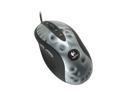
Logitech MX 518 Aluminum 8 Buttons 1 x Wheel USB Wired Optical Gaming Mouse
Pros: Operation is smooth and accurate, it feels good in my hand, and it looks pretty nice. The buttons have a soft feel, but they provide good positive feedback upon engagement. The sensitivity controls are nice, and I can quickly change the mouse speed by pressing a button. The forward and back buttons are well-designed, and I have yet to accidentally press either one, which is a problem I've had on mice in the past. It's smooth, well-weighted, and I like it a lot.
Cons: A bit pricey for a mouse, but it's worth it.
12/28/2007See more detail
Very Nice...

Intel Core 2 Quad Q6600 - Core 2 Quad Kentsfield Quad-Core 2.4 GHz LGA 775 105W None Integrated Graphics Processor - BX80562Q6600
Pros: This processor is pretty doggone fast. At this price, you cannot beat it. It doesn't have heat issues either, using an aftermarket heatsink, I'm running 27C at idle and about 35C under load. Although nothing is really properly using quad-core processors, I can watch the processor activity on my Logitech G15 LCD, and it's not like one or two cores are getting beat to death while the others are chilling out. The processes seem to get spread pretty evenly, and I have had no issues with running multiple programs. The price to performance ratio is pretty insane. Benchmark scores: (overall) 135,000 on Aquamark. 11,000 on 3D Mark 06
Cons: I've had no problems.
Overall Review: XFX PVT80GGHD4 GeForce 8800GTS XXX 320MB 4GB G-skill DDR2 6400 CHIMEI CMV 221D Black 22" 5ms DVI Widescreen LCD Monitor GIGABYTE GA-P35-DS3L LGA 775 Intel P35 ATX Intel Motherboard Rosewill RP550V2-S-SL 550W SLI Ready-ATX12V V2.01 Power Supply
12/28/2007See more detail
Good price, not perfect though
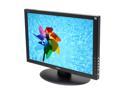
CHIMEI CMV 221D Black 22" 5ms DVI Widescreen LCD Monitor 330 cd/m2 800:1
Pros: With the current rebate, the price is pretty phenomenal. You can't get 22 inch LCDs at this price, especially considering that it even comes with a DVI-D cable. The picture is vibrant and clear, no ghosting, no bleeding. It seems pretty sturdy, too.
Cons: No height adjustment, but that's OK because it does have tilt adjustment. However, it does leak some light out the back, and on a completely dark screen, the backlight is brighter in some spots than others. There are two vertical bright stripes from the backlight on a black screen, but considering how rare that situation is, its not too big of a problem.
Overall Review: Not perfect, but at this price, I'm not complaining.
12/28/2007See more detail
Nice...more options?
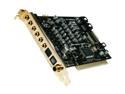
HT OMEGA STRIKER 7.1 Channels PCI Interface Sound Card
Pros: The drivers are not bloated, and the sound is tweakable with the equalizer and a few ambiance effects. Solid and clear sound, a decent price, and its easy to install, of course.
Cons: There is very little in the way of recording effects. I got a Cr3@t!v3 card almost four years ago that has more features than this card, and I paid about the same price. Also, there are some options for adjusting the output to suit your speaker placement, but it is all done through visual guesswork... you look on a diagram and drag your speakers where they are set up. I've used other systems that use test sounds to get phase and timing right, and I think that would be a more accurate way to get the sound right.
12/28/2007See more detail