




 here!
here!
I’m your shopping assistant for PC builds, upgrades, and everything tech.
Got questions? Ask away!
Start a conversation
here!
I’m your shopping assistant for PC builds, upgrades, and everything tech.
Got questions? Ask away!
Start a conversation

Joined on 05/15/07
Nice Low Profile Fan!
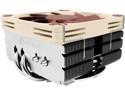
Pros: - Low profile - Quiet - Less RPM with better cooling than stock fan - Affordable
Cons: None
Overall Review: I'm using this fan with the i3-6100 Skylake and an ASRock Z170M-ITX/ac motherboard. To begin, this fan does fit this ASRock motherboard, but barely. Though the fan is not forcefully pressing on the RAM stick, it certainly does look like it is touching it or perhaps there is literally only thousands of an inch of space between the two. In my system, this fan cools the i3 Skylake up to 5-6 Celsius cooler with about 500-600 RPMs less than the stock fan. My results are based on ASRock's A-Tuning software that came with the motherboard. Also, the stock fan shipped with the i3-6100 Skylake is noticeably louder. Obviously, if you are gaming with this fan, RPMs will increase depending on temperature. As I am typing this review, A-Tuning tells me the CPU temp is 24C/75F and the fan is spinning at 1985 RPM. For those who are wondering if this Noctua fan will fit your mini-ITX case or other low profile/thin case, be aware that you will need at least 4 1/4-inch wide case to fit this fan. Preferably, the case should be about 4 1/2 inches and up for this fan. This fan will NOT come close to fitting in the Mini-Box M350 case, which I have. It will also NOT fit the Morex T3500 mini-ITX case, which I have. I purchased the In Win Case IW-BM639.AH160TB Black Mini-ITX case for this fan, which has sufficient room and is the smallest case that I know of that will fit this fan, which is 4.4 inches wide. This fan comes with thermal paste, which I am using. There is enough paste for a couple of tries. As far as price, you know what they say: "You get what you pay for!" Overall, I am very happy with this fan.
Unpredictable Quality!
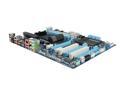
Pros: Plenty of USB ports. Good configuration with 2 PCI slots for use with older cards. Good enough for gaming.
Cons: In less than one year this board has developed the following problems: 1. One USB port no longer works; 2. One PCI slot no longer works; and 3. One RAM slot no longer works. Regarding #1, when I plug the mouse into the defective USB port the laser diode does not light; however, when I plug it into another port, the laser works, which means the mouse works. Hence, I have one defective port. Before writing this review, I again checked the port and it's not working. Regarding #2, the bottom PCI slot does not work, which I determined by inserting my sound card into this slot but Windows 7 will not recognize the card. However, the card is recognized when the card is inserted in the upper PCI slot. Regarding #3, about a month ago I started experiencing blue screens, which progressively became worse over the last few weeks to the point that at times my PC would blue screen on boot-up. At first I thought maybe there was a driver problem or one of the cards wasn't seated correctly. So I reinstalled the sound driver and updated the video driver and also reinserted all cards with emphasis on making sure they were seated correctly, to no avail. I then determined that there is a possibility that one or more sticks of RAM (G.SKILL Ripjaws Series 16GB (4 x 4GB)) may have went bad. I first ran a diagnostic check, which came up clean. Then I removed one stick at a time beginning with the fourth (most outer) slot. When I removed the stick in the third slot there were no more blue screens. So I ran 8GB of RAM for a few days with no blue screens. Then I decided to reinstall a stick into the third slot just to see if I would experience blue screens. When I booted into Windows about 2 minutes later everything froze, including the mouse. I had no choice but to shutdown by pressing the button. Then I put a stick into the forth slot to see what happens and all is good. I also swapped sticks between the third and forth slots in order to confirm whether blue screens could be related to defective RAM. It turns out that both sticks work in slot 4 without a problem. However, put either one into slot 3 and the blue screens/freezing will start again. So currently I'm running on 12GB using slots 1, 2, & 4. At this point, it appears that slot 3 is not working and is the cause of all the blue screens/freezing.
Overall Review: Will I ever buy from Gigabyte again? Maybe, but I will pay closer attention to the 1 and 2-star reviews. I have never run into so many problems with a motherboard before, even when I bought boards selling for under $100. This board could have been a 5-star board if not for quality problems. To bad! My board is under a year old.
Cool, Fast, and Energy Efficient
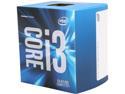
Pros: Runs cool Fast Energy efficient Heat-sink comes with thermal paste (which means it has been tested by Intel)
Cons: Stock fan is noticeable and could be considered loud in comparison to the higher end Noctua fans and others of this type made for quiet performance.
Overall Review: I went from the Gigabyte Intel J1800N-D2H motherboard with built-in processor to this i3 processor on an ASRock Z170M-ITX/ac motherboard and G.Skill DDR4 F4-3600C17-8 GT memory. The difference in performance is like night and day. This i3 is a fast processor for the price. The biggest surprise is that this i3 setup is using only between 58-76 watts, compared to the J1800N, which uses 49-52 watts (based on Power Panel software I am using with my battery backup). The point is that, given the clearly noticeable increase in performance, this i3 is very energy efficient. In addition, the i3’s Intel 530 graphics is much better. This is a nice processor for cruising the Internet and watching YouTube videos. I am not a gamer, so I cannot comment about gaming performance. But for typical everyday surfing and software this is one very nice processor. I am using the stock fan with temperatures generally below 30 Celsius (using stock thermal paste on heat-sink), even though I am using AsRock’s A-Tuning software to slow the fan down to under 2500 RPM to make this rig as silent as possible. I just installed this i3 on the ASRock motherboard and used a cloned hard drive from the J1800N rig and this baby fired right up without a problem. I then installed motherboard drivers, including the Intel 530 graphics driver and this setup is running great.
Nice Fan
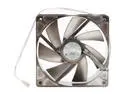
Pros: Quiet Thin Inexpensive
Cons: None
Overall Review: This fan does a good job moving a sufficient amount of air to cool. It's not totally silent, but about as quiet a fan out there and it's inexpensive. No issues since buying it over a year ago. I also like its thin profile for mini-ITX cases that have little room to spare.
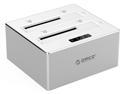
Nice - But not real Aluminum as advertised
Pros: Small Works
Cons: Not real aluminum as claimed. If you look at the "Specifications" tab, it claims the "Material" this dock is made of is "Aluminum". However, this dock is made of plastic that is painted to simulate aluminum. Obviously, this is false advertising.
Overall Review: I'm using both a Kingston SSD and a Western Digital Green 3.0TB hard drive. Both work well with this dock. It was easy to setup; just plug in the USB cable and power brick and it's up and running. No need to install drivers. I should drop a star because of the false claim that it's made of aluminum but I'm not. Instead, I'm just going to let potential buyers know this and leave it up to them as to whether this dock is worth the price. Also, the on/off button is on the back, left side if you're looking at the dock from the front.
Very Nice Firewire Adapter
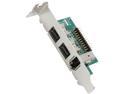
Pros: Small; Comes with both a Mini-ITX and full size bracket; Wiring is long enough for full size enclosure.
Cons: Wiring can be a awkward to handle if installed in smaller Mini-ITX enclosures (See below).
Overall Review: I installed this adapter into a M350 Universal Mini-ITX PC enclosure, which is as small as you can go as far as a Mini-ITX enclosure. It was awkward to route the excess wiring because it's long enough to accommodate full size enclosures. Once I figured it out and hit the button, Windows 8.1 immediately recognized it. Driver software was not necessary. I'm using this adapter for a Firewire audio interface. I'm also using it with a GIGABYTE GA-J1800N-D2H Intel Dual-Core Celeron J1800 SoC (2.41 GHz) Mini-ITX Motherboard Combo. I simply had to cut/file holes in the back plate to accommodate it. So far, an excellent adapter.


