
Your Browsing History


Dave P.
Joined on 01/20/04
0
0
product reviews
- 25
Good Product from Trusted Vendor!!!
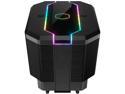
Cooler Master MasterAir MA620M Dual Tower ARGB High Performance CPU Air Cooler, 6 CDC 2.0 Heatpipes, SF120R Fan, Hexagon Strip Addressable RGB Lighting for AMD Ryzen/Intel LGA1200/1151
Pros: More than ample cooling for Ryzen 3rd Gen Processors. Quiet operation. Installation pretty easy. (see below). Fits AMD and Intel with a variety of formats. RGB LED's are super bright. Would definitely purchase again.
Cons: Instructions are only pictures. Cooler Master should have some notes about installation Size!! It is very large. Make sure you have enough room in your case.
Overall Review: Very good product! Installation note: Once you remove the stock mounting bracket from your motherboard, install per the supplied instructions. Once assembled, the supplied mount will be loose on the motherboard. This had me scratching my head for an hour thinking I missed some parts or assembled wrong. Once you install the cooler on the CPU, everything tightens up and nothing moves.... I had to search around for videos and CM forums for quite a while to see what I may have been doing wrong.
4/13/2020See more detail
Please let it work.......
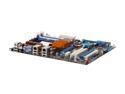
ASUS Crosshair II Formula AM2+/AM2 NVIDIA nForce 780a SLI HDMI ATX AMD Motherboard
Pros: Very well designed board. I love the layout, especailly nice for bigger cases. More than anyone could want for BIOS tweaking. Lots of extra's for the price.
Cons: First board was bad. Dreaded no POST after BIOS update with Phenom 2 940. Hope to get the second one soon and write a better review. Only 4 SATA ports work IDE. Other 2 only work AHCI or RAID, and then all ports are RAID.
Overall Review: ASUS should have left the option to use all 6 SATA as IDE devices. Some of us still don't use RAID arrays all that much. Seems like they needed to work some bugs out of some of the boards with POSTing problems. I am going to give them another try, because I have an original CROSSHAIR and love it. It is one of the best boards I have used. I really hope this version is just as good.
3/9/2009See more detail
Phenominal card for the money
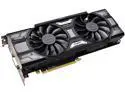
EVGA GeForce RTX 2060 SUPER SC BLACK GAMING Video Card, 08G-P4-3062-KR, 8GB GDDR6, Dual Fans
Pros: Awesome card for the cost! Only one 8pin connector!
Cons: None
Overall Review: I bought 1 and then 2 more of them.... Ungraded the wife and kits Big bang for not big bucks
4/13/2020See more detail
Great Mother Board
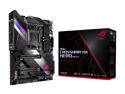
ASUS AMD AM4 ROG X570 Crosshair VIII Hero (Wi-Fi) ATX Motherboard with PCIe 4.0, Dual M.2, SATA 6Gb/s, USB3.2 Gen 2, 2.5Gbps LAN, WiFi 6
Pros: Longtime fan of the ROG Crosshair series. Lots of functionality, even if you don't use all of it. Software automatically updates drivers/software once installed. Packaging is 11 out 10....
Cons: Some interference issues with video cards (see below) No slot for older cards (sound cards) but this has most everything built in.....so Ordered from 3rd party......Newegg did not have correct status of the items in their system. Not worth an egg and its not product related, but worth mentioning. Don't trust the status of your 3rd party purchases in Newegg. This board still says "In Processing" as I type this using the very motherboard in my system.
Overall Review: I paired this MB with an EVGA RTX 2080ti GPU. This board (MB) has plastic guards near the PCI Slots (1&2). The guard covers the onboard sound processor I believe. On the GPU mounting bracket, there are 2 stamped dimples in the metal mounting bracket. These dimples on the mounting bracket of the GPU hit the plastic guard on the MB and will not let the card fully seat into PCi#1. It will install in PCi#2, as the guard on the MB is molded slightly farther in at that PCI slot, but who wants to run a single card at 8X? I looked at my 970 GTX and older cards and there is no dimples on the mounting brackets.....so must be something new with this series.?? You will have two choices. Modify the guard on the MB or modify the mounting bracket on the GPU. I chose the GPU bracket. 6 screws pops off the mounting bracket from the GPU and some quick work with a hand file to knock the dimples down flat and I was able to mount in the PCi#1 slot no problem.
4/13/2020See more detail
Gaadzooks Man!!!!
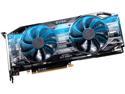
EVGA GeForce RTX 2080 Ti 11GB GDDR6 PCI Express 3.0 SLI Support Graphics Card 11G-P4-2281-KR
Pros: Upgraded from a 970 GTX......so a big leap. Absolutely stunning game play. Packaging is an 11 out of 10. Very quiet fans....even when they ramp up.
Cons: Pretty spendy. Would not install in the PCI#1 slot on my Motherboard. See Below.
Overall Review: Definitely would buy another! The MB I have is ASUS Crosshair 8 Hero. This board has plastic guards near the PCI Slots (1&2). The guard covers the onboard sound processor I believe. On the GPU mounting bracket, there are 2 stamped dimples in the metal mounting bracket. These dimples on the mounting bracket of the GPU hit the plastic guard on the MB and will not let the card fully seat into PCi#1. It will install in PCi#2, as the guard on the MB is molded slightly farther in at that PCI slot, but who wants to run a single card at 8X? I looked at my 970 GTX and older cards and there is no dimples on the mounting brackets.....so must be something new with this series.?? You will have two choices. Modify the guard on the MB or modify the mounting bracket on the GPU. I chose the GPU bracket. 6 screws pops off the mounting bracket from the GPU and some quick work with a hand file to knock the dimples down flat and I was able to mount in the PCi#1 slot no problem.
4/13/2020See more detail
Its worth it!!!!
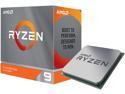
AMD Ryzen 9 3950X - Ryzen 9 3rd Gen 16-Core 3.5 GHz Socket AM4 105W Desktop CPU Processor - 100-100000051WOF
Pros: Amazing CPU..... Air cooled system and only seeing 70C when stressed. Gaming at 55C.
Cons: Packaging......Didn't like how they put the processor at the top of the package. Basically only plastic protecting the top of the processor while in the box. Kinda makes the whole package useless.
Overall Review: Happy.....Spendy but you get what pay for.
4/13/2020See more detail