
Your Browsing History


Michael C.
Joined on 03/31/01
0
0
product reviews
- 7
Best available low profile NVIDIA card
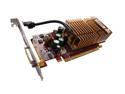
MSI GeForce 8500 GT 256MB GDDR2 PCI Express x16 Graphics Card NX8500GT-MTD256EH
Pros: -Best low profile card available -HDMI w/ HDCP -Creates no noise -Linux friendly (NVIDIA support) -SPDIF passthrough for HDMI
Cons: -Runs hot (~70+ deg. Celsius idle) -Couldn't run Yuri's Revenge, after running fine using integrated GMA 3100 (may be driver issue). -Must order low profile bracket from company (out of stock for 3 weeks!). -Uses two slots
Overall Review: Works as advertised. Not expecting 8600GT performance out of this. Great features, but it does run hot. The low profile bracket must be ordered from the manufacturer, and has shipping cost (at least it exists so no modding needed). It can block the next slot, but if you have a PCI-Ex 1x below, it may still fit. I'm using a 250 Watt power supply.
9/2/2007See more detail
I'm guessing buggy firmware
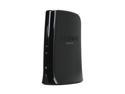
TRENDnet TEW-647GA Wireless N Gaming Adapter IEEE 802.11b/g/n Ethernet Port Up to 300Mbps Wireless Data Rates
Pros: It's definitely fast when it's working. WPS works just fine.
Cons: The device stays on when I use the internet. When I try to access any files on my network, it would reboot itself. I tested on two machines with the same behavior. It's connecting to a Trendnet router, for goodness sake. The machine used to test this worked fine when switching back to its own internal wireless card. What other evidence is needed to point to buggy firmware (latest version, v1.0.1.75)? I don't write firmware code, but I do write device drivers so I have some level of competence to determine a bug when I see one (unless it was intentionally not supported).
Overall Review: I would prefer that all the Trendnet web configuration interfaces had a logout option. Some of the menus pages are a little clunky. The internal parts and the external casing aren't solidly mounted together, so if you shake it, you may hear it rattle. I'ts not a total loss because internet access still works. But still only 1 egg for not working as it should.
4/2/2011See more detail
Suspend/resume problems, but decent otherwise
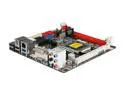
BIOSTAR TH61 ITX LGA 1155 Intel H61 HDMI USB 3.0 Mini ITX Intel Motherboard with UEFI BIOS
Pros: Dedicated 5 audio analog ports, USB 3.0, small form factor. Front panel connector supposedly supports USB 3.0. No problems in Win7 x64.
Cons: Suspend issues, resume issues. CPU seems to run hotter in this board than my other board, an MSI H61M-P23. No mouse support in BIOS. My other board supported this. No dual-LED option for suspend. Again, other board did.
Overall Review: Using BIOS 2012-01-02, the board would suspend, then resume after 10-20 seconds without touching it. Eventually, I found the problem was the LAN driver. I had to disable "Wake on Magic Packet" and "Wake on pattern match" in the Advanced property settings. Driver Version was 7.50.1123.2011. After this, it would sleep correctly (shouldn't the BIOS wake settings override the driver settings?). Resume works most of the time. Occasionally the system turns back on, but nothings shows up on the screen. The hard drive light shows no activity, opposite of a successful wakeup. Using MCE remote/KB/mouse to wake up works. For now, it's 1 egg because there are pending issues. I write device drivers and test prototype computers. I found one solution and wanted to share it. I can't figure the last one. If any of you find a solution to this resume issue, share it with the rest of us. Thanks.
3/4/2012See more detail
Not brand new, 512mb max
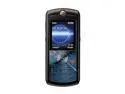
Motorola SLVR Black unlocked GSM Bar phone with iTune sync (L7)
Pros: This is everything I was expecting. It's sturdy and the screen is an improvement from my L2. Battery life and signal strength is pretty good. It's branded Cingular (good for AT&T users looking for all buttons enabled). It does work with iTunes if using a proper memory card (see cons).
Cons: It can only handle 512mb memory cards. The biggest con is that it's not new. It comes in one of those refurbished boxes that don't list the actual phone except for a sticker. The battery looks somewhat used. They just slapped on new faceplates and repackaged it. Some accessories are not included (usb to headphone connector).
Overall Review: I got one of these when I signed my contract almost 3 years ago. Though it looks refurbished, I don't doubt it's longevity. My L2 was refurbished, and it's still going on strong after nearly 3 years. I like my purchase. I just wish it was a bit cheaper since it's refurbished.
8/25/2009See more detail
Decent item except for one thing
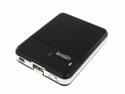
Tekkeon TekCharge Mobile Power & Battery Charger Black (MP1550)
Pros: It charges USB items with 2 or 4 AA batteries. It can also be charged via outlet with an AC to USB adapter.
Cons: When the power switch is off, current still flows through the USB connector. It behaves as if the off position puts the connector in direct drive from the battery.
Overall Review: If not for that one con, I would have given it top rating. Devices cannot be left connected because of that one flaw.
11/27/2008See more detail
Superb quality
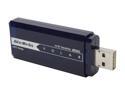
AVerMedia AVerTVHD Volar (A868R) 7 95522 96074 0 USB 2.0 Interface
Pros: Signal pick-up was the best I've ever experienced. Even the little antenna worked great. Picture quality is clear but slightly grainy.
Cons: Extra connector from antenna to tuner. It snaps on, but isn't secure. Just look at how short the connector is.
Overall Review: I used Windows Vista Ultimate 32-bit. I just let Windows Update grab the drivers, so I never used the included CD. It beats the "Ultimate stick" in signal strength, but picture quality is about 95% (just an estimate). I'll be returning the other stick and get another Volar.
10/31/2007See more detail