
Your Browsing History


Grant S.
Joined on 04/21/04
0
0
product reviews
- 19
Give some life to an older system
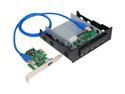
SuperSpeed USB 3.0 Bay Hub+Host Kit
Pros: I wanted a way to add USB 3 to my few year old Asus P6T Deluxe (socket 1366). Because of how my computer was situated, I also wanted to make sure I had access to some USB3 ports at the front of my computer (USB3 support on the front panel is a pretty new feature on cases). My aging Asus P180 case had plenty of drive bays to use, so this combo kit was a good solution.
Cons: The documentation is rather sparse and really doesn't mention that much about the needed power connectors. These are labeled on the drive bay though. A person needs to choose either a SATA power connector OR an older molex power connector for the drive bay. You will also need to find a SATA power connector to plug into the PCI-e card (might work passively without it for devices that don't need power over USB???)
Overall Review: One major curveball I experienced with my Asus P6T Deluxe motherboard was choosing the appropriate PCI-E slot in which to put the adapter card. I first put it into a little PCI Express X4 slot that is between the first PCI Express X16 slot and the CPU. The card was detected at this location and I did the driver install, but then my computer started totally flaking out (e.g. couldn't open "All Programs" or "Control Panel"; USB drives not being recognized, etc.). The motherboard manual says that the X4 slot it is fine for networking or SCSI, etc. Whatever it is about it, the system didn't want to run this card from this slot. When I moved it down to the second PCI-E x16 slot, everything got along harmoniously. Both the PCI-E card and the drive bay panel seem to work great now.
8/26/2011See more detail
Nice g-sync gaming monitor but has limits
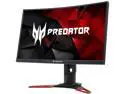
Acer Predator Z1 (Z271 bmiphz) Black / Red 27" VA 144Hz, 1920 x 1080 16:9, 1800R Curved Gaming Monitor, NVIDIA G-SYNC Technology, Tobii Eye Tracking Technology, VisionCare Technology, 2 x 7W Speakers
Pros: I really like this monitor but it is important to be realistic about what you are getting. First, if you are looking for a g-sync monitor in the 24-27" range that is not a TN panel, this is one of your few options, especially if you are interested in the 1920x1080 resolution. There are some ips panels out there that are 2k/4K but if you want g-sync be prepared to pay $200-300 more than this monitor. Yes there are some less expensive ips free sync monitors but I use nvidia graphics cards instead of AMD. Colors are much better and vibrant than my old TN panel. G-sync works nicely in my games and keeps things smooth. Viewing angles are much better than TN but not as good as the best ips. I don't perceive any ghosting. Speakers are better than many that are built into monitors but lack bass. My 10 year old 2.1 external speakers still blow these away.
Cons: It shouldn't come as a big surprise that a 27" monitor is at the larger end of what is acceptable for 1920x1080. If you abhor ever seeing a pixel then you should step up to a 2k monitor. The nice part is that this resolution allows more flexibility for your CPU/gpu combo while still running at good frame rates. It requires more horsepower to run at 2k and as games add more visual effects the demands will be even greater.
Overall Review: The true minimum height of this monitor is about 17.75 inches. While you will see specs that say 15.7 inches, that is to the top of the panel. The post of the monitor stand sticks up higher and the little plastic wing is not removable without damaging the unit. Maybe they added that to assure proper ventilation but it forced me to elevate my book hutch on 1x4 planks so that the monitor would fit under the first shelf.
12/1/2016See more detail
Still Loving it
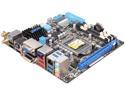
ASUS P8H67-I DELUXE (REV 3.0) LGA 1155 Intel H67 HDMI USB 3.0 Mini ITX Intel Motherboard
Pros: An update from my earlier post. I've continued to use this board without major issue. Largely wanted to respond to the concern about the "PCI simple controller" in a previous review.
Cons: The issue of the "PCI simple controller" was one that I encountered during the install and took me a few days to resolve. People that encounter this issue probably do like me, and try to minimize the amount of extra stuff installed by the installation CD. The solution, at least for me, was to install the "Intel Rapid Storage Driver Software" that is on the drivers page of the install CD. I had apparently skipped this during my initial install and had only run the "Intel Chipset Driver". Since it lists the issue being as a PCI controller, a person would think the regular intel motherboard drivers are enough, but this is not the case.
Overall Review: This little issue with the install CD could be avoided with a little clearer instructions that the "Intel Rapid Storage Driver Software" is a necessary install. Those that choose the "Asus InstALL" option won't see this issue, but will end up having Norton Internet Security installed as well (which they may or may not want).
5/21/2011See more detail
Great for a powerful little machine
Intel Core i5-2400 - Core i5 2nd Gen Sandy Bridge Quad-Core 3.1GHz (3.4GHz Turbo Boost) LGA 1155 95W Intel HD Graphics 2000 Desktop Processor - BX80623I52400
Pros: This is a great all around CPU that will handle gaming, encoding, etc. with ease. I waffled about going even cheaper and getting the dual core i3-2100, but I decided to go with this one for better versatility. Most games only take advantage of two cores max, but there are some that can use more. The four cores on the i5-2400 helps keep me from having any regrets in the future.
Cons: It's not the top of the line model and does not have hyperthreading, but 4 cores at 3.1 GHz is plenty for most needs.
Overall Review: If you are running this in a setup with a separate graphics card (i.e. not using the integrated graphics), you could actually consider this to be a 65W TDP processor. Testing at X-bit labs found that about 30 watts of the TDP of sandy bridge processors is for the integrated graphics. When running a separate graphics card, the IGP essentially shuts down. Thus, comparing the 95W TDP of this CPU to other 95W TDP CPUs that do not have any integrated graphics isn't really accurate when a person is thinking about cooling solutions.
5/5/2011See more detail
Works Well
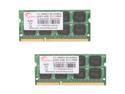
G.SKILL 8GB (2 x 4GB) 204-Pin DDR3 SO-DIMM DDR3 1333 (PC3 10666) Laptop Memory Model F3-10666CL9D-8GBSQ
Pros: Using this in an Asus P8H67I-Deluxe mitx board. It works just fine. The single sticks of this memory are listed on the qualified vendor list for this motherboard. This memory set just gets a D initial (for double) instead of an S for single.
Cons: SO-DIMM memory is usually used for laptops, so this isn't stuff that you can swap around between other desktop computers. Not really an issue for me.
Overall Review: I got mine even cheaper than the list price because Newegg had a $10 off promotional code for a few days in April. That made it too tempting to resist.
5/5/2011See more detail
Works great in my mitx build
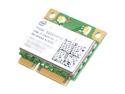
Intel 622AN.HMWWB Wireless Adapter 6200 Centrino Advanced-N Mini PCI Express Up to 300Mbps Wireless Data Rates
Pros: Used this to replace the stock 150 Mbps/ 2.4 GHz Azurewave wifi board in my Asus P8H67-I DELUXE mitx motherboard. That upgraded me to 300 Mbps and dual band (2.4/5.0 GHz). In my busy apartment complex, where the 2.4 GHz bandwidth is a hornet's nest of activity, the 5.0 GHz channel is wide open. I connect at 240-300 Mbps on the 5.0 GHz channel from a room away.
Cons: Not really a knock against the card, but people that upgrade their wifi over mini pcie may also need to consider replacing their antennas. The stock antennas with my system only seem to get up to 150 Mbps. I replaced them with two dual band antennas to get the 240-300 Mbps rates I report.
Overall Review: If I was trying to add wifi to a desktop computer, I think I would consider using this card or one of it's brothers (e.g. the 3 antenna, 450 Mbps). There are mini-pcie to pcie adapters out there with three antenna connectors for this purpose (run $10-14). This is the only way that I currently know of where you could add dual band wifi to a system using the standard sized pcie connector. None of the big companies like netgear, d-link, or linksys offer a dual band pcie card at the moment. A person is pretty much limited to USB (think one brand offers a dual band pci card) otherwise.
4/25/2011See more detail