
Your Browsing History


Tomasz M.
Joined on 11/26/16
0
0
product reviews
- 10
great motherboard, love the specs
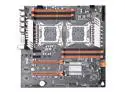
Jingsha X79 Dual CPU Motherboard Intel Xeon LGA 2011 E5 V2 WS Workstation Motherboard
Pros: -nvme was introduced just after windows xp, 2011, so the boards from the time had to have support added on if possible, not all server boards had nvme compatibilty even or took extra steps to personally write bios code in, so having a slot with native support is just amazing. -these boards are probably made in the same factories as boards like asus, and the components all look new and updated, I see that by the ram slots, vrm, capacitors. -I have 2 gpu ready to test the sli claim, you would be paying about 600 for a dual socket with sli(asus boards, SM x9dae). -put a samsung 960 and this computer is really fast. power on to desktop is 22s, windows loading to desktop is 12. saw advertised speeds without much more than drivers -dual 2667 v2 paired with this board handles anything I throw at it without a sweat.
Cons: -FYI manual is chinese, I was aware of that when I made the purchase, the pictures in the manual are still useful, especially bios pictures. I have been unable to find an english manual online, so I might need get a translation myself. -could use more pcie slots, but with an nvme slot on board, and sli, if you wanted more, you would choose a different board. there are 2 pcie x1 which is enough for a soundcard or other peripherals. sli is usually only about a 40% increase in performance, so I am on the fence about the benefits.
Overall Review: I was skeptical about chinese motherboards, but I wanted to look for other options to make use of server grade xeons without the cost of a $500+ motherboard. honestly, I am surprised at the performance of these, and I believe they have extended the life expectancy of this architecture among all the other options available especially in comparison of newer architecture. benchmarked with different software and although 2011-3 will surely outmatch this architecture, it still holds up great at this time and is close or comparable with consumer enthusiast that is currently available. the only problem I am having with these is that turbo is not working in windows 10. turbo is enabled in bios, so this could be an os problem I need to pin down. if all else fails, linux should register turbo without any problems.
7/17/2019See more detail
Great board from ASRock
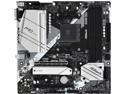
ASRock B550M PRO4 AM4 AMD B550 Micro ATX AMD Motherboard
Pros: - the peripheral slots were plenty, just what I wanted and glad it had PCIe 4.0 on am4 - the motherboard design and the heatsinks look as high quality as my msi b850m-a board - clean BIOS, doesnt have the quirks as MSI - fast and stable out of box before updating BIOS, updated anyways to keep it new - PCIE x16 slot is just where it is supposed to be potentially for a 2 slot GPU, but this wasn't the intended use case - pretty high tech for a modern office computer, runs fast and cool in a half height case - replaceable m.2 wifi slot means you can pick and choose how much or how little you want to spend on good wifi instead of being locked into 1 option for key e or wasting a pcie slot for wifi
Cons: - I hate shared lanes on any motherboard, but in the consumer market, manufacturers need to cut costs and make shortcuts to fit a certain budget. regardless, 1 m.2 and 6 sata ports on a m-atx or 2 m.2 and 3/6 sata ports is nothing to complain about, so minor con
Overall Review: built this computer to sell as a custom build, as the person wanted to buy a laptop on a $300 budget with a 2020 intel 4 core in mind since they needed windows 11 and were unable to upgrade due to lack of TPM module. this board paired with a 5600gt had 2 extra cores and significantly faster. I was personally satisfied by the build quality being the same as the msi b850m-a board I use with a ryzen 9900x, and the bios is a lot smoother compared to MSI, which has a weird bios that feels like panels animated in a gui that lag for a split second on transition instead of a regular UEFI/bios. whether that is a difference between am4 and am5, I do not know. ASRock board worked just fine and stable with the bios it came with, even though some versions behind, while MSI had stability issues under fedora kde until bios was updated. ASrock board only needed one 8 pin instead of 2 8 pin and a 4 pin, and no, the 4 pin was not for overclocking, but mandatory for full power delivery to run stable, so was the 8 pin. paper instruction manual is welcome when MSI did not bother and just left a QR code on the box redirecting to webpage, and the instruction manual was informative instead of MSI treating the user dumb or knowing zero about computers. so far user is quite happy, needs to decide if fully satisfied and suits work needs. if ASRock could make a board with this PCIe slot setup past the 800 series, I would be willing to replace the MSI board I purchased for $300. ASRock B650M Pro RS WiFi board was a real contender for my personal build, but adapting the 3rd m.2 slot into a usable PCIe x4 would have been a hassle, and might not even work while the 850 version just seemed like a downgrade. would love to buy another ASRock or ASRock Rack further down the road, hopefully the next tai chi board has 3 pcie slots or more, but that is likely a limitation of AM5 since only 28 lanes are available from just the processor
2/15/2026See more detail
great fans, highly recommend
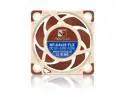
Noctua NF-A4x20 FLX premium-quality quiet 40mm fan
Pros: very quiet, whisper silent without the low noise adapter(is that even for audio noise or electrical noise?). have a heatsink with a similar fan. the loudest component is an old asus fan that is the same size, and as much as I would like to replace it, im not interested in bothering when the computer itself just works.
Cons: a little pricy for a fan, but hey, this is what quality looks like
Overall Review: would buy again edit: this low profile gaming capable build is going to be quieter than a laptop
6/15/2022See more detail
all the ports I would ever need
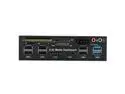
Multi-Function 5.25 Bay USB 3.0 Hub eSATA,Sata Front Panel,
SATA Port Internal Card Reader PC Dashboard Media Front Panel Audio for SD MS CF TF M2 MMC Memory Cards Fits 5.25" Bay
Overall Review: CD-drives are irrelevant now so all these ports are much better, I could even connect an external cd drive I have lying around; having an optical drive is a waste of power at this point. so many other options at this point makes my low profile build so much better. now if only it would have a gpio header, I wouldnt need a developer board anymore
6/14/2022See more detail
does what its supposed to do
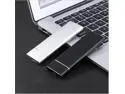
M.2 SSD Mobile Solid State Drive 2TB 4TB 8TB Storage Device Hard Drive Computer Portable USB 3.1 Mobile Hard Drives Solid State
Overall Review: says 488.3 GB on a Raspberry Pi 400, so I guess it works. being SSD interface it should last a while constantly connected so I could update when it fails
6/14/2022See more detail
decent, cheap motherboard that supports very capable cpu's
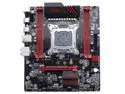
Jingsha X79 ATX Motherboard Desktop Computer for CPU E5 2680 v2 2011 Motherboard (Chinese Manual Only)
Pros: ive purchased 2 of these 2 years ago, lga 2011 is old, 7 or 9 years depending on whether you get v1 or v2, but these xeons have more than enough power to last up to 2025. this board has all you need in a budget system, and the xeons between 2650 and 2699 outclass all i3, i5, most i7's and has the core count to compete with recent chips. as an example, this is capable of running AAA games on ultra locked at 60 fps when matched with a 2080 ti. 7 channel audio is a nice bonus, so you dont really need a DAC. one pcie 3.0 x16 for a high powered gpu, 1x pcie is good for wifi and im not sure what to fill the x4 with since there are so many options. ddr3 ram has a sweet spot at 1866 and you really dont need more than that. filling to 64gb didnt cost me a lot and was stable oc to 1866. the Matx form factor is small enough for compact builds. the Jingsha board seems a higher quality than huananzi or some other chinese budget board. have the dual socket variant which makes a very cheap high core count workstation.
Cons: manual is in chinese. bios pictures and specific components are labeled in english, so you can work with what you have. haven't found any drivers for this motherboard, so I am relying on windows update to fetch the drivers for me. im not entirely sure how accurate the bios temperatures are, I use hwmonitor for temperature readings. only issue I have is VRM is a little toasty at 100c or even 110c under load(vrm is warm to touch, but not enough to burn me, so I dont know how accurate this is). putting a small fan directly behind the vrm could keep temperatures down, and may be enough to be a system fan if the air channel covers the face of the board.
Overall Review: if you want to build a cheap, high performing computer and new components are out of budget, this can be what you are looking for in a computer. xeons are server chips, but the e5 series are close enough to consumer chips that you can get performance on a budget. cheap ram and things like ECC are extra perks.
7/23/2020See more detail