
Your Browsing History


RICHARD J.
Joined on 05/21/05
0
0
product reviews
- 13
965P-DS3 & E4300 OC Success
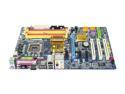
GIGABYTE GA-965P-DS3 LGA 775 Intel P965 Express ATX Intel Motherboard
Pros: I used to be one of the travelling roadshow PC hdwr instructors and so I've built a few systems. Given the remarkable results seen of late I decided to try this for my son's new system for FS-X. (Anyone remember the Celeron 300A?) System is stable without pushing it- I haven't had a chance to 'fine-tune' memory and FSB settings and had to play a bit with the multiplier and voltages to get where it is: FSB: 374 x 8 for 2.996GHz, 1.4v RAM: Corsair XMS-6400, loose at 6-6-6-18 NB: +.2v (w/fan) CPU: E4300, 8x (not 9x stock)Tuniq Tower 120. Never breaks 47C running SuperPI. Board received was version 3.3 with F10 bios.
Cons: Initially this was apparently DOA. System was built on the anti-static bag out of the case (Centurion 5) 'just in case'. Video card is EVGA 8800-GTS 320MB (sweet). Symptoms: initial power up- video cooling fan spun to high speed (hover craft mode apparently) while Tuniq Tower fan was loafing and wouldn't speed up. No POST, no beeps, nada. As noted above the cooling is via the Tuniq Tower. On other forums you'll find that there can be 'issues' with the backplate and that was the problem here. I swapped on the stock cooler, achieved successful post and then replaced the Tuniq Tower but inserted some plastic between the backplate mounting tape and the MBD PCB. NOTE: using Arctic Silver 5 per the website- when I swapped the Tuniq for the stock cooler I DID NOT apply more grease at any time. Coverage was already excellent. Also note I did not "wax the racecar" by lapping the base of the Tuniq Tower and my temps are still low (why bother?)
Overall Review: System has been rock solid stable...and to reward that behaviour I'm going to have a go at reaching 3.6GHz as soon as the family is out of town. Heh. SuperPI, 1M @ 20 seconds. Stock speed was (IIRC) around 30-32 seconds. 32M in 19 minutes. Oh, FYI, the temps are under 50C IN the case. Should note that there was little difference between outside with fans blowing and inside with all case fans running.
4/5/2007See more detail
Won't install and no help on their support site
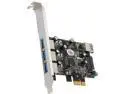
StarTech.com 4-port PCI Express USB 3.0 card Model PEXUSB3S42
Pros: Nothing, does not install
Cons: Won't install. Attempted installation on two different PCIe slots and attempted using both the CD ROM and drivers from the StarTech website. First error: "String Name Not Found" Second error: String_VMS_SCFMULFILE_NAME not found" Third error: "String_VMS_DLL_NAME not found"
Overall Review: I would not recommend this to anyone else. Based on this experience and lack of support on their website I would not recommend any of their products.
6/16/2016See more detail
Works great!
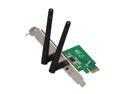
ASUS PCE-N15 300Mbps Wireless-N Network Adapter, PCI-E interface, Full Height and Low Profile bracket, WPS button Support
Pros: It works well in a problematic environment. I took my backup desktop system with me on vacation to the Estes Park YMCA Conference Center set the PC up on the kitchen table; I had verified the card would work in the same system at home first. I obtained higher throughput and a more consistent connection than I had ever experienced with my laptop in the same environment. I gamed on it at night (Titanfall 2) and had no problems.
Cons: None.
Overall Review: I would recommend this product to others and would buy it again.
6/2/2017See more detail
Best performance to price ratio ($42 and matches water cooling rigs costing twice as much)
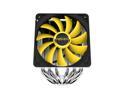
Reeven Justice High Performance 6 Heatpipes Copper Base 120mm CPU cooler
Pros: - stable OC at stock voltage for Skylake 6700K @ 4.6Ghz - running Prime 95 max heat test temps never exceed 71 C at 75 degree F ambient - running Handbrake transcodes temps never exceed 69 C
Cons: - none; it's big, but you won't get this performance from a dinky heatsink
Overall Review: - would recommend this to everyone - go read the review and performance testing results on HardOCP
11/28/2016See more detail
Perfect for my OC & cooling fetish!
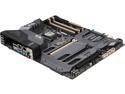
ASUS TUF SABERTOOTH Z170 MARK 1 LGA 1151 Intel Z170 HDMI USB 3.1 USB 3.0 ATX Intel Motherboard
Pros: - cooling options for the chipset/VRMs - clean appearance when unused slots are covered -additional fan headers for optional fans
Cons: - none so far; been operational since October 10, 2016 (Skylake 6700K @ 4.6GHz stock voltage) - saw some of the comments regarding a slow POST and thought I'd share my own experience as I too had a slow POST that would sometimes go to the BIOS screen(s). Solution (for me): take a look at the boot sequence. My OS drive was dead last, so the BIOS would check every HDD in turn for the MBR. Also, be sure you enable "Fast Boot" in the "Boot" menu in the BIOS Utility in Advanced Mode.
Overall Review: I would recommend this product to other people without reservation. TL;DR I recently had a laptop refresh at work with an i7-6700HQ CPU and ran a Handbrake transcode on it out of curiousity. When it returned a 88 fps avg on a 1080p transcode, vs 55 fps on the same file on my i5-2500K @ 4.2Ghz, I decided to do some research. I currently do video editing (Sony Vegas), video transcoding (Handbrake) and photo editing (Capture NX2 & Photoshop) and all of these will use multi-core cpus. I decided the 6700K would be the best bang for the buck - I could get maybe another 10% with a 6800, but that would another $100+ for the chip and a different mobo (also expensive). I have had Gigabyte motherboards for previous builds, but had two of them end up failing with memory controller issues so I used Asus for my i5-2500K build in 2011. Still running perfectly fine so I looked to the Asus line again. I wanted OC tools without sacrificing longevity or stability so I didn't need the very expensive end of the Asus line, but I did want as many SATA and USB3.0 ports for all of my hard drives (off & online) so the very cheap end was out. The review by HardOCP pretty much sold me on this model Other reviews of note: the Reeven Justice air cooler, also on HardOCP and on Newegg for $42 and various memory benchmarks showing the "knee" of the curve for $$/performance to be around 2666MHz. I went with 32GB DDR4 3000MHz on two sticks. I imaged the OS drive of the 2500K build that I mothballed as a backup as it has software that won't run past Win 7 and I really like it. Syspreped the imaged drive and booted up the new system on 10/12/16 without incident. OC'g was a smooth experience. I first tried it with "auto" voltage control and successfully booted, albeit unstable at 4.8GHz but at 1.42v- peaking at 1.50v. At 4.6GHz it was still using 1.42v and Prime95 was seeing temps of 80C. With the voltage set manually to 1.32v in BIOS (I do NOT run the AI Suite software) the temps now never get over 71C at 76F ambient. Handbrake benchmark results across multiple processors/generations, same file: Processor Turbo' Clk Avg fps Sandy Bridge, 2500K 3.3GHz, home desktop 4.2 GHz 52.0 Ivy Bridge, i7- 3632 QM, 2.2GHz Dell Inspiron 2.9 GHz 55.9 Skylake, i7-6920HQ 2.9 GHz, Dell Precision 3.8 GHz 92.4 Skylake, 6700K 4.0 GHz, home desktop 4.6 GHz 127.4 Other details: Highly modified mid-tower (Antec, IIRC) with the front carved off and a 14x20 electrostatic air filter mounted with 3x200mm case fans pushing air through the case from the filter. FYI, I never, ever have to dust and have sold used graphics cards out of the system that quite literally looked new. I also don't have to worry about air flow for cooling as everything- mbd cooling, CPU cooling and the GTX 970 all exhaust out the back. I have a 1TB SSD for the OS and another 1TB SSD for games + active video projects. System boot time from cold start to loin is about 45 seconds. 2x2TB spinning disks online + another 16TB offline via USB3.0 drive bays.
11/9/2016See more detail
Good price, bad performance
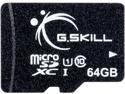
G.Skill 64GB microSDXC UHS-I/U1 Class 10 Memory Card without Adapter (FF-TSDXC64GN-U1)
Pros: None.
Cons: An SD card rated as UHS-1, Class 10 should reach a minimum of 10MB/s sustained write speed and on that basis I purchased two of these cards to use in Canon Vixia camcorders at a setting of 24Mbps which is 3 MB/s. Neither card in either camcorder would record for longer than about a minute before informing me that the memory card was insufficient. Next I tried the lower quality setting of 17Mbps and this too failed but took 2 minutes. If you need memory for video recording do not buy this card it won't support the write speed. Oddly it can write between 8-15 MB/s (constantly fluctuating) if I simply copy from a hard drive, but it doesn't meet the specs necessary for video.
8/7/2016See more detail
seller reviews
- 1
Great price- great product
I record OTA HD television programs and keep all of my DVD/BD collection on HD...along with my photographs, now approaching 1TB. All of this means backups and coordination and this little external HDD dock is a great tool. USB 3.0 connectivity to my systems- both desktop and laptop means I can quickly and easily use the appropriate HDD without having to futz with an enclosure. The built in USB ports are also nice for a quick daisy chain with my smaller external 2.5" drives as well. Great value!
On-time
Delivery
Product
Accuracy
Customer Service
Satisfactory
8/30/2014See more detail