
Your Browsing History


john m.
Joined on 05/13/03
0
0
product reviews
- 12
Outstanding Value; Incredible Performance
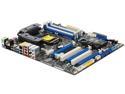
ASRock P67 EXTREME4 (B3) LGA 1155 Intel P67 USB 3.0 ATX Intel Motherboard
Pros: So many of the good things I have to say about this board have already been said in other reviews, so I'll simply reiterate that it is fast, stable, and packed with great features that are seldom found at this price point. The "Clear CMOS" button on the rear panel and POST code display on the motherboard makes the "trial and error" process of overclocking so much less painful! System runs great configured with: i2500k @ 4.0 GHz (WEI 7.6) G.Skill Ripjaws X DDR3 2133 (9-11-9-28 1T) (WEI 7.9) Crucial RealSSD C300 128GB (WEI 7.9) Gigabyte GeForce FTX 550 Ti (WEI 7.4)
Cons: The SATA II/III connectors are mounted parallel to the motherboard, which makes them rather hard to get at in many cases. On the flipside, though, this is beneficial to aesthetic cable management
Overall Review: To spare you some hair loss, here are the fixes to some issues you may encounter: 1. Have DDR3-1866 or DDR3-2133? It is undocumented, but only slots 2 & 4 support these XMP profiles. Using slots 1 & 3 will result in failed stability tests like Prime95 or Intel Burn Test unless you've left the RAM running at the slower DDR3-1600 (the default in UEFI). 2. Stuck on POST with code 98 (especially when overclocking)? Move your mouse and/or keyboard to USB3 ports 3. Device manager missing the driver for "Simple PCI Communication Controller"? Download the Intel Management Engine from the Asrock site. 4. Hard drives not scoring as high in WEI as you expect? Download the Intel Rapid Storage Driver & BIOS from the Asrock site. 5. It goes without saying: don't use the CD that comes with the motherboard. Download the latest drivers and BIOS from the Asrock site and save them on a USB drive, then install them all (starting with the INF files) to ensure maximum performance.
8/8/2011See more detail
Excellent product if...

5.25" Touch Screen Fan Controller
Pros: I read some good things about this controller on hardware review sites so I went ahead and ordered it for a new build. Of course, I then kept reading about it and found all of the user horror stories about loud buzzing and computer combustion. When it arrived, I was almost afraid to install it- but I'm glad I did! It works flawlessly and I have none of the issues others have mentioned. * None of my fans buzz (Rosewill & NZXT... more on that later). * Auto-mode works great. By default, keeps fans @ 40% until about 25c, then starts creeping up to max as you reach 40c. Can be customized to suit your needs. * The included tape isn't great, but has held fine for me (helps that all components were new vs. old & dusty). * Touchscreen looks nice with a viewing angle much less limited than i had expected. * The beep accompanying touch commands is not very loud, but can easily be turned off. * My settings are retained between sessions, even if the PC is turned off for a few day
Cons: Ah, the "if..." I had mentioned in the review title. My unit arrived with electrolytic capacitors. Some (I suspect older) units have ceramic capacitors. This difference may be why some love this controller and others have nothing but hatred for it. Also, the thermal probe connectors on the back of the unit can come disconnected pretty easily (despite the glue). Be careful when routing your thermal probes & power connectors lest you unseat one or more cables and cause your computer to explode, killing everyone for miles around... or the controller will just beep incessantly like mine did. If you're really concerned about the male molex connectors being exposed, fix it with a little electrical tape. This is an enthusiast product, after all, and what enthusiast doesn't get enthused about modding something to make it better?
Overall Review: I wish reviewers would post the model numbers of the fans that work with this controller (as well as those that don't). That would be SO helpful for those who want to buy but are concerned about the potential for loud buzzing. Rosewill RCA-1204BL work wonderfully with this controller... only $13 for a 4 pack of them on NewEgg at this time. Blue lights and super quiet to begin with. The case fans that come with the NZXT M59 work great with the Sentry 2, too. Plus they are a perfect match for each other aesthetically and functionally (since the M59 sports 5 case fans)
8/8/2011See more detail
Great, except for Newegg's handling.
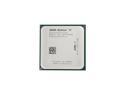
AMD Athlon II X2 240 - Athlon II X2 Regor Dual-Core 2.8 GHz Socket AM3 65W Processor - ADX240OCK23GQ
Pros: I absolutely love this CPU on paper. Judging by the reviews/benchmark's I've seen, this is one of the best 'bang for buck' processors out there right now for those not afraid to overclock a little. The combo deal(s) on Newegg make this chip and the AMD Hybrid Crossfire platform make for a very inexpensive yet powerful gaming rig.
Cons: Spend the extra $3 and get the retail version of this CPU. That's exactly what I had to do after RMAing the OEM version twice. The first CPU arrived outside of its clam shell and at the bottom of the shipping box with dozens of bent pins. I suggested to Newegg that their shipping department should tape the clam shell shut to avoid this. The second CPU was inside of its clam shell and secured shut by a ton of bubble wrap and packing tape... sadly, whoever placed the CPU in the clam shell thought it would be a good idea to put the foam pads in 90 degrees off the proper orientation. This caused the pads to arch inside of the shell. Coupled with the fact that the CPU was on top of the foam pads rather than between them, I ended up receiving the world's most well bubble-wrapped bent-pinned CPU. Thankfully Newegg's customer service is top notch and compensated me satisfactorily for all of the inconvenience.
Overall Review: Avoid OEM CPU purchases from Newegg unless the marginal saving is worth several weeks of waiting to you.
2/2/2010See more detail
Great buy
ANSMANN 5007093 4-pack AA Ni-MH Rechargeable Batteries & Charger Kit
Pros: I love Ansmann! I bought this charger for my girlfriend and it charges batteries in a few hours (up to 5-6 depending on how depleted the charge is). The included batteries hold their charge for a long time as well; far longer than regular batteries or any other rechargeable I've ever owned. For instance, I took over a hundred pictures and about a dozen 1-2 minute videos with a Canon PowerShot a590IS over the course of four days while on vacation recently and my battery light never came on. Impressive considering the amount of chimping I did (that is to say, reviewing photos/vids via the camera's LCD).
Cons: Product info is wrong both on newegg and the Ansmann site. This charger comes with 4x 2700 mAh batteries. Not a huge con really unless you're camera requires higher output batteries... I've personally never encountered one that does. You should be safe unless you own a professional grade camera, but check your manual before purchasing.
Overall Review: Newegg no longer carries it, but find the Ansmann DigiSpeed Ultra 4 if you're looking for a fast battery charger. It charges the same set of 2700 mAh (also included) in an hour or less.
4/20/2009See more detail
Impressed so far!
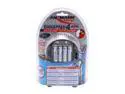
ANSMANN 5707123 4-pack Rechargeable Batteries & Charger Kit
Pros: It says nowhere on the Newegg product page what mAh output the included batteries provide, and Ansmann's product page has incorrect information, but wow: there are four AA 2700mAh batteries included. So far they have long outlived the batteries that came with my new digital camera, which is why I pulled the trigger on such a pricey charger. Recharge speed is good, too. With low mAh batteries, 10 minute charges are allegedly possible, but with the included 2700mAh batteries a full charge for all four takes under an hour. I started charging when i left work for lunch, and they were done when I got back. Very satisfied with this purchase.
Cons: A little pricey, but justifiable given the quality of this product. Also, I can not yet vouch for the number of times these batteries can be recharged. I'll post a followup if this proves to be a con.
Overall Review: I'd never heard of Ansmann and was somewhat reluctant to order their DigiSpeed Ultra (5707123) charger kit without the benefit of reading other Newegg customer reviews on this model, but after some research felt on Ansmann it seemed to be a safe bet. Their products are pure quality; led indicator lights, auto cooling fan, on-board computer... this is the model for you if you're sick of slow recharging and short lived rechargeable batteries.
1/24/2009See more detail
TripleHead2Go Owner's Dream
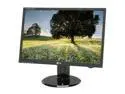
LG L226WTQ-BF Black 22" 2ms GTG Widescreen LCD Monitor 300 cd/m2 3000:1 DCR with HDCP Support
Pros: It is hard to add to what previous reviewers have said about this monitor in terms of image quality (which is high relative to the price point), so this review instead will focus on this monitor's suitability for multi-monitor setups. First off, the left and right bezels on this model are super thin- right at 1/2" by my measurement. This means you'll only have a 1" gap between the LCDs of any two of these monitors. Also, perhaps more importantly to owners of the Matrox TripleHead2go, this monitor supports a wide range of refresh rates. This is important because, with the limit of DVI-D bandwidth, high-resolution modes across multiple displays will require the monitor to sync at less than 60Hz. For instance, a 5040x1050 signal (3x1680x1050) is limited to 57Hz. I learned the hard way to avoid any monitor that does not advertise its range of refresh rates.
Cons: Of the three I purchased, only one was not flawless. Even then, that one screen had only 2 stuck pixels. Not a big deal. And yes, there is blacklight bleeding... and it is more pronounced than on the much less expensive monitors I replaced with these.
Overall Review: My friends and office mates are sickened by me, especially when I was complaining, "The second set of 3 LCD's I've used in a week, and both times the 1 monitor with stuck pixels was the one I hooked up in the middle! How 'bout that luck!?" After reading that, I make me sick, too. Cool!
9/24/2008See more detail