
Your Browsing History


Brandon Y.
Joined on 12/15/16
0
0
product reviews
- 7
Beautiful & Easy to Work With
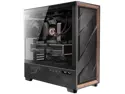
Antec Flux Pro, 6 x PWM Fans Included, High-Airflow Front Panel with Walnut Wood, iShift PSU 90° Mount, USB3.0 x 2, Type-C, 420mm Radiator Support, Temp. Display, Full-Tower E-ATX PC Case
Pros: - All outside panels, top-to-bottom, are just pull off. Each panel has magnets and clip-in mechanism. This is the easiest case to get into and out of that I've ever used. HUGE plus!!! - The fact that it can take 420mm AIO on top or front makes it so flexible. - GamerNexus tested this as one of the coolest temp cases. My experience is similar. My 9950X with Arctic Freezer III 420mm idles in high 37C-39C. My ASUS TUF RTX-4080 SUPER idles 28C-30C. And, even with all of the airflow, it's really close to silent. With noise cancelling headphones, it very likely is (though I haven't tested that yet). - The flexibility of the fan bracket above the PSU basement is so nice. It can hold up to 3 fans. I have 2 fans on it, and a clear space to let the AIO tubing easy access to motherboard. - I really like that HDDs can be mounted vertically, where wiring is, so that they don't block AIO in the basement. However, there is room down there for 2 more HDDs if you're aren't taking the space with AIO tubes. - I've always found the wood-grained cases beautiful.
Cons: - I would've really appreciated it being slightly longer to allow the AIO to fit on the front without having to remove anything from the bottom fan bracket or remove the HDD basement bracket. - I would've really appreciated the wiring storage on the side be wider. I almost always have this complaint about classier looking cases. Only the fish tanks seem to care about giving lots of wiring space. This is good enough, but just enough to be comfortable. I don't want to wonder about it as I'm building (will this close?). - The USB C on the top/front panel is 3.1 (10Gbps). I would've appreciated 3.2 (20Gbps) or 4.0 (40Gbps). Not sure why a brand new case is using an older transfer standard on the most-accessed high-speed port. - Last, I would've appreciated that the top ports be slightly more spread out. If I plug in anything wider than my thumb, I have to unplug other things.
Overall Review: I'm coming from a be quiet! Dark Base Pro 901. And, I really like this case better. Feels like much better value with better-used space, even if not as moddable. My problem with the be quiet! case was that for all of its modularity, it was a ton of unclear tradeoffs that bit you without you expecting it. You-get-this-but-lose-this was just too annoying. You know what this is, and it's does what is expected wonderfully! Definitely consider it - I don't think you'll regret it. This case is now for my A computer, and the be quiet! is being used for my B computer.
4/9/2025See more detail
Runs at Rated Specs in Gear 2
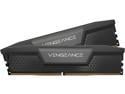
CORSAIR Vengeance 64GB (2 x 32GB) 288-Pin PC RAM DDR5 6600 (PC5 52800) Desktop memory Model CMK64GX5M2B6600C32
Pros: - These run at rated specs in Gear 2 setting for ULCK on 9950X. This is a CPU memory controller limitation, not a RAM one. But, the RAM runs fine at its rated speed. - I was able to get these run at 6400MHz with same timings in Gear 1 ULCK on 9950X, lowering latency. I didn't change voltages. So, maybe some more tweaking would work.
Cons: - It will not work with the 96GB version of the set. Having the different memory sizes caused problems in Windows 11 Pro.
Overall Review: I have these running on a ASROCK NOVE WIFI motherboard. Yes, I recommend these. For several generations (AM3, AM4, and now AM5), I've exclusively bought Corsair Vengeance and haven't had one fail, yet. Only once (DDR4 3600MHz) I've had to slightly boost RAM voltage to get them to run at specs. They just work. BTW - I bought these at $229.99. At the time of this writing, the prices have exploded since tariff announcements.
9/26/2025See more detail
Works!
CORSAIR Vengeance 96GB (2 x 48GB) 288-Pin PC RAM DDR5 6600 (PC5 52800) Desktop Memory Model CMK96GX5M2B6600C32
Pros: Runs great at rated specs with XMP/EXPO. I didn't need any adjustments to make them work.
Cons: Will not mix with the 64GB identical spec kit.
Overall Review: I do recommend the product. Here my main, related components, in case that helps with deciding likelihood of compatibility. AM5 9950X X870E NOVA WIFI Motherboard Windows 11 Pro Other specs that shouldn't impact compatibility 2TB Samsung 990 Pro 4TB Samsung 990 Evo 8TB x 2 HDD setup to mirror RTX-4080 SUPER
9/26/2025See more detail
Fans Are Great - RGB Hub Has Very Limited Instructions

be quiet! LIGHT WINGS 120mm PWM HIGH-SPEED TRIPLE PACK
Pros: The positive - The fans provide great performance. They are quiet. They move a lot of air. The lights look really good on the front and the back. They have an incredibly solid, quality feel to them.
Cons: The negative - they come with ARGB hub that is almost entirely undocumented. The only thing it says is that you can plug 6 ARGB devices into it, which is the number of ports on it. It doesn't tell you how many LEDS total for the hub or total for each port (because their fans allow daisy chaining - suggesting you can safely use that daisy chaining). After seeing odd lighting results (I'm first time at this), I contacted support. They ONLY said that you can plug 6 total ARGB devices into the hub. They still never clarified individual hub tolerance levels. They seemed to imply that you should only put 1 of their devices into each port. I still have my lighting problems. I have been able to prove that all lights and colors are still functional on the fans, but my motherboard can no longer properly address all of the lights, no matter what I do. I've ordered a Razer Chroma hub, which is well documented, and hope to get better results. Last, the "be quiet!" hub mounts to SSD holes, which is great. BUT, in their own 901 Dark Base case, doing that results in 1 of the 6 ARGB ports being blocked by the case screw that holds the SSD bracket on the case. For all the advertised modularity of the case, there are these weird tradeoffs that surprise you when doing an all "be quiet!" setup. It's a little annoying, considering the full cost of all of it. Spent nearly $500 on case and fans, just to have half the fan lights be wrong color and ports blocked on ARGB hubs.
Overall Review: These are high quality fans that move lots of air at a reasonable noise level. I also really like the look of them. They are aesthetically pleasing. I totally recommend buying them! Just be careful - when you read "The ARGB Hub (2) allows you to synchronize up to six 5V ARGB devices directly through your motherboard." It means it is best to plug 1 fan into 1 port, up to 6 fans. Don't daisy chain them, even though the cables on the fans allow daisy chaining.
1/31/2024See more detail
Move Serious Air Quietly
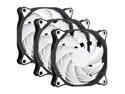
SAMA SF200 3 in 1 Case Fans with Fan Hub 4Pin PWM 120mm PC Fan 12v High Airflow Premium Quiet Mode Computer Cooling Case Black White
Pros: I used 2 of these in a 3080Ti GPU mod for EVGA FTW3 ULTRA. At 60%, they have lowered my idle GPU temps down to 28-29C, from about 33-35C. The GPU overclocks to 2050MHz, up from the default of 1800 (with a default boost of 1950). At that max speed, GPU is around 83C, which is my thermal throttling setting.
Overall Review: NOTE: To do what I did, I used this inexpensive conversion kit. It includes all the necessary brackets as well as the adapter cable so that the fans can plug directly into the GPU fan headers (allowing the continued use of GPU temps to regulate fan speed). https://www.etsy.com/listing/1367614277/evga-ftw3-rtx-3070-3080-3090-deshroud
12/5/2023See more detail
Great PSU - Some Cables Too Short
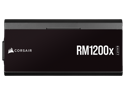
CORSAIR RMx Shift Series RM1200x Shift Fully Modular 80PLUS Gold ATX Power Supply
Pros: 1) More than enough power for my PC with these specs: Overclocked 5950x 64GB 3600MHz RAM 3080Ti EVGA FTW3 Ultra (it pulls as much as 450W when OCed). 2 x 8TB HDD 2 x Samung 980 Pro NVME SSDs 2) It's really neat that the PSU cable ports face a computer wall, instead of the standard direction. It really helps with accessibility for adding/removing cables, it is why I decided to try this PSU out.
Cons: 1) Some of the cables are not long enough, and I couldn't route them through the cable-management side of the case. I had to route the CPU power cables from the front - an almost the MB cable. The inside of my case isn't visible, but it was still disappointing. Depending on the orientation of the walls in your tower, this may be a challenge to you. It should be noted that besides the cables being longer as a remedy, if my case was hollow under the motherboard, instead of having a wall, I could have turned the PSU around. If you have a windowed side, be sure to study the cable port orientation before purchase.
Overall Review: I would definitely recommend this PSU, in spite of the con provided.
12/5/2023See more detail
seller reviews
- 1
Works Great for GPU Mod
I attached these to the heatsink of an EVGA RTX-3080Ti FTW3 Ultra. The idle temps of the GPU are 28C. With the auto-overclocking enabled, the GPU can run steady at 2050MHz. This is compared to the 1800MHz base clock and 1950MHz standard boost. The fans are also quieter than the stock fans. NOTE: To connect to the GPU fan headers, you will need an adapter cable. The mod kit with cable for this card and others can be found at this URL: https://www.etsy.com/shop/Osserva?ref=l2-about-shopname
On-time
Delivery
Product
Accuracy
Customer Service
Satisfactory
11/29/2023See more detail