

Your Browsing History


Bradley C.
Joined on 04/21/06
0
0
product reviews
- 15
Best AGP Card OUT!
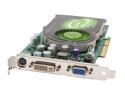
EVGA GeForce 7800GS 256MB GDDR3 AGP 4X/8X Graphics Card 256-A8-N506-AX
Pros: I have a lot of experience with Video Cards and this one tops the AGP field. It gets 30FPS on GRAW and when I overclock it I am getting 40. The card overclocks very well. Im running 496 GPU by 1.43 memory. No artifacts or overheating with stock cooling. The fan is not as loud as the previous cards I have owned and my benchmarks are awsome.
Cons: The bracket was slightly bent on the card. I bent it back no problem so no harm done.
Overall Review: I have two top of the line video cards for AGP..The ATI x850XT PE and the GeForce 7800GS. The 7800GS is a much better card overall. I did not get near about the overclock ability of the Geforce on the ATI and I also was about 3 to 4 FPS slower on GRAW. Benchmarks came out higher on the 7800 also. This is the best AGP card you can buy.
10/3/2006See more detail
PCI-E BROKEN
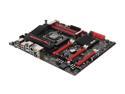
ASUS Maximus V FORMULA LGA 1155 Intel Z77 HDMI USB 3.0 Extended ATX Intel Motherboard
Pros: Read the Specs?
Cons: * PCI-E slot one only runs x8 while the second and third slot do not work at all * Bios updates, cmos reset do not fix it * Tried 3 different video cards with no luck * Tried a second CPU and no luck * Every component connected to the board was tested in a different board without issue
Overall Review: * RMA'd the board and requested for them to send me a board with prepaid box to ship it back * The agreed and told me to wait two days while they check there warehouse (Pretty sure there stock is entered into the computer?) * 3 days later no email or call * Contacted them again and the rep was unhelpful stating they didn't enter the RMA correctly and will need to repeat the process * Asked for someone to call me and tell me why it was messed up and was told to leave feedback on a automated line (Pretty much do not want to deal with me) * Poor customer support at the very best * Will never buy from them again...
7/23/2013See more detail
Broken after only a few months
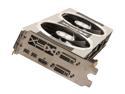
XFX Double D Radeon HD 7970 GHz Edition 3GB GDDR5 PCI Express 3.0 x16 CrossFireX Support Graphics Card FX797GTDFC
Pros: The pros of a 7970 ghz edition card are pretty straight forward. 3 GB Ram high overclock Runs games well under a 2560 x 1440 resolution etc etc etc... i guess read the specs?
Cons: This card malfunctioned from day 1 and finally stopped posting in Windows * First problem was that my video would not wake back up after the monitor shut off causing me to manual reboot to get video back. I thought this was driver related so I let it go. * Second issue was that it failed to run at x16 PCIE at 3.0. I have done a lot of research on this subject. Some people say its only supposed to run at 8x PCIE 3.0 but a few friends of mine with different variations of the 7970 ghz get x16 3.0 so I tend to believe the card is broken. I tested another graphics card in there and it worked fine. * When I game with a Nividia based GPU and my frames drop below 60 the games usually maintains a smooth game play experience until i sink to 25 - frames. With this card once you got into the high 40's it micro stuttered horribly. The only way to fix it at any level was to disable v sync and then you get to watch your screen tear regardless of frame rate. I have read in forums of so many issues with micro stuttering with AMD 7000 chip-set that I am surprised a driver update hasn't been issued to actually fix it. * Finally the card stopped posting in Windows. Reformat, drivers and safe mode would yield no results. I even tried it in Linux... Thank goodness for the built in HD4000 * I requested a RMA through XFX only to get responses back after nearly 3 days in between tickets. Anything over 24 hours is ridiculous in today's advances in communication. Either they are seriously understaffed or they simply do not care. I tend to reach for the ladder on this one. Sure enough Its been almost a week and I haven't heard anything from them. There website hasn't posted one thing about my card. Tracking says they have it.
Overall Review: After waiting on XFX to at least say something about my hardware I went ahead and purchased Nvidia cards by MSI. No problems with them as of yet. I can drop to 30 frames and the game plays wonderful. Same situation with this card would have resulted in massive stuttering regardless of driver. Once I get the refurbished XFX junk back I am going to put it in a glass case and keep it on my desk as a reminder to avoid XFX.
7/11/2013See more detail
Dell Delivers with there Monitors Solutions
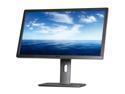
Dell UltraSharp U2713HM Black & Silver 27" WQHD IPS-Panel Displayport HDMI Widescreen LED Monitor 350 cd/m2 DC 2Million:1 (1000:1), height&pivot adjustable
Pros: - Very Sharp Image (With ability to adjust sharpness) - High Performance cables included - High 16:9 Resolution - Great color and contrast - Multiple Profile modes
Cons: - Slightly overpriced
Overall Review: Do not complain about LED bleed over as it is a normal occurrence with LED back lighting
6/5/2013See more detail
HUGE!!!
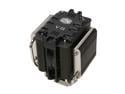
COOLER MASTER V8 RR-UV8-XBU1-GP 120mm Rifle CPU Cooler Compatible with Intel 1366/1155/775 and AMD AM3/AM2+/AM2
Pros: Keeps my AMD Phenom 2 X4 955 BE at 35 to 38 idle and 45 to 49 under load. I havnt seen my CPU hit 50C yet and I am in California in 106 degree heat as of right now. I do not run my A/C very much so my office is around 85 degrees and this thing never goes over 49C no matter what. The fan is super quiet and installation was easy.
Cons: This is the biggest heatsink I have ever seen. When I tried to put the side of my case on the heatsink prevented me from doing it. I had to go to home depot and get a sheet metal roller to bulge the side panel so that I could put it back on.
Overall Review: This probably is the best air cooled product you could buy. Thie price is kinda high but if you want your CPU to last you a long time this will be a better long term investment.
7/29/2009See more detail
Dead after 2 days
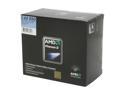
AMD Phenom II X2 550 Black Edition - Phenom II X2 Dual-Core 3.1 GHz Socket AM3 80W None Integrated Graphics Processor - HDZ550WFGIBOX
Pros: This CPU is probably the best performance to cost ratio unit you could buy. Mine died on me after 2 days which is unheard of with this CPU so for that fact I am not going to mark it down on rating. I returned it for a 955 BE and in all honesty cannot tell much difference.
Cons: Died after 2 days but this is most likely a rare occurance and you should not base your purchase off of this reviews cons.
Overall Review: I would have been more than happy to have kept this CPU over the 955BE. 100 bucks for this performance is unheard of. Do not compare MAD chips to Intel i7's. The i7's are simply overpriced and are for people with more money than sense.
7/29/2009See more detail