
Your Browsing History


Miluo H.
Joined on 02/02/12
0
0
product reviews
- 4
The guy below me is very strange
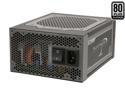
SeaSonic Platinum-1000 1000W ATX12V / EPS12V 80 PLUS PLATINUM Certified Full Modular Power Supply New 4th Gen CPU Certified Haswell Ready
Pros: Please ignore the comment/review below mine - the poster can't even put half a sentence together or even really state what the problem was (it could have been the power supply, but he never specifies the issue at hand). I've only had this PSU for one day, but it is working like a charm. Even if I experience something like coil whine or total failure, I will still give this PSU another chance provided my RMA goes smoothly. As you can see, two of the reviews here which gave this PSU a one-star rating are for completely bizarre reasons unrelated to the actual QUALITY and PERFORMANCE of this power supply. I've read countless reviews and conducted my own research for days - when I saw this PSU on sale, I grabbed it without thinking twice. This is THE best 1000w PSU in the world right now. Independent testing has shown this to be THE MOST STABLE as well, and a TRUE Platinum.
Cons: Relatively expensive, but it's worth the price even without the promotion/discount. However, for someone on a budget, there are cheaper options which are nearly as good (Corsair/Seasonic 80+ GOLD options primarily). Some people have complained that the cables are a bit short, but I think they are OK. I suppose if you have a HUGE case, then it might be problematic.
Overall Review: Like I said, I'm never one to buy into another simply because of hype. However, I am very satisfied with this product thus far, both for its quality and performance. If I ever have any issues, I will come to this reviews section once again. However, with Newegg RMA to back me up as well as Seasonic's 7-year warranty, I don't see any problems in the forseeable future. A good system should always start with a proper spine - solid case with good airflow and cooling potential, a proper CPU cooling solution, a reliable motherboard, and an efficient, powerful PSU. If you want the ability to upgrade your system with multiple SLI/Xfire configurations in the future, DON'T GO CHEAP ON YOUR PSU!!!
8/14/2012See more detail
Fast! Beautiful! Superb!
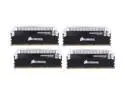
CORSAIR Dominator Platinum 16GB (4 x 4GB) DDR3 2133 (PC3 17000) Desktop Memory Model CMD16GX3M4A2133C9
Pros: These are beautiful dimms, first and foremost. The heatsink is in a nice shiny, but somewhat brushed style of aluminum, giving it a very unique look. Each stick all have an etched (is that even the right word?) Corsair logo on the front, giving it an even more "high-end" look and feel. But this RAM isn't just all eye candy. Don't let the pretty profiles fool you - these are fast. REALLY, REALLY FAST. And efficient. REALLY, REALLY EFFICIENT. If you haven't read the specs yet (why the hell not?), let me highlight them for you again - CAS 9 (that's NINE), 2133mhz @ 1.5 volts. ONE-POINT-FIVE. That is simply put, insane. This is like the Porsche amongst memory. Not only are they aesthetically beautiful, they are also durable, efficient, and powerful. For the entire Dominator Platinum line, beauty & power share no compromises.
Cons: Expensive as hell. $250 price tag is not bank-breaking (for most people with a decent job and isn't forced to pay child support or something crazy like that), but it is a hefty amount for what you're getting, which is... RAM, to be precise. Oh, and I guess the only other con is that these are NOT the highest rated RAM from Corsair. There are 2400mhz, 2666mhz, and 2800mhz kits (of course, with looser timings). So "NOT THE BEST." 911 Turbo compared to a GT3. How sad.
Overall Review: Do you WANT these? Probably. Do you NEED these? Probably not. I bought them for the combination of looks and performance, without sacrificing one for the other. But if I was to be completely honest, I wanted these for the eye candy, first and foremost. If you're on a budget, there are much better options, much better ways to spend your money to get comparable performance (or hell, worse "performance" but MORE RAM). If you have money to spend, no child support to pay, no crazy girlfriend to spend 90% of your paycheck on, and love ridiculously fast and pretty-looking RAM, then go for it. Who's gonna stop you?
4/20/2013See more detail
Beastly Little Cooler!!!
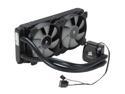
CORSAIR Hydro Series H100i Extreme Performance Water/Liquid CPU Cooler. 240mm
Pros: Great price! For around $110 USD, you get a fantastic AIO cooler that is hard to beat. The smaller radiator with very high static pressure fans (higher than classic H100) will fit into even smaller cases without too many problems. My setup: - Core-i7 3770k - 4.6ghz, 1.238vcore MAX, 77c on cpu-core number 1 during Intel Burn Test at MAXIMUM stress level. 20c ambient. Core 0 reaches 69c max. Core 2 and 3 are around the low 70s. This is only during ITB torture test. - ASUS Z77 Sabertooth Motherboard. - Corsair Dominator Platinum - 16GB @2133mhz & 1.5v default. Overclocked to 2200mhz @ 1.5v using XMP profile. - Silverstone Raven RV02e-bw case. I have the H100i mounted right beneath the motherboard, on TOP of the two bottom fans (near the PSU) in a "semi-push/pull" configuration. All fans are set on maximum at all times. Obviously, those who hate any loud noise will find this setting unacceptable, but for me, maximum performance > dBA "comfort." Corsair Link is not needed; can adjust fans via UEFI Bios. - Seasonic 1000w Platinum PSU. CPU is routed via the 8-pin to 8-pin PCIE/CPU cable. Go watch Linus' or Paul's review on this PSU to understand what I mean. There are two ways to route the CPU on this PSU, as well as support for dual CPUs. Conclusion: I know what you're probably thinking, if you hate heat as much as me why not use a custom loop. Well, I am a poor college student who cannot afford a custom loop, so this was the next best thing. Is this the BEST AIO cooler on the market? I don't know. But what I do know is the H100i default fans (superior to SP120, btw) MOST LIKELY have superior static pressure compared to the fans on the Water Extreme 2.0, and the Kraken X60.
Cons: Radiator is flimsy, and fins bend rather easily. My room mate also has a H100i, and he bent about 5-6 fans on accident during installation. Be very careful! I bent about 2-3 very slightly, and was able to fix it to near-perfect with a small flathead screwdriver. Tubing is a bit on the inflexible side; not sure if this is really a con. I managed to squeeze everything in. I'm not sure if this has an adverse affect on my performance, but my tubes are a bit "winded" compared to H100i installed on bigger cases, particular in the normal method of top exhaust installation. Note, the RV02 case has its intake on the bottom and the exhaust on the top, the opposite of most other cases.
Overall Review: Is this better than the Kraken X60? I would have loved to to test the X60 but the thing won't fit into my case. I would have had to use a combination of superglue, a drill, and probably duct tape + heavy rubber bands to hold it in place. Anadtech and some other recent reviews have placed the X60 from a tiny bit to a small fair bit above the H100i in terms of performance. The X60 is very hard to mount on intake/exhaust outlets made for 120mm fans and radiators. I THINK these H100i fans create more static pressure than any other fans on any other AIO systems, including the X60 (higher RPM, smaller surface area). As for which one to get, that is for you to decide. If you have the space or add-ons to fit the X60, give it a shot. You may find slightly better temperatures than the H100i. However, results may differ between these two coolers depending on a number of variables such as case design, case size, interior space, case fan speed & static pressure, and everything else. Therefore, I would hesitate to claim that the H100i or the X60 is "definitively" superior to the other. I am patiently waiting for more tests on more static conditions between these two.
1/7/2013See more detail
Superb Mousepad!!!

Razer Goliathus Gaming Mouse Mat - Fragged Control Edition - Standard M
Pros: Excellent weave/surface for detailed control and mouse movement. The speed which you want the mouse to move is almost completely at your own control, giving you the ability to adjust during a game as necessary. Clot pad, therefore relatively easy to clean and keep in good shape. Not too pricey, for a bit over $20 USD this mouse pad is one of the best I've ever used. It's really, really good. I'm primarily an ARTS player (DotA, Dota 2, HoN), and this mouse pad is really awesome for giving me both the speed and fine control as I see fit. Currently using it with a Razer Deathadder 3500. I was actually planning on replacing my mouse as I preferred hard gaming mousepads w/laser mouse, but this combination is working really nicely!!! The lifespan of this pad should be higher than more expensive hard pads because the surface of those tend to wear out after a year or so, sometimes less.
Cons: Quite thin and light, and not the sturdiest of mousepads. Of course, it's not going to break. However, I wish the cloth material was a bit thicker, as well as a bit stronger, as to hold a less pliable shape. Small complaints though. I like thicker mouse pads because they tend to have a more flat surface as a result.
Overall Review: This is the M-Medium size pad. There are four sizes to my knowledge, but I think this is the preferred size for 90% of gamers. XL is pretty huge and good for those of you with huge hands/arms. XXL is even bigger. Small is probably the best option for a portable mousepad. My previous mousepad was the Mionix Propus 380. It is a hard pad with a special surface, a bit grainy. When it was brand new, the glide is better than this pad. However, I've found that supersmooth glide does not always translate to "better performance" in-game. My mousepad is a surface for me to execute fine control and positioning for my units, not to slide my mouse around frantically. Since I don't play any FPS games or the like, only ARTS/RTS, I may be biased. However, for these types of games, I highly recommend this mousepad, especially if you don't want to spend $30+ or more for a hard pad. It's certainly NOT worse just because it's cheaper!!!
12/4/2012See more detail