
Your Browsing History


Sidney H.
Joined on 12/28/06
0
0
product reviews
- 2
Fantastic Product!!!
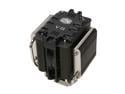
COOLER MASTER V8 RR-UV8-XBU1-GP 120mm Rifle CPU Cooler Compatible with Intel 1366/1155/775 and AMD AM3/AM2+/AM2
Pros: I've had this thing, actually two, for almost 3 years now. And it's still a beast!! My AMD six-core idles in the upper teens/low 20s, and maxes in the low 40s under a full-load. The size isn't a con if you have an Antec 900 case, or something similar.
Cons: After three years, the fins are kinda dusty. And I had to uninstall it, reapply thermal paste, and then reinstall it. :)
Overall Review: I'm not sure if this is standard practice. But before installation, you need to place the heatsink on a hard, flat surface and apply downward pressure to make sure the arms are all on the same plane. This will affect your temps, if you don't. Also apply slight, downward pressure on the top when screwing the arms into the motherboard. This made a huge difference in my temps.
2/23/2012See more detail
Finally Got The Webcam To Work
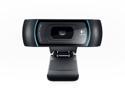
Logitech C910 USB 2.0 1080p HD Pro Webcam
Pros: Good picture/video quality. The software installation itself is pretty easy and straightforward.
Cons: It took me almost a week to find a way to get the Logitech software to detect the physical webcam in Win7-64bit. I had to go into the Device Manager. Under USB controllers, I changed the Logitech Webcam device to a USB Composite Device by choosing Update Driver and then manually selecting the device type. So instead of Logitech Webcam, my webcam is now detected as a USB Composite device. It works. And that's all that matters.
Overall Review: I would give this webcam 4 stars, but I almost gave up on this webcam because of the software/physical device detection issues. Plus, I haven't had a chance yet to play around with all of the webcam features.
8/6/2011See more detail