




 here!
here!
I’m your shopping assistant for PC builds, upgrades, and everything tech.
Got questions? Ask away!
Start a conversation
here!
I’m your shopping assistant for PC builds, upgrades, and everything tech.
Got questions? Ask away!
Start a conversation

Joined on 12/04/03
Good for the price, will buy again
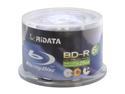
Pros: Price, up to 8x write with Pioneer BDR-2208, inkjet printable.
Cons: Only time will tell if they last, withstand scratches, and any dye degradation.
Overall Review: I purchased a Pioneer BDR-2208 Blu-Ray burner and these RiData BD-R discs at the same time. The cost is about $1/per disc when you include the shipping. So far I have burned about 5 out of the 50 discs, and even though the specs say 6X, the Pioneer burner shows them at 8x. Keep in mind the Pioneer can burn up to 15x, but there are no discs that support it. The inkjet printing works well with my Epson, but I did notice the printed image doesn't look quite as good as the Verbatim DVD printable I've been using for many years, but not a big concern. Still, at the $1/disc price, I'm quiet pleased so far. I just hope the quality lasts and the dyes used on inside the disc don't start to degrade after a few years like some cheap poor quality DVD-R discs. The Verbatim DVD-R discs that I've been using for 8 years still play just fine, so hoping these RiData BD-R last long too.
Fast, but returned it
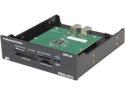
Pros: Fast USB 3 speeds, 5.25" drive bay, accepts every memory card.
Cons: Bulky USB 3 header
Overall Review: When I built my PC last year, I went with the AFT PRO-55U USB 2 memory card reader. Since then, I have been impressed with it, as it works well. I decided I wanted to upgrade to the newer AFT PRO-57U USB 3 memory card reader. I ordered it and was shipped via Shop Runner with UPS 2-day, and the package was never delivered, even though the tracking # said it was. I had to call NewEgg and they put a tracer on it, and ended up sending me out a replacement a week later. It was properly delivered by UPS. (Thank you NewEgg for good customer service.) When I went to install the AFT PRO-57U, I first removed the 55U and disconnected it from my motherboard's USB 2 connector. I saw that the 57U uses a USB 3 header, that has to connect to the motherboard's 20-pin USB 3 connector. Unfortunately, this USB 3 header is too wide and interferes other ports next to it on the motherboard. So because of that, I had to return it. Other reviews have also commented on how wide it is and may not fit properly on some motherboards. It would be better if the included cable had a 20-pin connector on it, so it would actually connect directly to the motherboard, instead of having to use a 20-pin header in-between that has two USB 3 plugs on the other end that the cable pugs in to.
Good basic SSD from WD
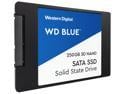
Pros: Good price / affordable. 7mm form factor. Faster than a standard HDD. Easy to use and install with Windows 7 or 10
Cons: Not as fast as some other SSDs. Only a 3 year warranty.
Overall Review: I have been using a Radeon R7 480GB SSD for the past 2 years, and get ATTO speeds of 560MB/s Read and 530MB/s Write. With this new WD Blue 250GB SSD, I get a bit slower ATTO speeds of 495MB/s Read and 470MB/s Write. Crystal BenchMark also shows the WD Blue a bit slower than then Radeon R7. But in real world use, fully booting my Windows 7, both the Radeon R7 and WD Blue are within 2 seconds of each other. Since the warranty on the WD Blue drive is only 3 years, I can't really see it as a primary SSD where you want it to last more than a few years. Usually I recommend replacing a SSD 6 months before the warranty is out, otherwise you may risk possible data loss. Since my Radeon R7 that I use as a primary Win 7 boot drive has a 4 year warranty, and I've used it for 2 years, would look at replacing it in another 18-20 months before possible failure at the 4 years mark.
Large 10TB capacity for NAS
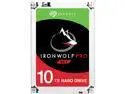
Pros: Largest SATA HDD for PC and NAS at 10TB. Very fast for a mechanical HDD, but still half the speed of a SSD.
Cons: Not quite as fast as the BarraCuda Pro ST10000DM0004
Overall Review: I first tested out the 10TB BarraCuda Pro ST10000DM0004 a few months ago, and was impressed with it's large capacity and speed. It was able to get 256.7 MB/s Read, 216.5 MB/s Write under ATTO and Crystal. The only thing I did not like about that drive was the "clicking and chirping" sounds that it would make. By comparison, the Seagate IronWolf Pro 10TB drive is similar specs, but slightly slower at 230 MB/s Read and 200 MB/s Write. This is still plenty fast for a mechanical hard drive used in a PC, in a NAS, or external back-up. One plus is that the IronWolf Pro drive is not at loud as the BarraCuda without all the clicking sounds when doing read/write operations. Since both of these drives are about the same price, I would suggest going with the BarraCuda Pro is you need the fastest one, or the IronWolf Pro if you want one that is more quiet.
Not sure about the quality and Made in China
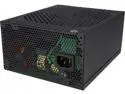
Pros: Nice sized power supply and should fit fine even in smaller cases. Modular design. 1200W power is more than most users will need. Gold power rated. Single 12V rail. Quiet fan.
Cons: The 24-pin Motherboard power cable is hard-wired and not modular. Burning/Chemical smell for 1 week of first use. Electrical buzzing sound when under load.
Overall Review: Overall this would be a great power supply if it wasn't for a few issues. First of, the good... I installed it in my 4 year old PC that I built, and it actually replaced a 10 year old Enermax NoiseTaker 600W power supply that still works without problem. This Rosewill 1200W supply is still about the same size as the older Enermax 600W, and always about the same weight. One thing I noticed is the external case metal of the Rosewill power supply feels a bit thinner and cheaper quality, and looks like it is just spray painted black. My old Enermax has a nice dark pearl blue color and is thicker metal. Installing the new Rosewill was easy, but wish the motherboard cables were also removable and that would of made for better cable management in my case. All the rest of the cables were fine and I like the long length, but wish there was a 2nd 4-pin Floppy connector (I have a Sound Blaster drive bay that uses a floppy power cable). Now for the bad... Once I powered it on for the first time, I could smell something coming from the Rosewill power supply. It smelled like a burning chemical smell (not that anything was burning or on fire). After a period of time this smell became less, and now a week later it is gone. I think this is "off gassing" that I've experienced before with some lower-quality electronics when new. But my other issue is that when the system is under load, such as rendering video using Sony Vegas, or playing a game (which I don't do often), the Rosewill power supply will start to make a high-pitch electric buzzing/harmonic sound. It isn't super loud, but I can hear it (about 5 feet away) as it is very high-pitch. I think this is coming from either a capacitor or a transformer, again being low-quality. My old reliable 600W Enermax never had any of those issues, and has lasted 10 years. Even though this Rosewill 1200W has a 5 year warranty, it just doesn't seem to be good quality that will last over time. Because of this, I am rating it 3 out out of 5.
Nice Dual-Band Wi-Fi USB Adapter
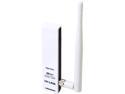
Pros: Compact with an external antenna for extra range and signal strength. Comes with a USB cable added flexibility.
Cons: Windows 10 USB drives are still in Beta. Does not have a stand for the USB adapter when using the cable.
Overall Review: Overall this is a nice Wi-Fi USB adapter. I tested this first using Windows 7 Ultimate x64, and downloaded the newest drivers. Everything installed fine and I was able to connected to my home network. I have Comcast and was able to get download speed using the 5GHz band of 180Mbps down and 24Mbps up, which is the same speed I have when using a wired LAN connection. Naturally, 2.4Ghz band is slower, about 85Mbps down, but this is expected. I also tested this on a Windows 10 laptop, but had to contact TP-Link for a driver, which they sent me. It is still classified Beta (after a year) which is exceptionable. But despite this, it was able to work just fine and without any problems with Windows 10. Even though the rage is better than other USB adapters with only an internal antenna, it still isn't as good as I would like, and drops when used on the other side of the house. I like that included is a USB cable or added flexibility, but wish there was a stand to attach and set the USB dongle on, as it tends to fall over when setting on a desk.


