




 here!
here!
I’m your shopping assistant for PC builds, upgrades, and everything tech.
Got questions? Ask away!
Start a conversation
here!
I’m your shopping assistant for PC builds, upgrades, and everything tech.
Got questions? Ask away!
Start a conversation

Joined on 11/08/05
I build things.
Updated Review
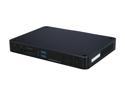
Pros: Excellent ITX/Nano PC AMD Hudson Chipset outranks and outperforms Intel's Atom/GMA Chipsets. Take my word for it. The drivers for this chipset exist and are updated frequently compared to Intel's. I struggled just to find drivers that worked for the GMA 3600 for Intel's Atom Chipset (x86 drivers exist, x64 forget about it).
Cons: Needed to make a few modifications and spend some cash on parts to get the best results from this PC. It well worth it though.
Overall Review: Hard Drive Used: Samsung 830 128gb SSD (I'm considering upgrading this drive to a larger SSD) Memory Used: Corsair Vengeance 8gb 1600mhz (1 DIMM) The specs say the maximum is 4gb, but AMD Hudson's Chipset actually supports 8gb maximum per dimm available. I also added these cards for improved performance: Habey HB-VD920 Broadcom Crystal HD PCI expresses Mini Card AVC/VC-1/H.264 Enhanced Hardware Decoder. I swapped out the stock Wireless Card (Intel's 1000 - 112BNHMW) for this unit: Intel 533AN_MMWG2 5300 Ultimate N Wi-Fi Link Network Adapter IEEE 802.11n (draft) Mini PCI Express (Full Length miniPCIe, NOT Half Length) I had to take the whole Unit apart just to do the work I wanted. Definitely a headache, but well worth the results. I placed the HD Decoder in place of the wireless card and installed the new wireless card in the open miniPCIe Port. I also added new wireless cables to the card and ditched the old ones - I needed to better wireless signals. I also reapplied thermal grease to the CPU/GPU. That dropped the average temps quite a bit, thus keeping the fan quiet. Overall, I'm happy with this unit. Excellent Setup. Mounted to the back of an LCD with the included VESA Mount too!

Pros: It automates the filing of taxes. Software is easy to use, but be very patient with it. It'll update the moment you launch the application.
Cons: The software does not perform like it used to. Certain forms such as Schedule C, D, and E are no longer handled by this software unless you update to the premier version (small business version I believe), which is offered midway through using this program. Federal E-file is included with this software, but I do not understand how the software can verify the number of E-files submitted through the application. State E-file application is included with the software, but you must pay to submit it electronically, otherwise, print the entire form (not just the state documents) and mail them using certified mail. If you are a returning TurboTax user and you decide to import the information from previous tax years, go through the information imported. I strongly suggest you review each line transferred over. Many mistakes were created through this process and I cannot stress enough the importance of checks and balances. Making changes to a submitted tax return isn't easy.
Overall Review: A $25 rebate is offered for this product, however, in order to fulfill it, you must fill out a form online through the Intuit website. There is a major condition to this rebate that customers must be aware of, which most users will neglect to notice. There is no disclaimer shown for this while using the software. If you upgrade the TurboTax Suite (for free) while using this software, you lose your eligibility for the rebate when submitting the request online. I believe this is unfair practice for consumers. Also, in regards to the newly introduced healthcare section required of tax filers, errors will be made by the software prior to submitting your return, even with the updates provided by Intuit. Be sure to review the information entered and confirm your values with the paperwork you received from your health care insurance providers (1095A and Form 8962). If you didn't receive a 1095A, omit the section entirely (clear out any values you may have entered as well) and make sure an exempt status is shown, otherwise your return value will not be entirely accurate. If problems occur, please refer to the TurboTax forums online for further guidance.
This heatsink > Stock CPU heatsink
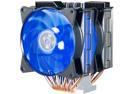
Pros: Cooler Master's packaging and documentation of this product are excellent. Two heat shrouds with two fans for a push-pull configuration work efficiently for heat dissipation. I've noticed the fans will range between 600-1500rpm depending on the load; user experiences may vary depending on if fans are powered by a molex connector or by the motherboard pins. The included RGB feature set is a nice touch for anyone adding RGB to their computing experience. A separate controller is not necessary as one is included with this unit.
Cons: Installation is difficult but thorough instructions are provided by Cooler Master. You will need to install this onto your motherboard and CPU before mounting the assembly into your case. You will need to either use the included wrench or an angled wrench to lock down the four screws onto the appropriate CPU bracket. Mounting this will require some trial and error as the CPU mounting plate may interfere with the backplate behind the motherboard (i.e. not large enough of an opening, offset, ...etc). You will also want to take into consideration the orientation of the heatsink and fans as the assembly may interfere with your RAM, GPU, or 12v EPS motherboard connector. Also, the height of this heatsink is not friendly with smaller cases; proceed with caution.
Windows 7 or newer? It's plug and play.
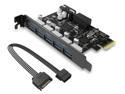
Pros: Solid addition to any desktop needing USB 3.0 ports. Bandwidth amongst the ports is distributed evenly with constant throughput. Windows 7 and 10 automatically installed the drivers for the USB controller, however ORICO provides a better driver package.
Cons: Molex power socket can be a bit stiff to plug in, but that can be adjusted and it's dependent on the quality of the molex connector provided by your power supply.
Overall Review: I had initially purchased this card to make use of my USB 3.0 front panel header; my motherboard did not provide any onboard external USB 3.0 headers. I find this card rather easy to work with, with any build.
Bluetooth Audio on a Budget.
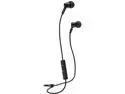
Pros: If you're new to bluetooth audio, these are excellent to start with. Connectivity and form factor are superb. The included ear pieces will allow for accommodation with any listener. While wearing, the "noise cancellation" is on par with more expensive headphones. I have to take them off when having unprompted conversations. These have excellent treble and vocal response with a balanced middle range. They can be loud. The microphone picks up your voice rather well, and incoming calls are outputted in stereo. These can charge with any functional MicroUSB cable you throw at them. Sweat tolerance is rather good compared to other in-ear headphones; I rarely had to reinsert them during strenuous activity. I was able to use them in a sauna, however, I don't recommend you do that for more than 15 minutes at a tine as that constant heat and amplified humidity will damage them.
Cons: Bluetooth connectivity is rather good, however with rapid motion, they tend to lose signal. Battery life is not good; I would estimate an average of 3 hours of constant use before the audio output begins to drop. Bass response will vary depending on which ear pieces are used. The included USB charging cable is junk, and I don't advise you to use it with any other devices as the internal pins are fragile and move around, and an unsuspecting user may short out their devices with it. The grille protecting each headphone tends to get pushed into the socket with use, and it's tough to pull back out. I also ran into connectivity issues when more than one device was paired to the headphones. You have to manually disconnect when terminating use from device and moving to another. This tends to be annoying.
Computifornication
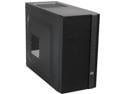
Pros: This is one of those cases you will find yourself tinkering with until you've found your sweet spot for satisfaction. I placed three different builds into this case since I purchased it, and the last build will be the one I keep configured. I found myself dismantling the entire case and every included component to the bare frame. I've tinkered with the cable management, IO panel, hardware mounts, insulation, cages, and etcetera, multiple times. I figured out what works best with this chassis. I've never had an mATX/ITX designated case consist of so many options to choose from, especially for the low price point. Its construction should not fool anyone. The pictures posted online do not serve it justice. It's lightweight, and NOT flimsy compared to other cases of similarity. The airflow potential in this case is remarkable. 3 pre-mounted case fans are included with the purchase, and can easily be removed and/or upgraded accordingly. Thank you Cooler Master. This case is dead silent if you use a water cooling solution without case fans and moving components. All of the set screws and grommets are included as well.
Cons: Cable management and disassembly are the largest concerns for this case. Once you've disassembled the entire chassis, reassembly and build configuration become easier. The reason cable management is a concern is if you A) do not use a modular power supply, and B) install more components than needed to run a simple desktop PC. Tucking the cables behind the motherboard tray can be tedious. I suggest you invest in using the zip-ties and finding notches to strap the cables to. Stacking cables may not allow the panel doors to close properly. They are prone to bending and bulging. Please be careful.
Overall Review: For clarification purposes, the chassis supports the following drive configurations. 1x 5.25in Drive mounted in the optical bay. (External) 1x 3.5in Drive mounted under the optical bay. (External) 2x 3.5in Drives mounted on the bottom of the chassis (Internal) This cage can also shift positions in the chassis. 2x 2.5in Drives (One under the modular bay, One above the 3.5in cage) (Internal) 2x 2.5in Drives (Mounted on the motherboard tray, using the included rubber grommets) (Internal) Users can swap out the 2x 3.5in drives for 4x 2.5in drives by using adaptors to mount in the cages. For users looking to invest in water cooling solutions for this case, I strongly advise you stick to single radiator solutions rather than the maximum permitted 240mm solutions available on the market. I attempted to front-mount install the h100 from Corsair and realized that the tubing restricted both the cable management options available with this case and the internal component mounts. For anyone that's curious, this is the build I installed in the N200. Case: Cooler Master N200 CPU: AMD Phenom II X6 1100T Black Edition Cooler: Corsair H50 Watercoolor Using 2 ~5v @1000±RPM Fans for Push-Pull Exhaust Motherboard: MSI 880GMA-E45 (MATX/AM3) Memory: GSkill RipJaws 4x4GB DDR3 1600mhz CAS 9 PSU: Corsair Enthusiast 650W NonModular GPU: Onboard AMD Radeon Graphics Optical Drive: LG BluRay Combo Burner Storage: 1x Samsung 850 Pro 2.5in 256GB Storage: 1x Samsung/Seagate 2.5in 1TB 5400RPM Storage: 2x WD Green EARS/EARX 3.5in 2TB 5400RPM


