
Your Browsing History


Ronald F.
Joined on 04/03/02
0
0
product reviews
- 20
Really like this board
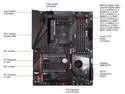
GIGABYTE X570 AORUS PRO AM4 AMD X570 ATX AMD Motherboard
Pros: I was going to buy the Gigabyte X570 Aorus elite, but they were out of them. I ended up spending a few more dollars for the Pro version and am glad I did. It was an easy install with this board. I powered on the board and went into the bios where my first change was too set the XMP profile for my memory. I checked the rest of my settings, and watched the temps for a few minutes to make sure all was ok. Everything went fine, so I restarted and setup windows. Oh, and the 7 hybrid fan headers are really nice. I was able to get rid of my fan hub and run all my fans off the motherboard. I have a Gigabyte video card, and Gskill trident z neo memory. I have all of them showing blue right now, but I can have a serious light show when I want, lol. Lovin the board.
Cons: I found a con. Please stop pushing Norton, Google tool bar, and Google drive. I unchecked them and every time I update app center or any of the other apps I have to uncheck those three apps again and again. I don't want them on my computer, so please fix that. Thank you
Overall Review: I would recommend this product I have one gripe and it's pushing software I don't use. I really can't think of anything I would change other than the software.
5/21/2020See more detail
Read before buying this product Lonovo TAB A10

Lenovo TAB 2 A10 10.1" FHD 2 GB Memory 16 GB Storage Tablet Android 4.4 (KitKat)
Pros: Yes, it has a pretty screen
Cons: This is the first product that I have considered returning to newegg. I bought it for internet use like checking facebook, gmail, etc. The product description says it comes with Android kitkat 4.4 which would be fine accept during the first startup of this device it auto installed Android Lollipop 5.0. This breaks the wifi signal of this device. When I first started using it I would get from 5-10 minutes of great wifi signal, but then it gradually got worse until now it sometimes connects only to disconnect shortly after. Pretty annoying. Lenovo says to drop the wifi connection and reinstall it which I have done many times to no avail. I read on the Lenovo website where others have reverted back to kitkat, but it's not an easy process and you have to turn off auto update or it just updates you again.
Overall Review: Please don't buy this product until they fix it.
2/4/2017See more detail
Had an issue
Microsoft Windows 10 Home 32-bit/64-bit (Product Key Code Email Delivery)
Pros: Windows 10 home is stable and fast. No issues
Cons: The real reason for this review is I purchased the digital key code through email. When I tried using it to setup windows 10 home microsoft said something was wrong with the key. I contacted tech support and the nice lady asked me to forward her the email with the code, and attach a screenshot of the microsoft error message. Once done she said that she escalated the problem and it would take 3-7 days for a response. She also said that most of the time it was faster. It was faster cause I got the response the next day. They sent me a new key which worked perfectly. 5 stars for great tech support.
Overall Review: I would recommend this product and if for some reason the key doesn't work don't get frustrated. Just contact tech support on neweggs site for help. Great job
5/7/2020See more detail
Razer DeathAdder Elite

Razer DeathAdder Elite - Multi-Color Ergonomic Gaming Mouse - RZ01-02010100-R3U1
Pros: Fit and finish is quality. No jitter, skipping, or other issues. Razer Synapse software setup was easy and works well.
Cons: None so far.
Overall Review: I started with the Razer Diamondback mouse and have had a few others through the years. I'm a fan of razer mice, so will recommend them to others.
3/28/2019See more detail
Love it.
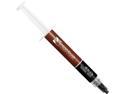
Noctua NT-H1 3.5g, Pro-Grade Thermal Compound Paste (3.5g)
Pros: It always works great, is easy to apply, and easy to remove. My AMD FX6300 runs from 36*C to 47*C on air cooling. I have boost turned on so it idles at 1406Mhz and max speed is 4145Mhz. As always Newegg ships fast and where I live I normally get it the next day.
Cons: Can't think of any
Overall Review: I put half a pea sized dot in the middle of the cpu and let the heat sink spread out. To remove I use a little alcohol on a paper towel.
1/31/2019See more detail
Works great
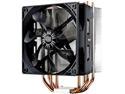
Cooler Master Hyper 212 Evo CPU Cooler, 4 CDC Heatpipes, 120mm PWM Fan, Aluminum Fins for AMD Ryzen/Intel LGA1200/1151
Pros: It keeps my AMD FX6300 between 36-47 degrees C with my processor min speed 1406 Mhz , and max speed 4145 Mhz. It comes with second fan brackets, so I added a Noctua fan. I used stock fan for pushing airin and the Noctua for pulling air out. Works great this way.
Cons: If it came with a long L shaped screw drive like the Noctua heat sinks it would make install easier. I had to remove two stick of memory to get the cooler in. I put the memory back in and the one stick touches the fan.
Overall Review: If they had made the cooler 1mm thinner it wouldn't have touched the memory. I used Noctua paste instead of the included paste. My son has the same cooler and used the stock paste, so it does work. I'm just used to the Noctua brand. Can't think of anything else.
1/31/2019See more detail
seller reviews
- 2
On time
My experience with this seller is I would recommend them. They shipped my product on the 4th of may and I got it on the 5th of may. The product was Noctua NT-H1 which came undamaged.
On-time
Delivery
Product
Accuracy
Customer Service
Satisfactory
5/14/2020See more detail
Great experience
I got the item the next day which wasn't expected. It does what it says it does, so no complaints at all.
On-time
Delivery
Product
Accuracy
Customer Service
Satisfactory
2/20/2017See more detail