
Your Browsing History


Gary A.
Joined on 07/25/06
0
0
product reviews
- 17
Nice motherboard
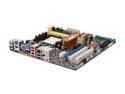
ASUS M3A78-EM AM2+/AM2 AMD 780G HDMI Micro ATX AMD Motherboard
Pros: Good motherboard with nice overclocking features in bios. Bios can be flashed from within the Bios, with a CD, USB Memory Stick, Floppy Disk or even from ASUS site online (not so sure I would use this one though). The front panel wiring connects to a connector block that allows you to pull the connector block from the motherboard with all wires still intact (nice). No more fumbling with wires in the even you need to pull the motherboard for some reason. On board graphics (***see other thoughts below). Can use several speeds of DDR2 memory up to and including 1066mhz (which I recommend). This board will support a range of dual and quad core AMD processors. Layout is pretty decent.
Cons: The 4 pin power connector to the motherboard is a little close to the Power supply slightly increasing deficulty in connecting but still managable.
Overall Review: ***The onboard ATI graphics works but really cuts the performance of this board down. I recommend something like the ATI XFC 4770 graphics card (put bios clock speed from 100 to 133mhz for significant performance. I am using the AMD Athlon 64 X2 7750 Kuma 2.7GHz 2 x 512KB L2 Cache 2MB L3 Cache Socket AM2+ 95W Dual-Core black edition Processor which is a decent, inexpensive low power usaged dual core processor that is unlocked for clocking that does well with this board. Also I fully recommend the Mushkin 4GB (2 x 2GB) 240-Pin DDR2 SDRAM DDR2 1066 (PC2 8500) Dual Channel Kit Desktop Memory. With my setup I get a Windows Vista performance of 5.9 on memory and both business and gaming graphics, 5.7 on SATA Seagate hardrive and 5.6 on CPU. I can't complain as being a non gamer it works phenomenally for what I need it for.
5/16/2009See more detail
Decent....But

ASUS M2A-VM AM2 AMD 690G Micro ATX AMD Motherboard
Pros: Bios can be saved. Stable motherboard. On board video adequate for general use but not for graphics intensity programs such as games. Decent layout and excellent manual. Very nice sounding audio with Altec Lansing speakers I have had for several years.
Cons: Asus site shows Vista drivers for this motherboard but when you try to install them it says something about the server refusing due to a referral. When I contacted Asus Support by phone they said that is because Vista has issues with some of there motherboards and the M2A-VM is one of them. Vista did load some drivers from the internet and their site but this motherboard is not on the list of Vista Approved motherboards. Settings somewhat limited. Little ability to overclock if that is an issue for you. I do not care to do it so this is not a problem.
Overall Review: Check the Vista Approved motherboard list on the Asus site before selecting a motherboard if you plan on using Vista. This board is excellent with Windows XP.
5/10/2007See more detail
Nice Video card for the moneyh
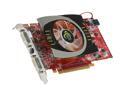
XFX Radeon HD 4770 512MB GDDR5 PCI Express 2.0 x16 CrossFireX Support Graphics Card HD-477A-YDLC
Pros: Good price for a middle of the road graphics card than can kick some booty when comparing to similar cards. 512mb of newer DDR5 memory. Nice amount of streaming processors compared to some Nvidia cards of similar price range.
Cons: Nothing noted as of yet.
Overall Review: Good bang for the buck mid range card. Using on Asus M3A78-EM motherboard. It didn't fair much better than the onboard ATI graphics until I went into the bios and bumped the clock speed from 100mhz to 133mhz. What a difference. The Vista graphics rating went from 4.1 to 5.9 in both Business and Gaming ratings. I was shocked at the difference. Literally woke this baby up.
5/16/2009See more detail
Good bang for the buck CPU
AMD Athlon 64 X2 7750 - Athlon 64 X2 Kuma Dual-Core 2.7 GHz Socket AM2+ 95W black edition Processor - AD775ZWCGHBOX
Pros: Low power (95 watts). This CPU comes unlocked and running at 2.7GHZ. I have it running rock stable at 3.0GHZ with just frequency adjustment and stock Heatsink/fan combo it is keeping it a cool 116 degrees F. At $59.99 this is a no brainer for all but the serious gamer. I am very satisfied so far.
Cons: Nothing so far
Overall Review: Running this on an Asus M3A78-EM motherboard with Mushkin 1066mhz Memory.
5/16/2009See more detail
Decent Low price case
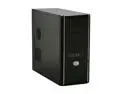
Cooler Master Elite RC-334-KKN1-GP Black SECC ATX Mid Tower Computer Case
Pros: Nice looking. Easiest installation of cards and drives I have ever had due to the "Twist and lock" mechanisms (NO SCREWS). Standoff placement for my ASUS M3A78-EM motherboard was dead on (unlike some other cases I have used). Nice front panel layout with Blue LED's and a black grill. Overall this is recommended as a good buy.
Cons: While the side flow tunnel air intake for the CUP fan is a nice addition it doesn't totally line up with the CPU placement on the Asus M3A78-EM motherboard but it seems to be more than adequate.
Overall Review: If you don't mind a case that doesn't have a showy side window then you will like this one. A 120mm Fan with blue LED's would be a nice addition for the front fan mount that would allow you to see the blue glow from behind the front grill.
5/16/2009See more detail
Very nice!
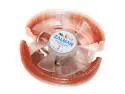
ZALMAN CNPS8700 2 Ball CPU Cooler
Pros: There are 3 power modes in Windows Vista. Power Saver, Balanced, and Hi Performance. Before using this heat sink my AMD Athlon X2 6000+ could not run Spybot scan nor NOD32 Anti-virus scan without shutting down due to temps in excess of 165-170°F unless I put the computer on a very slow "Power Saver" Mode. And you could forget about Hi Performance mode altogether. This Heat Sink lowered my idle temp from 120°F (Balanced power setting on Vista) to 79°. I can run High Performance with an idle temp of 95°F and can run both NOD32 and Spybot Scans while surfing the Internet. My old heat sink was a Server Heat Sink with a fan that sounded like a vacuum cleaner it was so loud. This heat sink is quiet, cool, and looks cool too with the Blue LED fan.
Cons: I have this on an Abit K9 SLI motherboard with an AMD X2 6000+ processor. I had to move the two sticks of 1MB(each) to the two outer slots because the heat sink encroaches on the first one. Not a big deal unless you plan on populating all four sockets with memory.
Overall Review: I love this heatsink! Other than the one con above there is nothing bad to say about this one.
5/3/2008See more detail