
Your Browsing History


Kim K.
Joined on 12/09/08
0
0
product reviews
- 11
Quiet...but BIG!!!!

ZALMAN CNPS10X QUIET 120mm 2 Ball CPU Cooler
Pros: Cool looking. Very quiet. Good instructions.
Cons: Too big. Fan is easy to move after putting it on. Taking the fan off so the cooler can be fastened down is a pain. Also, the clips that hold the fan on are flimsy. I foresee these things breaking if I have to mess with it too much in the future. Oh, and I had to turn the fan towards the I/O shield because the fan was so big it blocked one of my RAM slots on a Gigabyte GA-P55-UD3R MB.
Overall Review: I just put an i5 build together. This fan fit into a Cooolermaster Storm Scout case on a Gigabyte GA-P55-UD3R MB. CPU temp was at 26C with just the video card and RAM hooked up. No HD yet.
10/11/2009See more detail
v1.6 has problems with RAM
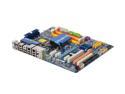
GIGABYTE GA-EP45-UD3P LGA 775 Intel P45 ATX Intel Motherboard
Pros: 1. pretty board with nice laser etched lettering on it. 2. Nice moderator on the tweaktown Gigabyte forums.
Cons: Ran memtest86 on with a single RAM module: Slot 1-failed Slot 2-pass Slot 3-fail Slot 4 -pass Absolutely no response from Official Gigabyte peeps yet.
Overall Review: Bare bones start-up, and I had issues with an intermittent keyboard. As I followed this down the rabbit hole of "what is causing all this in bare bones", I entered the wonderful world of tweak your BIOS this was and that way until you byte it into submission. Currently, I run 2 sticks (2x2 DDR2 1066 PC28500) in slots 2&4. Windows loaded. I am currently debating on whether or not to use the RMA from newegg. If one were to look on the tweaktown forum or the gskil forum they might find a more detailed description of the issues.
9/9/2009See more detail
Pretty good for 11 hondos
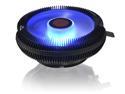
RAIJINTEK JUNO X BLUE led CPU cooler
Pros: looks awesome adequate cooling for a non gaming rig
Cons: the contact surface for the CPU could be upgraded to copper
Overall Review: runs 45-50c under normal load according to asus bios runs 32-45c according to passmark My set-up: AMD - Ryzen 5 1600 3.2GHz 6-Core Processor Asus - ROG STRIX B350-I GAMING Mini ITX AM4 Motherboard Corsair - Vengeance LPX 16GB (2 x 8GB) DDR4-3000 Memory Sapphire - Radeon RX 580 8GB NITRO+ Special Edition Video Card
2/11/2018See more detail
ROG STRIX B350-I GAMING AMD MB
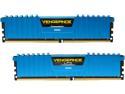
CORSAIR Vengeance LPX 16GB (2 x 8GB) DDR4 3000 (PC4 24000) Desktop Memory Model CMK16GX4M2B3000C15B
Pros: - Color and low profile go with my mITX build 2-11-14 update Things fit under the rajintek cpu cooler. easily upped the lock speed from 2133 to 3000 passed all stress test with no failure
Cons: -Reviews saying this RAM does not work on Ryzen set-ups has me worried. 2-11-14 update NONE
Overall Review: I just ordered these based on color and low profile for a mITX build. These RAM sticks are on the Asus site QVL for this motherboard. I just ordered all the parts so I don't have any other information except for my minor freak out when I read how these don't work with Ryzen set-ups. I will update and adjust star rating accordingly after my build. My set-up: AMD - Ryzen 5 1600 3.2GHz 6-Core Processor Asus - ROG STRIX B350-I GAMING Mini ITX AM4 Motherboard Corsair - Vengeance LPX 16GB (2 x 8GB) DDR4-3000 Memory Sapphire - Radeon RX 580 8GB NITRO+ Special Edition Video Card
2/11/2018See more detail
Bought for a 2009 computer build
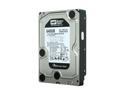
Western Digital Black WD6401AALS 640GB 7200 RPM 32MB Cache SATA 3.0Gb/s 3.5" Internal Hard Drive Bare Drive
Pros: This thing is still running in 2017
Cons: None. This hard drive has been boss. Only negative is picking another hard drive that can last as long as this.
Overall Review: I'm planning another computer build as my last rig was done in 2009. And although everything is still running from that build (except a wee RAM stick failure a couple years ago), it's time to update...everything.
6/4/2017See more detail
Still going since 2009 build
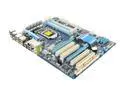
GIGABYTE GA-P55-UD3R LGA 1156 Intel P55 ATX Intel Motherboard
Pros: It's a very good looking board. Was easy to put in. All the board connectors were well marked.
Cons: When I built this board, I had 2 PC builds under my belt. This was the first one to be a total PITA to get up and running. Only 2 RAM slots work. It has some weird USB issues. Sometimes when I plug in a USB, it actually disables my mouse and keyboard USB. I have to do a complete restart.
Overall Review: I gave it 3 stars mostly for the start up issues in the beginning, and the bad ram slots. Other than that, this MB is still going after 6 years. I think that counts for something. I am planning out a new build right now. Truthfully, I will probably steer away from a Gigabyte MD. However, it doesn't mean I wouldn't get one.
11/26/2015See more detail