
Your Browsing History


LANCE E.
Joined on 08/29/05
0
0
product reviews
- 9
Surroundy Sound Is Good!
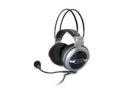
Turtle Beach EarForce HPA2 Circumaural Multi-speaker 5.1 ch Surround Sound Amplified PC Gaming HeadSet
Pros: Excellent bass response, comfortable for long gaming sessions (except in the middle of summer when it's 100 degrees F, the insides of the cups made me sweat), great representation of 5.1 surround sound for movies and especially games if you have the right sound card. Detachable mic is great 'cuz I rarely use it in online games. I love the way the headband automatically stretches to fit your noggin. These are a terrific buy in this price range. The individual channel volume controls, as well as the master volume control, in an inline container is absolutely great. Plus, the extra line splitter is great (haven't used it myself, but it'll come in handy when I do use it though). Also, these don't slide off your head if you lean your head forward like my old cheap headphones did.
Cons: I keep hearing the crows crying about cheap construction, mine are still perfect after two months of daily use. Just buy a 99 cent precision screwdriver and tighten them if you're concerned about the two screws falling out and ruining your life forever. A bit heavy, but what the hell there are eight speakers inside all together. The open-cup design of these lets others in the room hear the audio too, but what are you gonna do hide in a cave to get quality audio without disturbing others?
Overall Review: I'd give a 5 rating if these were studio-grade, reference headphones...but those cost an awful lot of green which I don't have. I read the review of these headphones as an upgrade I "didn't know I needed" in MaximumPC magazine. I was skeptical and waited a while before I bought these. I am absolutely glad I did buy these. You'll be too.
9/10/2007See more detail
Great Value and Performance
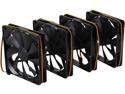
Cougar CFT14SB4 140mm Case Fan
Pros: First off, I never would have thought I'd be actively reviewing a computer case fan product let alone wanting to put the word out. I've been geeking out over the details of my computer rigs since 2005 and this is by far the biggest small-purchase accessory surprise I have yet to encounter. I currently have a Cooler Master Stacker 830 case with a dedicated sidedoor with slots for four fans of varying sizes up to 140mm. Before I purchased this Cougar fan pack I only had one Cooler Master LED 120mm fan that didn't seem to be doing anything worthwhile considering the size of the chassis. After perusing online I found this four pack of 140mm fans from a reputed company with an amazing number of positive reviews. The price was too sweet to pass up so I gave it a go and ordered. The product arrived as advertised in no frills packaging with the stated adapters and screws. I installed these four fans within minutes and had it up and running with no problems whatsoever. Even the included screws easily threaded their way into the plastic holes in the fans. Other fans I've used have offered quite the resistance but not these. The noise is definitely present but since I typically play music constantly it's a non-issue. It's fairly low compared to some of the Antec or Cooler Master case fans I've had in the past that sounded like the hyperdrive was being engaged at system powerup. One thing I found pleasant was to keep the side door open and feel how much air is being displaced by the fan array on my upper body. It is significant. Temperature-wise, my system decreased by the following amounts in the following sensor areas: Processor: 6 degrees Celsius (even with a dual fan already attached) Motherboard: no change Graphics card: 16 degrees Celsius (it just has a passive heatsink with no fan present) Hard disks: 5 degrees Celsius (both of these mechanical drives are mounted in the front lower portion of the case in a cage with a 120mm fan already blowing on them front so the fact that the temps decreased even more is impressive). I did some various stress tests and essentially these value changes hold true at either idle or full load +/- a couple of degrees Celsius. Best money I ever spent on case accessories. I now plan to buy fans from just this brand name in the future. Nice job, Cougar.
Cons: I was hoping to find the orange blade color version in the 140mm size at this price point but, alas, not.
Overall Review: I almost did not purchase these as they did not contain LED's as I come from gaming culture. I'm glad I did though.
8/10/2015See more detail
Blue and cool for my P4 3.0GHz
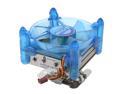
GIGABYTE GH-PDU21-SC Ball CPU Cooler
Pros: Looks cool and cools well. CPU temp is about 48C even while encoding video as I type this review. The fan housing is connected to the heatsink by four corner clips. When I clean out the inside of my case periodically, it is hella handy just to snap the cooler off CAREFULLY and clean up and snap right back on. Have had this product on my CPU for 2 years now and not one hitch at all.
Cons: Not the absolute best cooler at the time of purchase, but it was a good balance of cooling power and price.
Overall Review: I connected a DIY fan controller onto the power cable on the fan. My point is that if you have ANY fan controller set to the minimum setting at system startup, the fan may not spin and you could have a potential CPU burnin' escapade. Someone else installed it for me so I can't comment on that part.
9/10/2007See more detail
Solid, Quiet, Cool
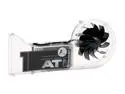
ARCTIC COOLING AVC-AT1 Rev. 2 ARCTIC Ceramic VGA Cooler
Pros: Suuuper quiet, looks great, have owned for two years now and not one hitch at all. It's good that the hot air is expelled from the rear of the case and not just mixed right back into the case air volume.
Cons: Rather large (it robs the PCI slot right below the AGP slot, but that's standard issue).
Overall Review: I removed the cooler from my ATI X800 XT AIW AGP GPU and removed the standard thermal paste and used Arctic Silver 5. I noticed a considerable drop in my maximum GPU temp (from 72C to 68C), but I also increased the fan size and count in my case so that also helped alot. As far as my card goes, I had read forums that stated that the RPM controller chip spiked to well above 12V (more like 20V+), I rewired the fan power cord directly to my power supply to avoid any potential burnout on the DC motor of the fan...just a thought for this card.
9/10/2007See more detail
Western Digital Strikes again!
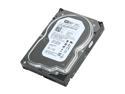
Western Digital Blue WD800JD 80GB 7200 RPM 8MB Cache SATA 3.0Gb/s 3.5" Internal Hard Drive Bare Drive
Pros: Cheap (even cheaper now than when I bought it two years ago). Solid drive that has given me two solid years of performance.
Cons: Nowadays, 80 GB is low...even for a laptop. In hindsight, I should have gotten a drive with more capacity. But this is more my lack of foresight than a product con.
Overall Review: Everyone knows to set a jumper on it if you're using a SATA150 controller on the mobo. Other than that, I paired this with a Hitachi 80 GB with the same number of cylinders, blocks, etc to run RAID 0 and noticed an instant increase in load times, boot times, etcetera. For my particular ECS mobo, I had to search for an older version of the RAID driver on the ECS website. Had to start the Windows re-install process like, five times until I nailed the right version of RAID drivers. I also ensconced this drive in a Cooler Master CoolDrive Lite aluminum heatsink enclosure with a 44mm blower fan to keep things nice and cool to prolong the life of my drive.
9/10/2007See more detail
Great product
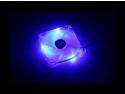
Thermaltake A2018 Blue LED Case Cooling Fan
Pros: High cfm rating, bright blue LED's, three options for operation (I opted for the pci slot manual control knob myself, I read some reviews that complained about the unexpected nonlinear behavior of the thermal sensor option and running this baby at top speed is just way too loud.)
Cons: My first one was DOA: the blue LED's lit up but the fan didn't spin so I RMA'd it (not from NewEgg, by the way.)
Overall Review: I think my fan at top speed is louder than others because I have this fan mounted on my case side door to a 12cm to 8cm plastic adapter which narrows the incoming airflow...a real big whooshing sound is heard. I plan to modify my side door so that I can get rid of the adaptor so this should be fixed hopefully. I purchased a Thermaltake A1926 12cm blue LED fan and soldered a 25 Ohm rheostat to control the RPM. The fan had a subsequent drop in air pushing capacity due to receiving less than 12 Volts (but much quieter). In hindsight, I should have forked over the extra cash and bought the Thermaltake A2018 fan with a built in controller instead. I am going to modify the rear exhaust area of my case and replace my two 8cm /\nt3c LED TriCool fans with one of these crazy A2018's. Also, to avoid digital amputation, buy 12cm grill guards and depending on fan placement, put grille guards on BOTH sides of the fan...seriously, it's only an extra dollar.
6/23/2007See more detail