

Your Browsing History


BRIAN P.
Joined on 04/30/01
0
0
product reviews
- 2
great product so far, but not perfect...
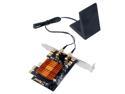
Fenvi FV-8802 AC1200 Wireless Bluetooth Dual Band PCI Express Wi-Fi Adapter, Up to 867Mbps (5Ghz) + 300Mbps (2.4Ghz), with 802.11ac Intel Wifi Card,Directional Antennna, For Desktop PC, Windows 7/8/10
Pros: Pros : good drivers from Intel which work great. Bluetooth a bonus for me, I actually didn't realize it was on the card as well. Heatsink makes it look sexy. Low-profile bracket included, antenna seems nice (neato magnetic base, wasn't expecting that).
Cons: Cons : Driver CD is worthless. It's one of those mini discs, which don't work well in some computers. At least mine could read it, but the only thing on it was one giant file in .kz format, which I had to download a program from China to open. By the time I went thru all that trouble, I find out the drivers are nothing but the standard Intel drivers two versions out of date.
Overall Review: I was either fortunate that my computer actually had an Internet connection or maybe just lucky that Windows 10 came with a set of drivers for the Intel AC 8265 wireless chipset. If you're installing in an earlier version of Windows you might not be so lucky. Minus one egg for the unusable driver mini CD, otherwise I'm rather happy with it so far.
1/9/2018See more detail
I am a very happy person
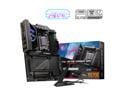
MSI MPG X870E CARBON WIFI Motherboard, ATX - Supports AMD Ryzen 9000 / 8000 / 7000 Processors, AM5 - 110A SPS VRM, DDR5 Memory Boost 9000+MT/s (OC), PCIe 5.0 x16 & 4.0 x16, M.2 Gen5, Wi-Fi 7, 5G LAN
Pros: 4 M.2 slots, with a nice tool-less mounting system looks very nice in my HYTE Y60 case some RGB, but not overdone this is the heaviest motherboard I've ever built with! it's got a nice 9800X3D on it :) was able to flash BIOS without components installed (just to be safe with my new 9800X3D)
Cons: this is the heaviest motherboard I've ever built with! having trouble controlling the onboard RGB with Corsair ICUE (mobo is not detected) manual seems to indicate that M.2 devices can be used in RAID 0 but I can't seem to find options in BIOS to set that up
Overall Review: I have been building systems for a long time. I have never had any problems with MSI motherboards, they have been serving me well for many years. This one looks to be no exception. Solid (VERY SOLID AND HEAVY) build. Would like to get RGB controlled with ICUE, but can't seem to get ICUE to recognize the mobo, even with the MSI plugins enabled. Various YouTube videos have not helped. Also I am currently using 2 Corsair MP600 PRO XT SSD's that I would like to get working in a true RAID 0 setup. I had been using them previously with an expansion card and a bifurcated X16 slot on a previous motherboard, but when I saw the RAID 0 mentioned in the manual I was very excited for this prospect. Sadly, I have only been able to get the drives set up as a striped array in software in Windows 11, and CrystalDiskMark only shows them running at their 'normal' maximum speed (about 7000) whereas on my previous setup with the PCIe expansion card the array was able to reach into the 12k range. I do not wish to return to the expansion card route, I feel like I'm missing something or perhaps using the wrong slots. Current setup: m2 1 - 2TB WD SN850X m2 2 - empty m2 3 - Corsair MP600 PRO XT m2 4 - Corsair MP600 PRO XT any suggestions for my issues would be appreciated! I am enjoying my new system!
11/23/2024See more detail