
Your Browsing History


Andre P.
Joined on 03/30/16
0
0


product reviews
- 11
High end viewing on a budget
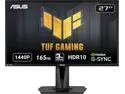
ASUS TUF 27 inch QHD 2K 1440P 165Hz IPS Adaptive Sync & G-SYNC Compatible 1ms HDR10 Built-in Speakers Gaming Computer Monitor with Height Adjustable, Pivot, Swivel, &Tilt Stand VG27AQ
Pros: Easy to set up Intuitive menu Amazing display quality Adaptive Sync Display Port Silky smooth adjustable stand
Cons: Low end built in speakers No RGB
Overall Review: Wow what nice monitor. I upgraded from an LG 22" and boy is the difference in size a nice improvement. Attaching the stand was very simple with just 4 Phillips screws for the back plate and a single Phillips thumb screw for the base. Swivel, tilt, rotation and height adjustment all feel silky smooth. The menu buttons are easy to reach and are even labeled with intuitive icons. To know how to navigate the menu requires you download the user manual from the Asus site. Setting it up to work with my MSI RTX 3060 Ventus 2x gpu's G-Sync was a breeze with this monitors "Adaptive Sync" feature. The included Display Port cable came in very handy. You need to use the Display Port cable if you want to use Adaptive Sync as well as run at the higher refresh rates this display offers. The adjustable blue levels are great for low light viewing. It has several pre-configured profiles for different viewing scenarios such as racing games, FPS's, MOBA's, watching movies or reading web pages plus more. There are several adjustmentsfor things like brightness, gama, contrast and color. The monitors ELMB (Extreme Low Motion Blur) is very good. I didn't have any issues playing Need For Speed, Warzone, Diablo 4. They say IPS panels don't have as much black background as VA monitors but honestly this one has no problems with that. The built in speakers are definitely small and not the greatest sounding but they're helpful if you don't have anything else. Overall I'm quite happy with this monitor. It gives a high end viewing experience on a budget bank account.
9/10/2023See more detail
Runs everything I throw at it
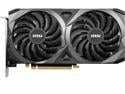
MSI Ventus GeForce RTX 3060 12GB GDDR6 PCI Express 4.0 Graphics Card RTX 3060 Ventus 2X 12G OC
Pros: The card is a great product. It runs cool and hardly breaks a sweat. I run Diablo 4 at max and have no trouble at all. Modern Warefare Warzone runs smooth too. The card is very quiet and Handles ray tracing with no issues
Cons: Software needs a bit of attention to be sure fans start when temps rise.
Overall Review: I'm having a great experience with this GPU and honestly can't find anything bad to say about it. The software handling the fans on the other hand is a bit different. I had to set up a user profile to make sure the fans kick on when the GPUwarms up.I hope MSI will patch this issue soon as it's been a problem for a long time it appears.
8/4/2023See more detail
Great stuff

Cooler Master CryoFuze Violet High Performance Thermal Paste, Nanoparticles, High CPU/GPU Conductivity W/m.k= 12.6m, Non Corrosive Formula, -50°C up to 240°C for CPU and GPU Coolers (MGY-NOSG-N07M-R1)
Pros: Comes with applicator and alcohol wipe
Cons: None
Overall Review: I bought it after seeing it had good reviews online and the price was kinda not too bad, kinda. Lol Would buy again
7/6/2023See more detail
Sleek
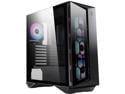
MSI MPG GUNGNIR 110R - Premium Mid-Tower Gaming PC Case - Tempered Glass Side Panel - 4 x ARGB 120mm Fans - Liquid Cooling Support up to 360mm Radiator – Black
Pros: Fits 360mm AIOs, lots of USB3 ports. Included fans, tempered glass side panel and front bezel
Cons: Takes a lot of fiddling to install your gear. Hard drive cage is irritating, front bezeel restricts airflow to radiators
Overall Review: Overall this is one of those sleek and sexy cases but it was a real task to setup. The hard drive cage gets in the way more than once. First it must be moved if you want to install a 360mm AIO cooler. It gets in your way again when trying to install the PSU. My advice, leave it out till the very end.
7/6/2023See more detail
Beautiful
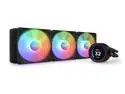
NZXT Kraken Elite RGB 360mm - RL-KR36E-B1 – RGB AIO CPU Liquid Cooler – Customizable LCD Display - 3 x F120RGB Core Fans Radiator Fans Black LGA 1851,1700 / AM5 Compatible
Pros: Lcd display, 360mm rad, included ARGB fans
Cons: None yet
Overall Review: I can't get over how sharp the display is. The customization is extremely simple in NZXT CAM. The pump head can be rotated to any position you need with the clock keyed mounting brackets included with the setup. All hardware is provided, including pre-applied thermal grease. I had already applied my own before finding out. Lol.
7/6/2023See more detail
Can't go wrong
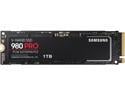
SAMSUNG 980 PRO SSD 1TB, PCIe 4.0 M.2 2280, Speeds Up-to 7,000MB/s Best for High End Computing, Gaming, and Heavy Duty Workstations (MZV8P1T0B/AM)
Pros: Fast solid state storage. Price, easy to install,
Cons: None that I have noticed
Overall Review: Bought this m2 drive to install my O.S. on. Runs great. Lightning fast. Will recommend. Think I'll get another one and set up in raid. It's worth it IMO.
7/1/2023See more detail