

Your Browsing History


douglas f.
Joined on 05/27/04
0
0
product reviews
- 6
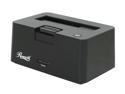
Rosewill RX-DU300 - 2.5" & 3.5" SATA USB 3.0 Hard Drive Docking Station
Pros: handles 2tb lp seagates just fine like they were connected directly to sata-2 ports in the pc
Cons: none so far
Overall Review: loaned it to my bro to test out to see if he likes it so he can buy his own so we can swap data back and forth, now he won't give it back..he's hogging it on me
4/30/2011See more detail
works fine til u need to rma it
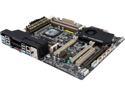
ASUS Sabertooth X79 LGA 2011 Intel X79 USB 3.0 ATX Intel Motherboard
Pros: decent speedy motherboard, hyperduo works like a charm holds 64gig quad channel memory just fine.
Cons: but if u plug in a 2.1 TB hd or larger into the marvel sata 2.0 ports..the motherboard may die on u, it happened to me. rma service is a joke, they misplaced it for 2 weeks, had "worked" on it for 2 weeks. then returned with damaged cpu socket pins and voided my 5yr warranty after 1.2yrs of usage. they must use some sort of stamp to damage the pins cause i've seen pics of other asus returned motherboards that went thru rma back to the users with bent pins and voided warranties...they all look the same. i did a fine look into the socket area, it's not only having bent pins..it's missing a few too. i think it woulda been better if asus released a bios patch to disable problem areas instead of causing users to crash their systems and deal with rma nightmares. general note for other buyers...look at all the reviews...both good and bad and see if u have the money to waste on this.
Overall Review: i just wish corsair made motherboards...at least with them u get free replacement. i was nearly broke after saving up my money to build a system i was hoping it was to last 5yrs at least. now i had to borrow money to find an alternate brand of motherboard.(shame abit went under, their mobo's still work to this day). and why did intel have to change the 2011 socket pattern for new generation cpu's.
3/23/2015See more detail
finally a dock with a hub
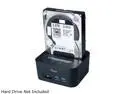
Rosewill SATA Docking Station with USB 3.0 Hub and SD Card Reader, 5Gbps Transfer Rate, Supports SATA I/II 2.5" 3.5" HDD - RX303-PU3-35B
Pros: handles all my drives and 2.0 and 3.0 sticks fine..on my friend's 8.1 laptop. i plan to get a few myself, docks are like old 8-tracks cassettes except for the information age, treat them with care.
Cons: if u have small kids or pets running around i would recommend the accidental insurance from this website cause docks of any brand will drop to the floor and stop working cause most of the drive interfaces aren't glued and bolted in on them and they will disconnect the connections u need. happened to one of the older docks i got.
Overall Review: to the guy with problems with his dock, ur machine must be screwy. cause i tested these on 4 different machines and os's and they work fine. so either u got a faulty unit or its ur pc that is faulty
2/20/2015See more detail
for any cpu, it's an effective paste
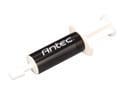
Antec FORMULA 7 Nano Diamond Thermal Compound
Pros: awesome thermal paste, kept my i7 3930k to 4.2 ghz at 39c and i didn't even oc the system. i use it on my corsair h100 water cooler for the cpu. ppl complain about this being a thick paste, u want it thick for more diamond particles per cubic nm between cpu and cooler.
Cons: none (i dumped all my other pastes on my brother so he can moan and gripe about my pcs running better than his)
Overall Review: case was modified so i could fit a 20inch 3-speed fan to the side of it, i didn't like the idea of having 1-2 dozen 120mm fans on it to keep it cooled, so i took out all fans except the one on the chipset on the motherboard(voids warrenty if i do remove it), then applied packing tape to any case vent area i didn't want to have air go thru. so all airflow goes to mobo, ram, radiator, pwr supply, and hds and vid cards. no wasted airflow. i use 4 stage filter on the intake side of the fan to blow into the case.
12/10/2014See more detail
loved the mouse

Razer Naga Molten MMO PC Gaming Mouse
Pros: great for online gaming and mmo..i use it for wot/wowp and war thunder
Cons: wish it had 2 things = was longer cause i have big hands it had mechanical buttons cause they do wear out in mmo games
9/2/2013See more detail
good case...needs slight improvements tho
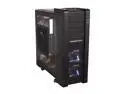
Xigmatek Elysium Black CCC-HSA0DS-U01 All Black Aluminum / Steel ATX Super Tower Computer Case
Pros: allows open airflow everywhere i had to make modifications to fit my 20-inch box fan so i could mount it on the "windowed" side panel..took off the window, and hard mounted the fan(a standard 15-20usd 20inch box fan cools off case like 20-50x better than any "case" fan sets u shove into it), top hd dock is nice, but needs a cut-off switch to disable pwr to the drive so u can swap out hds safely.
Cons: reset button shouldn't be behind the tab on top, u could accidently hit reset, it should have been moved to near power switch like behind it or on other side panel across from the power switch, case needs more usb front ports..or at least offer pass-thru ports from back of motherboard.
Overall Review: definately needs more usb ports or pass-thru ports..2 usb 2.0 and 2 usb 3.0 isn't enough..needs ports on bottom for keyboard and mouse since it's a monster case for those that don't want to spend money on usb extenders just to sit in a lazy-boy chair in front of a 32-50 inch display
11/28/2012See more detail