
Your Browsing History


John H.
Joined on 02/17/05
0
0
product reviews
- 14
"Amazing and awesome!" PhotoShop loaded almost instantly!
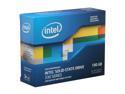
Intel 330 Series Maple Crest 2.5" 180GB SATA III MLC Internal Solid State Drive (SSD) SSDSC2CT180A3K5
Pros: Bought for a friend who likes to play with his Adobe Photoshop. We did a lot of homework ahead of the time and chose to use Intel tool to transfer his existing HDD content to this SSD. All was done and we booted up - the moment we got into Windows 7 I could see my friend's eyes widened. "Wow," he said. Being over 60 and still passionate for technoloty, he is one good friend to have. "Yeah?" I asked. "What did you notice?" "That's it?" He awed in disbelieve. "I mean, the moment we log in to Windows 7 is the moment loading completes?" "Yup," I said, kind of proud. :) He went ahead and launched Photoshop (I think it was CS3). The splashscreen displayed for a brief second or two, and the screen was taken over by Photoshop. "Woah," he laughed. "Amazing! It usually would have taken another 20 or so seconds to load, at least!" "Pretty awesome upgrade we did to day, isn't it?" I answered... :)
Cons: His wife later stopped by and learned how much joy this new toy has brought him. "Ok," she said, disbelieving, but you could see her was just playing along... :P
Overall Review: Built a new i-7 2600K system for my friend about a year ago. Since at that time the price for SSD was still high (around maybe $1.3- to 1.4-per-GB) we postponed buying. The price was getting much better (falling right about $1-per-GB) and we pulled the trigger. We were so glad that we had done it and that we got an Intel drive!
9/29/2012See more detail
Worked like magic
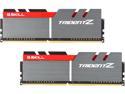
G.SKILL TridentZ Series 16GB (2 x 8GB) DDR4 3400 (PC4 27200) Desktop Memory Model F4-3400C16D-16GTZ
Overall Review: I purchased this exact same set of module back in 2016 for my build, and I had been wanting to buy it again to double my memory... but the price was a lot more expensive than when I bought them way back then (which was just below ninety dollars... the listing price would fluctuate between fifty and one hundred percent above my previous purchase price). I have waited and waited and finally pulled the trigger when it dropping to the high nineties one day. : ) The first two times I installed the set, my machine wouldn't boot. The board would try to POST but it just wouldn't. I tried to swap positions between the existing module with new one, but it still did not work. I finally removed the 2016 module and just leave the 2020 module in positions 0 and 1, and it booted. I then installed the 2016 module in positions 2 and 3 and they booted up with the expected speed. Each time I ensured that all modules were fully installed. I wasn't sure why there was a problem at with the first few tries. I was expecting a smooth plug-and-play experience, but oh well. I am happy with what I have now. : )
2/22/2020See more detail
5$ off is good enough

AMC Theatres $25 Gift Card (Email Delivery)
Pros: - $5 off - Easy to apply to my account
Cons: - Limited 1 per person... otherwise would have gotten more to save more.. : ]
7/9/2017See more detail
Great product! Warranty registration is a problem though
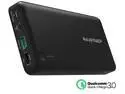
RAVPower 20100 mAh QC 3.0 Power Bank External Battery Pack Portable Charger with Qualcomm Certified Quick Charge 3.0 - Black
Pros: - This first USB 3.0 charge I owned - Super easy to use, charges all my USB 3.0 devices fast and charges itself even faster than the other USB 2.0 chargers do
Cons: - Could *NOT* register for the lifetime warranty from RavPower (see other thoughts)
Overall Review: - This charger came with a RavPower lifetime warranty card and a short instruction on how to register for it; when I tried to register, its website required Am*zon's invoice number... apparently their (RavPower's) website is built for Am*zon's customers, and buying from Newegg makes registering for warranty ****IMPOSSIBLE****. Yes, I have exchanged multiple emails with a RavPower rep, and she told me it wasn't possible to register my product for the warranty because I bought it from Newegg and not from Am*zon...... - The same RavPower rep did guarantee me that even though I couldn't register for the product warranty, if anything goes wrong and I email them, they will make it right! - It is much longer than I had anticipated; I knew the spec before buying, but it still felt quite long when I held it in my hands... not a con, but just a personal feeling that I thought I should mention. I'll just put it in my backpack and not worry about its length - Would recommend for anyone owning USB 3.0 devices!
9/26/2016See more detail
True to its advertised speed!
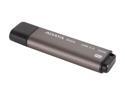
ADATA N005 Pro 64GB USB 3.0 Flash Drive (Gray) AN005P-64G-CGY
Pros: Advertised speed: Read up to 180MB/s, Write up to 80MB/s. Actual data, tested using CrystalDiskMarker 3.0.1: Test 1: 1000 MB [I: 0.0% (0.0/58.9 GB)] (x5) [USB 3.0 port] Seq Read : 194.055 MB/s Seq Write : 95.892 MB/s Rnd Read 512KB : 159.242 MB/s Rnd Write 512KB : 5.095 MB/s Rnd Read 4KB (QD=1) : 7.320 MB/s [ 1787.1 IOPS] Rnd Write 4KB (QD=1) : 0.073 MB/s [ 17.9 IOPS] Rnd Read 4KB (QD=32) : 7.443 MB/s [ 1817.2 IOPS] Rnd Write 4KB (QD=32) : 0.043 MB/s [ 10.5 IOPS]
Cons: - Like in Dan's comment, the flash drive is indeed a bit long, especially considering how tiny those USB 2.0 drives could have been these days - The cap can easily come off. Need to be mindful of where it is
Overall Review: Sharing my test data: Test 2: 50 MB [I: 0.0% (0.0/58.9 GB)] (x5) [USB 3.0 port] Seq Read : 193.682 MB/s Seq Write: 88.657 MB/s Rnd Read 512KB : 159.059 MB/s Rnd Write 512KB : 20.279 MB/s Rnd Read 4KB (QD=1) : 7.113 MB/s [ 1736.6 IOPS] Rnd Write 4KB (QD=1) : 0.295 MB/s [ 72.0 IOPS] Rnd Read 4KB (QD=32) : 7.435 MB/s [ 1815.3 IOPS] Rnd Write 4KB (QD=32) : 0.279 MB/s [ 68.2 IOPS] Test 3: 1000 MB [I: 0.0% (0.0/58.9 GB)] (x5) [USB 2.0 port] Seq Read : 34.794 MB/s Seq Write : 30.339 MB/s Rnd Read 512KB : 34.295 MB/s Rnd Write 512KB : 7.024 MB/s Rnd Read 4KB (QD=1) : 5.012 MB/s [ 1223.6 IOPS] Rnd Write 4KB (QD=1) : 0.049 MB/s [ 12.0 IOPS] Rnd Read 4KB (QD=32) : 5.013 MB/s [ 1223.8 IOPS] Rnd Write 4KB (QD=32) : 0.035 MB/s [ 8.5 IOPS]
9/28/2012See more detail
Love the little antenna!
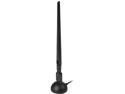
Rosewill RNX-N180UBEv3 - Wireless High Gain N300 Wi-Fi Adapter - IEEE 802.11b/g/n, (2T2R), Up to 300 Mbps Data Rates, USB 2.0 Cradle, 5 dBi High Power Antenna
Pros: Great reception - improved the reception of my living room PC from 1-2 bars to 5 (full) bars.
Cons: Not really a con, but if you are installing this over Vista, you should use the driver that comes with the CD. I have heard that on Windows 7 it "just works" without any driver install, but you would need to run the CD for Vista if you didn't have any other types of network connection. After installing the driver, hit Windows Update and you'll see a driver update for it.
Overall Review: I used to own a competitor-branded USB dongle wireless adapter that can only be inserted in the *back* of my living room PC (it was a visual distraction if I insert it in the front USB ports). The reception was horrible (1 - 2 bars). Now with the extended USB cable + stand, I can raise the antenna up and get a full bar reception without moving my PC. Yes! Bye-bye lags in streamed movies! :D
8/3/2011See more detail