
Your Browsing History


Lance O.
Joined on 03/08/06
0
0
product reviews
- 26
Forget the big boys, Get This!
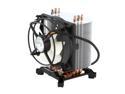
ARCTIC Freezer 7 Pro - Compact Multi-Compatible Tower CPU Cooler | 92 mm PWM Fan | for AMD AM4 and Intel 115x CPU | Recommended up to 115 W TDP
Pros: Incredible cooling with a managable size and very low noise. Fits with no problem on my ASUS mATX board. My Pentium D 920 is overclocked 20% to 3.32Ghz. Stress testing for hours at 100% utilization, I cannot get the CPU temp above 48C -- and that is with the fan hitting a max of about 1500 RPM. It idles at 30C with the fan running at about 750 RPM (QFan controlled by ASUS P5LD2-VM, set to default "optimal speed"). In my Antec Sonata case, even at 100% CPU stress, I can hardly hear this fan. With Qfan set in BIOS to quiet (slowest) mode, the CPU will go to about 52C max, with the fan running around 1100 RPM. Turn the fan on constant full blast (BIOS fan control off) and it will run at 4500 RPM - much louder of course, but at that spead, I cannot get the 920 CPU temp above about 36C, and it idles at 16C with a case temp is 28C. Equally good results on a hotter d805 overclocked -- could not get the temp over 52C.
Cons: None.
Overall Review: Could you ask for better?? What more could you need? I can OC my 920 from 2.8 stock to 3.6 and not go over 52C at full load. I used the stock paste on my first install on a Pentium D 805, and it worked fine. Used Arctic Silver 5 thermal paste on the second install on the 920. And the A.Silver 5 has only been on a couple days running the above tests. Will probably drop a few more degrees after the 200 hr break-in. Unless you are doing huge OC on a very hot chip, the stock heat pad is probably all you really need. BTW, I had one RMA on another item in my order - and Newegg was great. A human answered the phone immediately, and treated me extremely well. Best customer service experience in a long time.
3/26/2006See more detail
Stuck on Region 2 for DVD Play
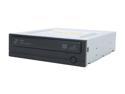
SAMSUNG 20X DVD±R DVD Burner with LightScribe 20X DVD+R 8X DVD+RW 16X DVD+R DL 20X DVD-R 6X DVD-RW 16X DVD-ROM 48X CD-R 32X CD-RW 48X CD-ROM Black SATA Model SH-S203N LightScribe Support
Pros: Works. Except for the stuck region 2 DVD setting... see below. Took two stars off for that problem, which cost me a few hours of trouble.
Cons: DVD play is stuck on Region 2 (UK). It cannot be changed by XP or Vista using the usual Device Manager properties selection process -- player just gives an error on attempts to change region. Google search indicates several others buying this drive from Newegg have had the same problem. Updating the Firmware from Samsung did not help. I had to hassle around for a few hours, downloading utilities, patching and the burning my region-free patched firmware. If you do not know how to do this, take caution. Check your region setting when it arrives. Windows Media Player and the OSX DVD player (using my hacked Mac OSX 10.5.2) will not permit playing a region 1 (USA) disk until you reset the firmware region code. And flashing the Firmware with a patched BIOS does void the warranty, so they say.
4/4/2008See more detail
Wheel is the problem, a killer problem
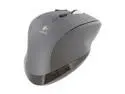
Logitech MX 1100 Black Tilt Wheel 2.4 GHz Cordless Laser Mouse
Pros: Very comfortable to the hand. Logitech Control Panel works very well (in the current version) with Mac OSX 10.5, and the preconfigured functions of the buttons are well-selected. Reprogramming button functions is easy and works well, and functions are selectable for specific programs, allowing different button functions in differenct program environments. Great battery life.
Cons: The wheel is the problem. I really wanted to like and use this mouse, but after a month of use -- and many adjustments in my technique, and good familiarity with the product -- I switched back to my old corded MX500, which is in my opinion one of the best mouses on market. Unlike the MX500 series, the wheel here will not give a solid "click by click line scroll", so when scrolling pages it tends to "jump" up or back a line or two, what I call "scroll jitters". The MX500 series mouse never does this. The other problem with the scroll wheel is the sensitivity of the lateral/tilt button in the wheel -- side to side tilt is a programable click function. I have found it impossible to run a fast scroll through a page without accidentally moving the wheel to one side or the other and activating the tilt click function. Of course, I wanted to use this tilt wheel functions, but when scrolling it became a constant problem. And believe me, for a month I really tried to like it and use it
Overall Review: I did not return the mouse (used it too long trying to get used to it). Now it is in the drawer as a backup. It do not need to use the lateral wheel clicks for anything, or do not care about smooth scrolling through text (a major thing for me), then it might work for you. Sorry to give a bad review. Logitech MX500 series are the definitely the best, and I use several on different computers for complex tasks. I only wish they made the same mouse in a wireless model.
9/1/2009See more detail
Fast
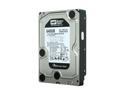
Western Digital Black WD6401AALS 640GB 7200 RPM 32MB Cache SATA 3.0Gb/s 3.5" Internal Hard Drive Bare Drive
Pros: Fast, like its brother, the WD6400AAKS Transferring large (70GB+) image files from my older WD6400AAKS to this new version, I was getting disk max transfer rates over 125 MB/s between the two, and averaging around 110 MB/s. On some quick disk benchmarking, the 640g AAKS and this version, AALS, seemed to perform nearly the same. This one has the 5 year warranty. Running them with OSX 10.5.5, XP and Vista I did not notice more noise from this drive, and can hear nothing from it inside my fairly quiet Antec P182 case.
Cons: None yet.
Overall Review: Run transfers 30% faster than my one year old WD500 drives -- which top out at around 80MB/s. Amazingly, I have only had only one personal computer HD die unexpectedly in the last 20 years. (Maybe this will be the one, now that I have challenged fate with a comment like that.)
1/11/2009See more detail
Works great with Mac / OSX
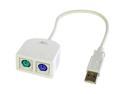
KINGWIN USB to PS2 Adapter Model UPS2C
Pros: I have used these with a couple of Mac and hackintosh boxes, using a several different old PS2 mouses and keyboards. They work perfectly with every setup. Can use with only a mouse, OR only a keyboard, OR with both plugged in -- works in every combination, properly sensing the hardware in use. Works perfectly with XP and Vista, too.
Cons: None, other than rather ugly appearance. But is on the back of the box...
Overall Review: Be careful, many other brands of converters do not work well with Mac. This one does.
1/11/2009See more detail
Mac / Hackintosh / OSX - Works!
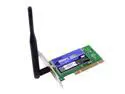
Linksys WMP54GS Wireless-G Adapter with SpeedBooster IEEE 802.11b/g 32-bit PCI Interface Up to 54Mbps Wireless Data Rates
Pros: This card works perfectly in OSX 10.5.5 (hackintosh). It is recognized as Airport in Network setup -- no additional drivers need. Plug it in and use. This is the one and only one to get for your OSX hack box.
Cons: Price is too high, and the remanufactured version (at half-price) is now out of stock.
Overall Review: Finding a wireless PCI card that will work flawlessly with OSX 10.5 in a hackintosh is difficult. This one does it. There was a remanufactured version selling $20. It is now out of stock. Search again, it may be back in stock. Model is given as WMP54GS-RM. I got it, and it looked new, worked fine, and was labeled as version 1.1 (current new version). NOTE: ONLY this model, 54GS, model works with OSX -- the 54G model uses a different chip set and will not work in OSX.
1/11/2009See more detail