
Your Browsing History


Stephen S.
Joined on 06/01/04
0
0
product reviews
- 21
READ Before BUYING!!!!
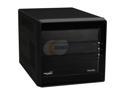
Shuttle P2 Chassis SP35P2V2 Intel Socket T(LGA775) Intel P35 Barebone
Pros: Now that I have gone through a pretty rough setup, it flies. I think it is super quiet, very fast, and really nice. I have a Q6600 *** read below!!! and 6 GB of corsair ram in it, I also have a pny nvidia 9600 GT
Cons: THIS IS IMPORTANT. I read many times the bios doesn't support many CPUs... it is SOOO TRUE. Wouldn't post, I had to rip apart another PC (lucky I had another one with a socket 775, or I would have been in trouble. So I used a core 2 duo 8400, it posted, then I flashed to the latest bios, then I reinstalled my q6600, all is working well now. I think it is pretty bad that shuttle doesn't update their bios but advertise on the box core2quad... that is misleading, and I am sure many people have to return it just because they don't have a spare cpu, plus you just don't anticipate that, you have to have a ton of artic silver, to put in, discover it doesn't work, take out the cpu, use another one, then replace it and put the other one in the other computer.... this was a 4 hour project once I went through all the troubleshooting, and I am really good with computer...
Overall Review: The build is really nice, I like it... it is a lot bigger than my first shuttle, I measured it from what other people said, but even doing that, I was suprised. Also when I first fired it up it was very loud, but once I installed the nvidia graphics drivers, the video card went silent and everything has been good. I hope this review saves people some time and work, I read before it might not post with new cpus but then I read a bunch of reviews where people used a q6600, so I figured someone would have said it didn't work out of box, but no one did on here. My processor is G0 stepping, so I don't know if that being the 'newer' q6600 made the difference with it not posting... but all is well now. I am giving it a 5 stars because when it is all said and done it was a good purchase for good price.
2/20/2009See more detail
So so...
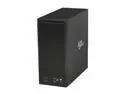
Sans Digital 8-Bay USB 3.0 / eSATA Hardware RAID5 Tower Storage Enclosure w/ 6G PCIe 2.0 HBA Card TR8UT+B (Black)
Pros: It works ok.
Cons: Sometimes I will lose some of my drives until I reboot. The card that comes with it is not only junk, but you can't find the driver at all on their website. I thought you could connect 2 esata cables, but there is only one out connection on the back. I am limited to 5 drives maybe because of not plugging in 2 cords... but like clockwork the drives will fall off, i need to either reboot the machine, or my pc for them to show back up.
1/11/2013See more detail
Meh

iPhone/iTouch/iPad Remote Controlled 3-Channel i-Helicopter with GYRO
Pros: It works, it was cheap
Cons: It is a really lousy product. It was cheap I guess I shouldn't expect much. The remote and plane have to be individually charged. U have about 4 minutes until you have to charge them both again. The remote sucks. If it isn't directly pointed at the plane it loses communication. It isn't responsive and has a crazy short range.
Overall Review: I am not sure if they are all this bad but don't even think of running this thing outside if there is even a slight breeze.
6/4/2013See more detail
Be careful
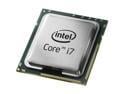
Intel Core i7-980X Extreme Edition - Core i7 Extreme Edition Gulftown 6-Core 3.33 GHz LGA 1366 130W Desktop Processor - BX80613I7980X
Pros: Super fast. Runs cool. Nice new fan design.
Cons: Once I installed this in my gigabyte board my ram is no longer being read by the motherboard correctly. I have 12 gb and the bios now only says 8 gb. Then in win 7 64 bit it says I have 12 gb installed but only 8 gb usable. Weird. I have a nvidia 275 so it isn't sharing memory. Hopefully a bios update will fix. Hate to think I spent 1000 to not use 4 gb of ram. So research.
Overall Review: I reseated the CPU and looked for bent pins. I also did memtest 86. So it has to be this CPU with my corsair ram. It must be conflicting somehow.
4/26/2010See more detail
Annoying!!!
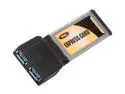
BYTECC BTU3-EC200 2 Ports USB 3.0 ExpressCard
Pros: It is USB 3, and has 2 USB ports
Cons: Every USB 3.0 Express Card adapter I have had will not power an mini external USB drive. The whole point of an external 2.5" drive is portability. So each of these adapters has a little power plug, then you either need an adapter that goes to power, or they have ones that go to a different usb port and draws power from there... so the set up is a card, a cord from this adapter to another usb port then it will work. And the kicker to the whole thing is that if I run the external usb 3.0 drive in the usb 2.0 port, it works and will power the drive, but will not run at super speed. The thing that is really annoying about this card is that it doesn't come with a power adapter, just a place to put one on the card... at least the other express card I had, came with a cord to plug the card into another usb port. I don't know if this is a limitation of the express ports, but this is not a solution, I will have to wait for a laptop with native usb 3.0 that supports providing power.
Overall Review: don't get it wait.
2/27/2010See more detail
Update to my original review
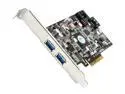
ASUS Model U3S6 USB 3.0 & SATA 6Gb/s Add-on card
Pros: this card is AWESOME. Tops out at 100+ MB/sec on large files, and 32 MB/sec on very small files.
Cons: only works with certain motherboards, it did work with my gigabyte board
2/27/2010See more detail