
Your Browsing History


Craig P.
Joined on 10/19/01
0
0
product reviews
- 40
Cooking with Gas
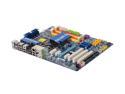
GIGABYTE GA-EP45-UD3R LGA 775 Intel P45 ATX Intel Motherboard
Pros: *Warning - Previous Asus Fan-boi.* Core 2 duo E8500, OCZ Reaper HPC 4GB DDR2 1066, BFG 8800 GT OC, SoundBlaster X-Fi Fatal1ty sound (onboard sound disabled) - Under Vista 64 Ultimate. (Realtek Vista LAN driver @ http://www.gigabyte.com.tw/Support/Motherboard/Driver_DownloadFile.aspx?FileType=Driver&FileID=3067 No need for another NIC.) 8 USB 2.0 ports on the back & headers for 4 more (front panel, FP). Have 12 USB ports just because. 2 Firewire ports (mini & regular) on the back & a header for 1 FP one. 10 total SATA 3.0 ports. Unbelieveable expandibility. Booting from RAID 1. Simple to set up. Straightforward if you've ever set up a RAID array before. Easytune6 works great. Running @ QuickBoost level 1 (of 3). CPU @ 3.6 GHz (3.16 stock), FSB @ 1600 (1300 stock). Q-Flash can use USB flash drives instead of a floppy to update the BIOS. With Vista's ability to use USB flash drives to install RAID drivers during install, a floppy isn't needed any more. Easy/nice build
Cons: eSATA pigtail power connector should be longer - only other molex powered peripherals at the top of the case. This connector just reaches to the back of the board. Used a molex Y-adapter to get it to reach to the top. Floppy connector is at the bottom-middle of the board. Tall cases and/or short (round) floppy cables need not apply. Don't let Microsoft Window Update apply Realtek - Network - Realtek RTL8168B/8111B Family PCI-E Gigabit Ethernet NIC (NDIS 6.0) DriverUpdate: Realtek Network software update released in June, 2007 to Vista (64-bit) CPU fan, Pwr fan, and 2 system fan headers. Really wish it had 2-3 more fan headers for the side & top case fans. Only the front & one of the rears is being monitored. Others using Molex to 3-pin adapters. PCIe-x16 slot is located 1 slot position lower than most would be found (with 2 PCIe-x1 slots above). Had to move disk drive up to keep graphics card cables & HD cables from jamming into one another & cutting off all air flow.
Overall Review: Good thing I didn't need a floppy for this install since my round floppy cable didn't reach. A lot of them won't. The ribbon cable supplied probably would. Not sure why the previous reviewer couldn't get the Realtek 8111 LAN working under Vista. I have it working with Vista 64-bit using the drivers I downloaded from Gigabyte. I'm typing this review from my new build using that NIC. (I didn't use the enclosed CD at all. Downloaded all of the latest drivers and apps directly from Gigabyte instead.) This is my first non-Asus motherboard build in years. This board had all the features I needed at the right price. I'm not disappointed. Board is very well laid out and constructed. Weighs a ton though. Should be able to take a bullet.
12/27/2008See more detail
Nice USB 2.0 Hub; Unreliable as a 3.0 Hub
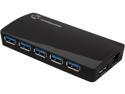
Tek Republic TUH-3700 USB 3.0 7 Port Hub with 2 x 2.1A Fast Charging & Sync Port and 5A Power Adapter
Pros: This hub is tiny. The power adapter (which is on the large side) is bigger than the hub itself. Comes with a pair of fast charging ports. Recognizes my USB 2.0 devices fine.
Cons: I got this hub to hook to the rear USB 3.0 ports on my Asus Sabertooth Z77 motherboard (i.e., not a cheap, poor-quality motherboard) because the older case I have doesn't have front USB 3.0 ports. While the Tek Republic TUH-3700 USB 3.0 hub works fine with all the USB 2.0 devices I tried, it didn't initially recognize either of the two USB 3.0 devices I use often .. a Corsair Flash drive (i.e., not a cheap, poor-quality USB 3.0 device) or an Orico USB 3.0 SATA hard drive docking station. I tried both ports on the motherboard and every port on the hub. I mostly got no response at all when plugging in a USB 3.0 device, but I occasionally got an "USB device not recognized" error. I verified that the devices worked properly when plugged into the USB 3.0 ports on the motherboard (bypassing the hub). Through a bit of testing, I found that if I reboot my computer, all USB 3.0 devices plugged into the hub are recognized, and they work fine until they are unplugged. Rebooting with no USB 3.0 devices plugged means that no USB 3.0 devices will ever work. I also found out that if I leave one USB 3.0 device hooked to the hub at all times, I can unplug and plug in other USB 3.0 devices as often as I want, and the newly-plugged-in devices are recognized and work correctly. It doesn't matter which ones I unplug or plug back in so long as at least one USB 3.0 device is left plugged in at all times. (Leaving a USB 2.0 device plugged in doesn't help with USB 3.0 devices being recognized when they are plugged in.) It appears that this hub wasn't thoroughly tested with a single USB 3.0 device. I won't always have USB 3.0 devices plugged into the hub, and I'm not keen on rebooting my PC every time I want to use a 3.0 device via the hub, so I think NewEgg is going to be getting this one back. It was supposed to make managing USB 3.0 devices simpler for me, but it complicated things instead.
4/11/2014See more detail
Great Value for the Price, But a Few Nits Short of Perfect
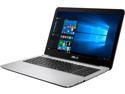
ASUS 15.6" Intel Core i5-7200U 8GB Memory DDR4 2133 512GB SSD Windows 10 Home 64-Bit X556UQ-NH51
Pros: - Latest (7th) generation (Kaby Lake) Intel Core i5-7200U with 2 cores, 4 threads feels zippy. Ran Prime 95 on it. Comparing the results to those found at Prime95’s web site showed it roughly on par or even behind older generations of Intel’s low-power CPUs. I thought it felt quite peppy. The laptop didn’t even get warm during testing, but it’s about the only time the cooling fan could be heard. - Graphics includes an Nvidia 940MX dedicated GPU rather than (just) Intel HD Graphics 620 integrated GPU. Likely using Nvidia’s Optimus technology to switch between the two on-the-fly as needed. - Display is 1920 x 1080 (full HD) on a 15” panel. (Does not appear to be an IPS display, but it is quite good.) - Relatively large (512GB) and fast SSD. It appears to be a 2.5 inch Micron_1100_MTFDDAK512TBN. (Probably the unencrypted MTFDDAK512TBN-1AR1Z) Used AS SSD Benchmark (v1.9.5986) to test it versus a 512GB Samsung 840 EVO and 1TB Samsung 850 EVO. The Micron SSD fared better than the 840 and matched or was only a small percentage slower the 850 EVO. - Has 8GB of DDR4-2133 memory (as opposed to DDR3-1600, which the processor also supports/allows). - Virtually free of bloatware. Seems to be a vanilla Windows 10 Home 64-bit install with only a few ASUS utilities added. - Fairly light and thin laptop, however, the case is plastic rather aluminum, which is cheaper but doesn’t allow it to be as thin as an ultrabook. The dark blue grooved top and black textured bottom make it very easy to grip. The case is not flimsy, and doesn’t bend when picked the laptop up by one of the front corners. - For networking, both 802.11ac wireless (Qualcomm Atheros QCA9377 adapter) and gigabit wired Ethernet (chip made by Realtek) built in. - The battery life is incredible. The ASUS X556UQ-NH51 seems to easily reach seven to eight hours. Being concerned about the laptop being charged just goes away. - Installed and played Doom (2016) - mostly to see if it could play it. With every graphics option set to low or off, and the screen resolution set to 1366x768, the game maintained a reasonably playable 25-30 FPS with occasional drops below 20 FPS. It wasn't bad, but I'd want an external keyboard and mouse. - The audio while playing Doom and listening to videos was surprisingly good. It lacks bass, but it also did not sound tinny as laptops often do. With headphones plugged in, the sound was quite good.
Cons: - The keyboard in general, but especially the space bar. About 20-30% lot of the time, it doesn’t register a keypress. Thereforealot of sentenceslook likethis, which is frustrating. Another person tried it, and didn’t have the same problem. Apparently it’s me, but I’ve never had that happen on any other laptop. - The placement of touch pad, which should be aligned with the spacebar (IMO). It’s wider than the spacebar and offset to the right. - The touchpad is too sensitive for my liking. When trying to simulate the a left-button click by tapping the touchpad, the cursor often moved and clicked something other than what was intended. Most touchpads have a control panel for setting the sensitivity for “palm checking” and/or how much pressure needs to be applied before accepting the touch as an intended one, however, the ASUS touchpad does not. It does include software for setting up a whole range of one, two and three-fingered gestures. - It is difficult to insert a cable into the Ethernet port. The port has a partial cover shaped to the contour of the rounded bottom of the case. That cover must be pressed down to insert a cable. This requires two hands - one to hold the cover open while inserting the cable with the other hand. Also, some cables don’t click-lock in place (but the port is very, very snug). - Wireless upload speed is slower than it should be. Internet service is 50/50 Mbps fiber, and routinely tests a little over that. While the wireless download speed of the laptop is just shy of the wired download speed, the wireless upload speed when using this laptop only reaches about 25-37 Mbps. (Wired upload speed using the laptop reaches the expected 50 Mbps.) Another laptop and cell phones on the same network reach 50 Mbps wireless upload speeds. - There are no indicator lights for Num Lock, Scroll Lock or Caps Lock. The laptop software includes ASUS On-Screen Display, which gives on-screen indicators for the FN (function) buttons such as brightness up and down, volume up, down and mute, but not for these standard keyboard keys. I downloaded and used TrayStatus Pro 3.1 to supply an on-screen display. (There were many other choices for this.) - Memory is running in single-channel mode. (Adding another 8GB of DDR4-2133 RAM will enable dual-channel mode.) That said, the advantages of dual-channel over single-channel memory access is quite application-specific. Those applications that benefit from dual-channel memory (e.g., video encoding, video editing) aren’t likely to be run on this laptop. - The Nvidia 940MX has only 2GB of memory and that is DDR3 memory (as opposed to GDDR5, which is an option with this GPU). - Though the SSD is fast, there is an M.2 version as well that would have been even faster. - SD Card reader doesn't have a blank insert to keep out dust.
Overall Review: - There is a single panel on the bottom that is accessible by the owner, that covers the single, open DDR4-2133 memory slot. Adding 8GB of RAM takes the unit to the maximum of 16GB. It’s the only panel on the bottom of the laptop. - The sound is produced by a Realtek audio chip. I was not able to find out the model. - Wireless is 802.11ac (supports b/g/n) supplied by a Qualcomm Atheros QCA9377 adapter. - Wired gigabit Ethernet is supplied by a Realtek chip/adapter. Although I listed a fairly large number of cons, most of them are not deal breakers for me. The worst is probably the space bar and keyboard in general. However, I have liked very few laptop keyboards (and even fewer in more recent models). If I find myself doing any real amount of typing on a laptop, I always use an external keyboard and mouse. This laptop has Bluetooth 4.0 support, so I'd go with a Bluetooth version.
12/30/2016See more detail
Simple Replacement and Works as Expected
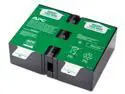
APC UPS Battery Replacement for APC UPS Models BR1500G, BR1300G, BX1500M, BX1500G, SMC1000-2U, SMC1000-2UC, BR1500GI, SMC1000-2U, SMC1000-2UC and select others (APCRBC124)
Pros: Not excessively high priced. Simple to replace. Recognized by my UPS as a genuine OEM replacement battery. My UPS isn't complaining any more about poor battery tests. It's a replacement battery for a UPS. What else is there to say really?
Cons: Heavy. Original battery only lasted about 18 months. (Not the fault of this battery though.) Did not seem to come with support for recycling the old battery.
Overall Review: This was purchased as a replacement for the original battery in my APC Back-UPS XS 1500 (Model number BX1500G).
4/12/2014See more detail
Very Good Sound & Very Light
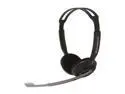
SENNHEISER PC230 3.5mm Connector Supra-aural Headset
Pros: The PC320 headset has very good gaming sound & even better music reproduction. The headset is very light. So much so, I often think it is falling off. A good head shake confirms it's snug. I literally forget I have it on. The ear pieces articulate slightly to adjust to different ear angles, but were stiff when new. The mic automatically mutes when rotated up. The headset beeps when the mic mute/un-mutes, which is good because the noise cancelling works well. I don't hear much room noise when the mic is on in a quiet room. There is a circular sound control on right earpiece with a dimple for easy one-finger adjustment. It doesn't adjust the volume over the full range. It's more of a fine tuning adjustment. It can be quickly found and adjusted when a game goes too loud (or quiet) for a time.
Cons: Earpieces could articulate a bit more, but they aren't an issue with my ears. A bit stiff originally.
Overall Review: This is a supra-aural (not a circumaural) headset, so it does not cover my ears completely. For me, that means it's headset I can wear for hours without making my head or ears sweat on warmer days. There's no picture of the right volume control. It's a rotating disc the size of the ear cup with a finger-tip sized indention in one spot on the edge. It's meant to be adjusted with one finger, but I found using two to be easier - one in the middle and one in the indention. A twisting hand motion makes it quick. Very handy when a game decides the proper volume for a battle should be ear-splitting.
2/25/2012See more detail
New and Improved!
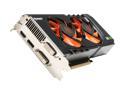
Palit GeForce GTX 470 (Fermi) 1280MB GDDR5 PCI Express 2.0 x16 SLI Support Graphics Card NE5TX470F10DA
Pros: Now with 480 Processor Cores instead of 448! Highlights from Nvidia's System Information (Nvidia Control Panel): GPU processor: GeForce GTX 470 CUDA Cores: 480 Core clock: 607 MHz Shader clock: 1215 MHz Memory clock: 1674 MHz (3348 MHz data rate) Memory interface: 320-bit Dedicated video memory: 1280 MB GDDR5 Video BIOS version: 70.00.21.00.00 In my quick earlier "review," I noted this card has two 8-pin auxiliary PCI-e power connections rather than two 6-pin ones. The extra 32 cores is why. Not sure when Palit decided to make this "engineering change," but I'm not complaining .. much. I haven't tried overclocking the card at all. I suspect with some extra attention to cooling, I would get up to near GTX 480 speeds. (The 470 still has a narrower memory interface.) My Metro 2033 benchmark min FPS is 3x & avg FPS is 2x what I had with a GTX 275. 3DMark scores are 43% higher. I dropped in a faster CPU though so it's not a fair comparison.
Cons: Since I didn't know about the change, I wasn't prepared to supply two 8-pin PCI-e connections by either getting a new PSU or 6-pin to 8-pin adapters. My PSU has plenty of wattage, but was made when SLI meant two 6-pin connectors. A late evening trip to <a _micro_ computer store in the _center_ of a shopping area that Newegg won't let me mention by name> cost me $9 in tolls and $14 in adapters, but I was in business the same night. Make sure you have (at least) a pair of 8-pin connections on your PSU or buy the adapters (if you have the wattage). The single adapter from two 4-pin Molex to a 6-pin PCI-e included in the box added insult to injury. It couldn't even be used with the card. All-in-all, it was minor inconvenience, but save yourself the parts run. I'll take the free 32 cores.
Overall Review: The box this graphics card shipped in was bigger than the box my new motherboard shipped in. Seriously. It was lots of foam. It's nearly as heavy as the motherboard, too. I didn't get the free Mafia game because I put the card in my wish list and back into my cart from there. Any freebies are only added when you add items from a product page. From what I read though, I should add an extra egg for *not* getting the game.
11/16/2010See more detail