

Your Browsing History


Mike S.
Joined on 04/25/08
0
0
product reviews
- 11
Great product, please read, important info for first timers getting a dram light with dead screen.
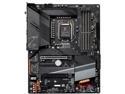
GIGABYTE Z590 AORUS ELITE AX LGA 1200 Intel Z590 ATX Motherboard with Triple M.2, PCIe 4.0, USB 3.2 Gen2X2 Type-C, Intel WIFI 6, 2.5GbE LAN
Pros: driver updates seem to install automatically with windows 10 update process. no disk needed. Make sure your Ethernet is connected and windows will ask you if you want to install the gigabyte app center. this will install everything else you need.
Cons: No cd came with this disk, it wasn't needed but not consistent. Support or better documentation required for first time startup, read below
Overall Review: forgive me i'm not the best writer.. but i wanted to make sure I shared this for those who do not know. this reflects 3 different motherboard brands. Yes z590 is bleeding edge but when you get the black screen with dram light on, just let it sit for a minute. the motherboard will power off. After about 30 seconds or so, maybe a minute, the motherboard will then automatically start up again. this time, after about a minute it starts going through a hardware check while still showing a black screen. soon your dram light will turn off, and it will switch to boot. Finally your screen stating no boot sector. now you can go into bios and configure it. I've called Asus tech support, Asrock tech support and gigabyte tech support. None of them asked me if i waited long enough for the motherboard to power down then back up again to do a self check of existing hardware. No one at micro center knew of this either. they all stated i had a bad motherboard, bad memory, bad processor.. I replaced the motherboard 3 times with the above brands, i've replaced the cpu and bought new memory before finding out that these new z590 motherboards require you to let it set powered on for it to eventually starts self diagnosing itself. I wish it would display something on the screen stating please wait or something verses sitting there acting as though it's DOA. Lesson learned.
5/3/2021See more detail
Horable technical support
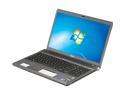
SONY 16.4" Intel Core i7-720QM 4GB Memory DDR3 1333 Windows 7 Home Premium 64-bit VPCF11NFX/B
Pros: Fast, runs a lot of higher end games.
Cons: came with 3 bad pixels heat issues, warped keyboard, had to have keyboard replaced. Blower fan starts to wine after a while. contacted Sony, jumped through hoops to get everything fixed. tech replaced pretty much everything in the shell except for the fan itself lol after spending that kind of money, I called back with concerns about the fan being noisy.. they said to send it to them so i did. Later i received an e-mail stating it's going to cost so much to replace screen, broken keyboard and so on.. i asked them why it needed to be replaced when i only had 3 bad pixels, and also knowing the keyboard was just replaced from warping via over heating.. they said the screen was cracked. they sent me pictures and it appeared as if the whole body of the laptop was bent in half. they claimed the laptop was that way before i shipped it. I filed complaintes via the BBB and also sent snail mail to every department at sony. (continued on other thoughts)
Overall Review: After many threats and asking about if the box was damaged and Sony not being able to prove the box wasn't damaged, and after asking why my concerns were about 3 bad pixels and a noisy fan if the whole thing was destroyed.. they finally gave in and replaced the screen, and keyboard at their cost. I told them i only had the laptop for a week and that because they should have insured the shipping that they paid for to have me return the laptop, that they should replace the laptop with a new one but they wouldn't budge. I do have a working laptop, but how do i know that it won't have issues due to what happened to it later on. Sony has horrible support. I wouldn't recommend any sony product to anyone anymore. Their support's goal is not to make the customer happy but to avoid costs at all cost.
9/14/2012See more detail
Built cheap
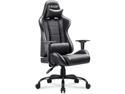
Homall Office Gaming Chair Carbon PU Leather Reclining Black Racing Style, Executive Ergonomic Hydraulic Swivel Seat with Headrest and Lumbar Support (Black)
Pros: Looks nice
Cons: not comfortable. built cheap be prepared, LOTS OF ASSEMBLY REQUIRED
2/19/2019See more detail
Great game

NVIDIA Gift - Battlefield V
Pros: beautiful graphics
Cons: in order to compete you need to do what others are doing and turn down your graphics so that everything is plane looking increasing your ability to spot others that have their graphics set higher.
2/19/2019See more detail
Great jump from GTX 980
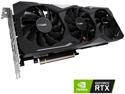
GIGABYTE GeForce RTX 2080 GAMING OC 8G Graphics Card, 3 x WINDFORCE Fans, 8GB 256-Bit GDDR6, GV-N2080GAMING OC-8GC Video Card
Pros: performance at 4k seems to have tripled only took about 20 minutes to install no change in cables required, came with 1 6pin and 1 8pin, same as my current gtx 980 quiet
Cons: price haven't tried the gigabyte software but i heard it's horible. i could care less about turning my box into a Christmas tree..
Overall Review: I play everything at 4k, ark survival went from an average of 20 fps to 45 fps. i did see around 70 fps and when looking at the sky, 90 fps. this seemed to have dropped but not due to the card. Nvidia Experience tends to "optomize" games automatically. I could turn this off and tweak graphics settings to get back the 70 fps but 45 seems great, especially at 4k. Everythings on epic. I did make sure i had the latest version of a display port cable however. this is very important.
2/5/2019See more detail
Long ethernet ready times
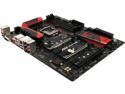
MSI Z170A GAMING M5 LGA 1151 Intel Z170 HDMI SATA 6Gb/s USB 3.1 ATX Intel Motherboard - Retail
Pros: Great UEFI (bios replacement) when it comes to auto detection and making recommendations as i purchased this as UEFI was really gaining ground.
Cons: Using windows 7, it takes a very long time for the Ethernet drivers to connect fully, i have to wait an average of 1 minute, sometimes 2 before i'm able to load Steam. I am tempted to either add a standalone Ethernet card to bypass the junk that came with this or simply replace the motherboard itself after seeing all the issues people are having with the chip set and hardware management software that seems to be required and at the same time the problem..
Overall Review: at this point, absolutely not, i'm just tolerating this for another few years as it's not harming anything.
11/16/2017See more detail