
Your Browsing History


Geoffrey H.
Joined on 11/06/04
0
4
product reviews
- 12
Phenomal
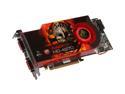
XFX Radeon HD 4870 1GB GDDR5 PCI Express 2.0 x16 CrossFireX Support Graphics Card HD-487A-ZHFC
Pros: I've got to say, I've never been more impressed with a GPU purchase since I've began building computers(~1999). Without meandering and digressing, this is without a doubt the greatest performance out there for the money. Handles great under pressure. Have had no need to OC this yet. And the performance isn't even the best part about this card, but the cooling block. It's so sexy. It's got this wicked samurai looking m'fer ready to wreak some carnage on anything that you throw at him. Here are some real world numbers for ya: Crysis 1650x1080 4xAA, 16xAF All Settings 'high': min: 35fps avg: 55fps peak: 85fps. All settings 'very high': min: 18fps avg: 30fps peak: 57fps Age of Conan: All settings/sliders completely maxed. DX9: min: 35fps avg: 65fps peak: 80fps DX10(w/ skylighting): min: 15fps avg: 25fps peak: 40fps Disabling skylighting in this game makes the fps skyrocket to DX9-like performance. AoC & Crysis are the two games I play predominately. All other gam
Cons: this 4870 that I've tossed at it (fear 2, prototype, mass effect, bioshock, etc). As far as cons are concerned, I've not experienced any besides heat. Heat's not even an issue, but some are uncomfortable pushing 70c under stress. Catalyst is not as good as nVidia's control panel IMO[catalyst feels clunky, nVidia's is alot more 'smooth' and 'refined.']
Overall Review: Amazing performance:price ratio. Best card I've invested money in. phenom ii x4 945 gskill 6gb ddr3 1333 gigabyte am3 ma770t mobo antec 900 ocz 700sxs psu wd caviar 160gb sata 3.0 great setup that only cost me sub $900. good job new egg, amd, and ati for making such performance attainable for us lower budget gamers. if you've been contemplating between this card or any others available, look no further. this card is it! good luck and have fun!
6/27/2009See more detail
Great potential marred by slight impracticality

CORN Carrying Case for Nintendo Switch Console & Accessories Black Protective Hard Portable Travel Carry Case Shell Pouch with 9HD Tempered Glass Screen Protector
Pros: Lightweight and unencumbering; decent shock-absorbing protective material ensures your Switch's safety; holds myriad game cartridges/microSDs; allows you to store your Switch with the JoyCons connected
Cons: The singular con is a nasty brute of a con: no space for your Switch charger!!! Like, what the actual F? This is a mobile case specifically meant for traveling with your console .. but there is no way of storing your charger. If you to try to pack your charger, the case will not close at all. It's unbelievably frustrating: I can pack my HDMI cable(utterly useless here considering the whole goal of the case is mobility) but I can't pack the one thing (charger) that I can actually use on my Switch to ensure that I can actually play for long periods of time while on the road. I don't need an HDMI cable for my TV, I need my charger so I can actually play on the plane/train for more than a couple hours while on a long trip! I can't believe they created a travel case for the Switch with such a glaring flaw. Of course, I can always pack my charger in another bag/elsewhere, but doesn't that ultimately defeat the purpose of buying a supposed all-in-one case for my console?
Overall Review: The case is fantastic despite such a terrible flaw. I'd still recommend it to anyone looking for a Switch case because for most intents and purposes, it's well built and durable with ample room for your games and JoyCons and smaller cables. However, if you travel alot and don't want to have to deal with packing your charger separately, I'd look at other options.
7/29/2019See more detail
Another excellent port from Sony; 2 games for the price of 1 @ ~15% off
![UNCHARTED™: Legacy of Thieves Collection - PC [Steam Code, UNITED STATES]](https://c1.neweggimages.com/ProductImageCompressAll125/32-886-134-18.png)
UNCHARTED™: Legacy of Thieves Collection - PC [Steam Code, UNITED STATES]
Pros: Noticeable fidelity enhancements; excellent optimization; continues the franchise's iconic unforgettable unparalleled blockbuster action
Cons: Not Bloodborne/The Last Of Us
Overall Review: Plays flawlessly on my 5800x3d/6950xt combo in UWQHD @ 144HZ, ~125fps avg on maximum settings @ full resolution scale. As usual, Newegg delivers the Steam key via email within minutes. Make sure you've got ~120Gb free SSD space. this one's an RDR2-sized whopper of an install. Has 101 Steam achievements.
10/20/2022See more detail
By far and large the best quality monitor (and price:performance ratio) I've ever paid for
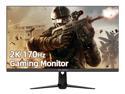
idea display G27Q 27" 2K QHD 2560 x 1440 170Hz 1ms Frameless Gaming Monitor, 1.07B Display Colors, 1 x HDMI, 2 x Displayport, FreeSync, HDR10, Built-in Speakers
Pros: - Bezel-free build aesthetic really opens the image up and makes it pop, much more than I was expecting when I first added this thing to my shopping cart. I'm upgrading from a 27''' FHD BenQ 144hz Esports monitor that had a rather thick bezel around the edges of the monitor and when comparing the two it's a night/day difference in how much bigger the viewspace looks, even if it's only imaginary. -The jump from 1080p to 1440p was quite significant in both empty screen space AND image fidelity. I've been using an RX Vega 64 since 2017 with a Ryzen 7 1700x in a Gigabyte Gaming 3 Mobo on 32GB of DDR@PC2666 and my worries that I would notice significant FPS-loss were completely unfounded. I can still melt through every game I throw at this rig and melt through it like butter, including more intensive titles like Hell Let Loose (which looks phenomenal on this monitor, btw). -I'm embarrassed to admit that it took me more than a long time to not only figure out how to access my monitor menu, but also how to properly navigate it AND figure out how to properly enable HDR. I made the mistake of thinking that simply turning HDR on in the Windows settings was enough to activate the proper HDR profile, but all that did was make the image look washed out and really quite fugly. You've actually got to access the HDR setting in a specific section of your OSD menu, and then either turn on 'Auto' mode (which will enable SMPTP2084 when watching/playing applicable streaming content, uhd-bd movies, or hdr-enabled games) or select the '2084' option to leave the SMTP2084 HDR color profile perma-enabled (which is the option I ultimately chose, and not only do movies and games look fantastic but even plain old Windows 10's operating system aesthetics like window borders and program icons look more vivid and livelier than ever) -I haven't experienced any backlight bleedthrough or related issues at all, the only backlight I've seen is the gorgeous RGB bar on the reverse-side of the monitor that lights up my wall and mirror giving my dungeon that hypnotic soft rgb-glow when the lights are off. Not to mention, the monitor itself pairs gorgeously with my ROCCAT Kone XP mouse and ROCCAT Vulcan 122 AIMO mechanical keyboard thanks to its minimalist RGB strip in the back. -I was surprised to notice a marked increase in the buttersmoothness of 170hz over 144hz; my guess is because of the large increase in pixels in my viewspace. If it was 170hz in FHD, I have a feeling the nominal increase of 26hz in the refresh rate wouldn't be nearly as noticeable. -I love the tank-like feel of the monitor and its base stand. I also love how minimalistic the design of the stand is, going for a simple skinny two-prong 'foot' as the base with a neck that's about 1.5''-2''' wide for supporting the monitor. If you're worried about build quality or the possibility of the parts feeling cheap, fret not. It's a solid metal base and it is significantly heavier than my previous BenQ monitor base, even though the BenQ base was easily twice(if not thrice) as big. -I like the use of a joystick for the OSD Menu as opposed to traditional button groupings. It really allows the minimalist aesthetic theme of the monitor to achieve the same maximum functionality of a traditional multi-buttoned monitor without disrupting the mellifluous flow of the bezel-less design. Plus, the joystick for the OSD menu is on the reverse side of the monitor next to the on/off switch for the RGB lighting, so you don't have to worry about some bulbous joystick or button becoming an eyesore and occupying any of that valuable viewport space -I set my HDR to 2084 and brightness between 700 and 800 nits and I felt it was the 'sweet spot' for image fidelity and color vividness. I can't get over how gorgeous the image is, and it only cost me ~$220. What an absolute steal. Don't sleep on ideadisplay, this new emerging Asian competitor is definitely here to play and they mean business. Their official page is ideadisplay.store if you'd like to see the other displays that they offer
Cons: -Menu access and menu navigation were far from intuitive for me, it took me a good few weeks to even realize how they worked (like I said earlier, I'm embarrassed to admit this but I'm also saying it just incase I'm not alone ) -Not really a con, just make sure that you enable HDR on your new display's OSD Menu with the '2084' or 'Auto' profile, and then make sure to change the color depth in Windows from 8-bit to 10-bit. Changing the color depth to 10-bit is a necessity if you want true HDR (hence the name, HDR10) -Power and menu botton/joystick aren't as responsive as I'd like, which is truthfully my only complaint with this monitor. It took me forever to not only apply the right amount of pressure to actually turn my monitor on the first time after setting it up, but it also took some serious jank and finagling of the joystick over repeated attempts (more than I care to count) to actually make the menu behave the way I desired it too when trying to navigate the menu subsections. It would either keep turning the menu off after I'd turn it on, or it would automatically take me to brightness/contrast control or some other undesired menu location instead of actually functioning the way I was wanting it to function. It's definitely frustrating at first (well, it was for me), but thanks to the beauty of muscle memory you'll finally be able to 'feel her out' much in the way that you can feel the RPMs out in the clutch and shiftknob of your car without looking at the instrument cluster when switching gears. -There's no way to adjust the height or tilt of the monitor with the base on this monitor, which I imagine will be a drawback to many potential customers looking for new displays. I thought this would end up annoying me when trying to watch movies from my recliner at night, but I ultimately found it to barely make a difference at all in the long run. Even from a sideways viewing angle the image looks full and vibrant and practically head-on. While this ended up not being a con for me in the grand scheme of things, I'm listing it as a con for potential customers because I know how much the ability to tweak and adjust every little setting means to most consumers. I'm 6'1'' barely scratching 6'2'' and I found this display to not affect my neck in any negative or painful way, but my taller kinsfolk out there might have an issue with it.
Overall Review: I'm still stunned that such a quality monitor costs only a hair over 2 bills. If you're looking for an upgrade over FHD but aren't ready to tackle UHD yet, this QHD monitor is your dream buy. After a few months of use I still haven't experienced any dead pixels or bleed through and the screen itself stays shockingly clean compared to the previous displays I've owned. I haven't even had to spray and wipe it down a single time yet, whereas I was cleaning my BenQ monitor at least once/twice weekly (pets, need I say more?). I'd also strongly advise people to not sleep on this newcomer 'idea display' to the monitor game. IMO, the G27Q is such a strong offering as far as hardware and price:performance ratio is concerned that it's impossible not to take them deadly serious. I'm looking forward to checking out their 1500R curved display and their 144hz 4K display in the future when I build my next battlestation. Peace and Vulcan signs to you, my fellow travelers
8/15/2022See more detail
X'ing out the Competition
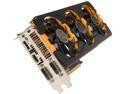
SAPPHIRE TRI-X OC 100362-2SR Radeon R9 290 4GB 512-bit GDDR5 PCI Express 3.0 Video Card
Pros: --> Fantastic Overclocking Capability (Hynix memory<3) --> Cooling solution is topnotch for a stock buy. --> Lots of raw GPU power, handles almost every task with absolute ease. --> QUIET as a mouse! My old card use to whirl and practically scream, so the lack of dissonance is definitely a welcome change. --> Great price; having this as a single card solution leads me to believe that for the cost, you'll nary find better performance. Having these in a CF mode would definitely be beneficial for a 4k setup.
Cons: --> Huge! I have a CM Stryker case (the largest case I've ever owned) which is lauded as having the most room available in a normal consumer-end tower. This card is about a foot long; despite having a huge volume of empty space in my ATX, I still had to finagle this card in my motherboard by putting it in bottom-first and sliding it under the hard drive bay. Definitely make sure your case is extremely well organized and your cables are set up and out of the way! If I had a smaller case, this would have been a HUGE issue. --> Compatibility issue with some games. For whatever reason, developers dislike optimizing for AMD systems (at least, apparently so). Dying Light is a great example--it runs like trash on AMD cards for no particular reason other than to just run like trash. While this will be fixed with a future patch, I think the lack of developer insight may hurt future AMD customers. Do some research before purchasing to make sure that your favorite games don't have any issues with the Catalyst drivers. -->No free game or useful software. The software bundle offered with this card is 'meh.' It has a driver cd with an older catalyst version (2013), and doesn't even include the TriXX Overclocking software. I was thoroughly disappointed with the software bundle with this card; luckily the performance of the card more than makes up for the dearth of utilities/useful programs. I would recommend MSI Afterburner for oc'ing anyways. --> Draws -TONS- of power. There are benchmarks out there showing the wattage draw during full load, and this card ranks up there in the top 5 in terms of how many watts are being pumped out at any given time. The Tri-X overclocked has hit 500w+, so make sure you have a rock solid PSU! I recommend any 750w+ bronze rated or higher EVGA. I've never gone wrong with their PSU's and they are built like bricks!
Overall Review: I'm running the card as a single card solution, paired with an FX8350, 16GB Trident X DDR3 1600, ASRock Fatal1ty Killer 990FX, and Samsung EVO 850 250GB. Games kneel in awe. I haven't been able to dip below 50FPS with 8xMSAA and maximum settings in -any- game yet. I have experienced slight dips in certain games (Oddly, Crysis 1 has FPS dips despite being an 8 year old game--I've no idea if this is hardware or software related, but I'm leaning more towards user error on my part), but my guess is these are due to improper optimization. Landmark Beta is the most noticeable power struggle for my computer, floating anywhere from 30fps up to 200fps. All other games: BF4, EQ2, The Secret World, Smite, DOTA 2, Warframe, PlanetSide 2, FFXIV, Crysis 3 all play beautifully at a native 1080p resolution with max settings. I would recommend this card highly to any future buyer!
8/22/2017See more detail
Thoroughly impressed, was not expecting such a good reference card.
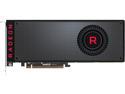
SAPPHIRE Radeon RX VEGA 64 DirectX 12 100410L 8GB 2048-Bit HBM2 HDMI / TRIPLE DP (UEFI) PCI Express 3.0 CrossFireX Support ATX Video Card - Retail
Pros: Coming from a previous Sapphire R9 290 Tri-X, this card immediately blew my mind as to how vastly improved my game's performance was. However, I should also note that I'm strictly a 1080P (primary res[avid FPS gamer]) and sometimes 1440P (depending on the game, usually for MMORPGs and 4X strat games). I don't really enjoy 4K that much when gaming unless it's a more cinematic, narrative experience like Hellblade: Senua's Sacrifice or Quantum Break. Paired with my BenQ 144Hz monitor (model number eludes me atm), everything I've played so far is a smooth-as-butter, visually surreal experience. I'm used to hitting 144fps constant in less-than-visually-stellar games like CS:GO. I was NOT prepared to get 144FPS in Dead Rising 3 (after some INI tweaking I was able to remove the 30 fps cap), and oh my goodness is it amazing. Dying Light? I took vsync off and was pushing upwards of 200+ frames. I haven't been this impressed since I was a teenager years ago upgrading my GeForce MX440 to a GeForce 6800Ti in anticipation of creating a Battlefield 2-capable computer. I paired this bad boy with 32 GB of DDR4 3200 TridentZ by G.Skill (I've used G.Skill in 3 of the last computers I've built over the last 5 years, and I've grown to absolutely love their memory for overclocking and gaming), as well as a Ryzen 1700X cpu plugged into an ASRock X370 Taichi. And, having absolute faith in EVGA for all of my power needs, I decidedly opted for the platinum rated 1000W SuperNova PSU. So far, so good. Just a slight step-up of 125mhz on both the memory and gpu clocks and a 100mV increase and it's running rock solid without any hiccups; I'm waiting to get my liquid cooling kit before I go HAM on the clockspeeds. Since I'm running a full array of SSD/SSHD's, I can honestly say this is without a doubt the fastest computer I've ever made. I absolutely love it, and I'm definitely all over AMD's jock now as I anticipate to see what these drivers do as they flesh out all the new features the card has to offer (the main reason I bought this card was because I'm whole-heartedly impressed by the HBM2 and the new system they have of using SSD/RAM in lieu of VRAM) and I'm definitely looking forward to more Vulkan API title (DOOM has never, ever looked so good.. Vulkan let me get 120+fps on my R9 290, on this rxv64 I've more than doubled that) The GeForce 1080Ti fanboys probably won't let AMD fanboys get away with bragging about the Vega, but I think it's premature to say this card can't compare with the 1080Ti. AMD is notorious for driver performance and I'm going to give them the benefit of the doubt here (mainly because I was also so impressed with my last AMD gpu purchase) and wait to see how and when (or even IF) those benchmark numbers improve. What I CAN definitively say is that, if you are like me and are an avid 1080p/1440p gamer, this card is your wet dream. I was very apprehensive about dropping the 7 bills needed to buy this card but as of right now I can say that all my anxiety has been assuaged and has been replaced with full confidence in my purchase. Great job Sapphire, Great job AMD, and fantastic job Nvidia for keeping AMD on its toes and allowing this enthusiast-competition loop to bequeath us with such beautiful and powerful hardware :-D
Cons: A wee bit noisy. Large (but what high end GPU isn't?). My CM Stryker had no problem fitting this big guy in there though. (Ps. the CM Stryker is a well built Full ATX case in case you're in the market for one) Power draw looks to be around 300-350 on average, but with a Platinum 1000W PSU i'm not worried about any surges or failures. Reference design is always so bland, i would have preferred a more aggressive/muscular/muscle car look like my Tri-X had.
Overall Review: I definitely would recommend this to anyone who likes AMD, or 1080p gaming in general. I've also always had great luck overclocking AMD cards on air, so if you're not heart-set on a water cooling rig and what good performance on air than give this card a whirl. I've only had the card a day so it is easy to talk it up since everything runs well (usually) in the first 24 hours. I'll update my review if I run into any problems.
8/22/2017See more detail