

Your Browsing History


Craig B.
Joined on 09/06/05
0
0
product reviews
- 1
Works Great
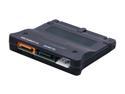
StarTech.com PATA2SATA3 Bi-directional adapter converts IDE to SATA or SATA to IDE
Pros: Windows 7 recognized the Adapter and Kingwin KF-21 IDE mobile rack and "old" IDE hard drive without having to download or install additional drives. All I had to do was turn on the computer once everything was installed and plugged in. The Adapter comes with all the cables you need. Just connect the supplied SATA cable to the back of the Adapter and then to a open SATA port on the motherboard and you are in business. No additional controller needed. NewEgg had this in stock and shipped very quickly.
Cons: None that I can think of. Just be sure you have the room inside your case for it as it does add a couple of inches to the length of your hard drive. You may have to change your other hard drive SATA cables depending how they are attached if they are not the straight in type or are at a right angle. Just make sure you have room for the Adapter. Some folks will say it's slow - that is true - because you are running a IDE into a SATA motherboard - but to salvage my old computers data saved me hours if not days of work.
Overall Review: I used this with a Kingwin KF-21 IDE Mobile Rack installed in a new Windows 7 machine. Now I can transfer the data off my older IDE Windows XP computer's hard drive and also use the hard drive to back up to. That also means I can swap out other IDE hard drives too. It comes with everything you need, SATA cable, Power Cords, etc. Just make sure your case can handle the additional length of the Hard Drive rack and the Adapter attached to the back of it. My Cooler Master Elite 430 works well with this. The old drive and adapter were recognized without adding any drivers using Windows 7.
2/4/2012See more detail