
Your Browsing History


Matthew K.
Joined on 06/06/06
0
0
product reviews
- 14
Understanding rating
OCZ Platinum 4GB (2 x 2GB) DDR3 1600 (PC3 12800) Dual Channel Kit Desktop Memory Model OCZ3P16004GK
Pros: This RAM is and always has been stable at "Auto" settings.
Cons: I do not understand why this memory scores higher benchmark results at 1333MHz are higher for me than when the RAM is at 1600MHz and the timings were both at 7-7-7-30 (I currently run them at 1333) MemTest83+ showed some bad memory at certain clock speeds, but then showed no errors at other clock speeds. --> maybe this shows my ignorance about RAM
Overall Review: The "Auto" settings are for 1033MHz. Please go to the manufacture's website. It will explain everything that people dis about this RAM.
10/23/2009See more detail
Lost performance gains
EVGA 512-P3-N802-AR GeForce 8800GT Superclocked 512MB 256-bit GDDR3 PCI Express 2.0 x16 HDCP Ready SLI Supported Video Card
Pros: It is a cheaper than a 8800 GTX. It can run DX10 games. Doubled my 3Dmark 06 score with this card over the 7800GT.
Cons: The real life performance increase from my 7800 GT is minimal, at best. The fan is loud. The card runs hot. All of my games play at the same frame rates (comparing with 'FRAPS') and some play even slower than with my 7800GT Playing at or above 1280x1024 I see no performance gain. THE OpenGL 2.0 PERFORMANCE IS TERRIBLE!!! AutoCAD and Solidworks run painfully slow. It could not even run the nVidia demos cascades nor adrianne above 10 fps.
Overall Review: At first I thought my CPU was limiting, so I took the multiplier from x15 to x12 and ran a couple games. To my surprise the frame rates where the same. As long as you are not using OpenGL for anything I would recomend this card. it is good performance per dollar spent. eVGA 590sli, AMD 6000+, 8800GT, X-Fi XtremeMusic, VisionTek theater 650 pci-e, WD 500 GB.
3/9/2008See more detail
Seems slow until...
Western Digital WD VelociRaptor WD3000HLFS 300GB 10000 RPM 16MB Cache SATA 3.0Gb/s 3.5" Internal Hard Drive Bare Drive
Pros: I did not notice my computer loading any faster with this drive until I plugged my old 7200RPM hard drive in. Than this one seems to be in a whole different performance league.
Cons: none
Overall Review: I like how it comes with a 2.5" to 3.5" convertion tray. That was very nice of WD.
10/23/2009See more detail
Basically a recap of everyone else
AMD Phenom II X4 955 Black Edition - Phenom II X4 Deneb Quad-Core 3.2 GHz Socket AM3 125W Processor - HDZ955FBGIBOX
Pros: It is a stable CPU that has the flexability to be overclocked. It runs colder than my old 6000+ despite them both having 125w TDP. I konw that you should not compare apples to oranges, but WOW. This processor actually surprized me by its computing efficiency. I used to play game XXXXX at high quality with good framerates. Now I play two clients of game XXXXX, both at very high quality with even better framerates.
Cons: The day after I bought it AMD release the Phenom II 965.
Overall Review: It was a very tough choice between AMD and Intel around the $200 price point, however I am satisfied with my purchase. Go Team Green!
10/23/2009See more detail
Foreseeable greatness
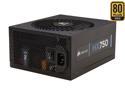
CORSAIR HX Series HX750 750 W ATX12V 2.3 / EPS12V 2.91 SLI Ready CrossFire Ready 80 PLUS GOLD Certified Modular Active PFC Power Supply New 4th Gen CPU Certified Haswell Ready
Pros: It is quiet. It fit perfectly into my case. I enjoy the flexability of having modular cabling. I like the box that it came it.
Cons: none
Overall Review: If you are shopping for power supplies and you have the money, please buy 80+Silver or 80+Gold power supplies. you will not regret it.
10/23/2009See more detail
my first Giga-Byte Mobo
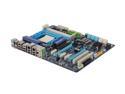
GIGABYTE GA-MA790FXT-UD5P AM3 DDR3 AMD 790FX ATX AMD Motherboard
Pros: 1) The motherboard can do everything that it states it can. 2) I like the physical setup. The IDE and Floppy connections are in a place close to where almost everyone is going to use them. Same with the front connections (USB, Firewire, and Audio). Some of the competition places these at the bottom of the Mobo which is rediculous. 3) I use the "On Board" SATA ports as eSATA to allow me to back up my system to a portable hard drive. Then I use the "On Chip" SATA ports for hard drives and a DVD burner. 4) The BIOS gives you a plethora amount of options for overclocking 5) The on board Power, Reset, and ClearCMOS buttons are very useful 6) it has an PCIexpress X1 slot above the first PCIexpress X16 slot.
Cons: 1) It is important that you use the correct BIOS revision that Gigabyte has released. FOR ME that is any "F#" BIOS when # is greater than or equal to 5. All of the "F#g" BIOS would cause me lots of headaches.
Overall Review: Read the manual or else you will make the same mistakes I did. When flashing the BIOS. Press "Del" to enter setup and then use the Giga-Byte built in BIOS flashing utility. It is a great utility.
10/23/2009See more detail