
Your Browsing History


Brad T.
Joined on 02/10/03
0
0
product reviews
- 9
Perfect mix of speed, low power, quiet, and small size
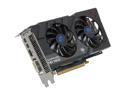
SAPPHIRE Radeon HD 7850 2GB 256-bit GDDR5 PCI Express 3.0 x16 HDCP Ready CrossFireX Support Video Card (11200-00-20G)
Pros: Less money than OC edition (at least on NewEgg). OC's to 1050 (CCC max) / 1400 MHz (default 0% "Power control setting" / PowerTune, default fan setting, no voltage tweak). At 1050/1400: Idles 31 to 33C. 27% Fan, 58C in Mass Effect 2 (max settings, 2048x1152) 50% Fan, max 73C wih Furmark 1.9.2 Small, quiet, low power (single 6 PIN power cable), good cooler/temps. Comes with: CrossFire Bridge Interconnect Cable DVI to VGA Adapter Mini-DP to DP Adapter 6 PIN to 4 PIN Power Cable
Cons: Not Applicable
Overall Review: I actually bought the non-OC edition to make sure I could do a hand-me-down in a year or so to a Dell 435MT (mini-tower) without upgrading it's small PSU. HD 4850 and 6850 work in MT, so 7850 should too, since it has similar TDP profile. Ignored CD, downloaded 12.3 from Sapphire. System: Dell Studio XPS 435T/9000, stock PSU, i7-980 @ 3.33 (stock) 24G (6x4G) Kingston HyperX PnP RAM DDR3 1600 @ 1066/CL6 (fastest I could find for locked Dell BIOS - sigh) Crucial M4 256G SSD Sapphire Radeon HD 7850 (non-OC edition) - OC'd to 1050/1400 MHz Samsung 2343BWX Monitor 2048x1152
4/1/2012See more detail
Ok with thumb drive, no go with disk enclosure
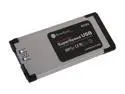
Silverstone EC02 Slim ExpressCard/34 USB 3.0 ExpressCard Adapter
Pros: Prefer exposed black color when in the slot (rather than silver or metal). Works fine with a Mushkin Ventura Pro 32 GB thumb drive. Does 110 MB/s read, 55 MB/s write with the Mushkin. (Performance seems to be limited by the laptop's ExpressCard PCIe slot.) USB power cable is perfect length, 24 inches. However, this doesn't help - see Cons.
Cons: Drops connection with disk enclosures, including Crucial M4 256GB SSD in either a SilverStone RVS02 or Thermaltake Silver River 5G. Seems to get insufficient power under load. Get disconnects even if BOTH EC02 ExpressCard and disk enclosure USB power cables are plugged in. Playing with "Power Management" settings didn't help. Was using latest driver (2.1.27.0) from SilverStone's website.
Overall Review: Returned the SilverStone EC02 and replaced with a SIIG JU-EC0212-S1 ExpressCard (that uses a more efficient uPD720200A chip), which didn't have disconnects with either disk enclosure, although at least one of the ExpressCard or enclosure must utilize their USB power cable. (Seems ExpressCard PCIe power specs are less than USB 3.0, meaning an ExpressCard slot can't supply full power per USB 3.0 spec.) ExpressCard size is standardized, so whether it's flush is totally dependant on one's laptop. "Flush" with screen lid on VAIO Z (similar to way VGA connector sticks out). On VAIO Z, its ExpressCard slot is spring-latched (press in once to latch in place, press in again to unlatch and remove). Must be careful to not unlatch ExpressCard when inserting a USB device. Also, must hold ExpressCard when removing USB device. Just the nature of ExpressCards, not specific to this device. Laptop: Sony VAIO Z VPC-Z1190X
7/19/2012See more detail
Works with disk enclosures
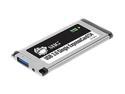
SIIG JU-EC0212-S1 USB 3.0 Single ExpressCard/34 1 x USB 3.0
Pros: Does not drop connection with disk enclosures, at least not with a VAIO Z and a Crucial M4 256GB SSD in either a SilverStone RVS02 or Thermaltake Silver River 5G. Gets sufficient power under load. Not sure these are Pros, but here are stats I got: ATTO stats ("Overlapped I/O" set to "Neither") with Crucial M4 256GB SSD in SilverStone RVS02 or Thermaltake Silver River 5G enclosure: SIIG - USB 3.0 (Read/Write): 4k - 20/17 MB/s 256k - 115/70 MB/s Laptop's native USB 2.0: 4k - 5/5 MB/s 256k - 27/20 MB/s For comparison, stats with my desktop USB 3.0 Host (4-Port PCIe SIIG JU-P40212-S1): 4k - 38/43 MB/s 256k - 223/149 MB/s With Mushkin Ventura Pro 32 GB thumb drive (formatted NTFS with 4k allocation size): SIIG - USB 3.0, (Read/Write): 4k - 16/1.8 MB/s 256k - 110/55 MB/s Laptop's native USB 2.0: 4k - 5/1.6 MB/s 256k - 27/12 MB/s
Cons: Prefer exposed black color when in the slot (rather than metal). USB power cable could be longer - it's 18 inches (24 inches would be better). Sometimes USB 3.0 devices connect at 2.0, not 3.0. Reconnecting usually fixes this. Performance could be better, but is probably limited by my laptop ExpressCard PCIe slot, not the device.
Overall Review: The SIIG replaced a RMA'd SilverStone EC02, which would disconnect under load with disk enclosures I'm using. SIIG uses a more efficient uPD720200A chip. At least one of ExpressCard or enclosure must utilize their USB power cable. (Seems ExpressCard PCIe power specs are less than USB 3.0 - an ExpressCard slot can't supply full power per USB 3.0 spec.) ExpressCard size is standardized, so whether it's flush is totally dependant on one's laptop. "Flush" with screen lid on VAIO Z (similar to way VGA connector sticks out). On VAIO Z, ExpressCard slot is spring-latched (press in once to latch in place, press in again to unlatch and remove). Must be careful to not unlatch ExpressCard when inserting a USB device. Also, must hold ExpressCard when removing USB device. Just the nature of ExpressCards. Driver on CD is old (2.0.30.0). I downloaded 2.1.16.0 from SIIG. This worked fine. Currently using 2.1.32.0 from Station-Drivers. Laptop: Sony VAIO Z VPC-Z1190X
7/22/2012See more detail
Nice, but needs work to fix mechanical issues
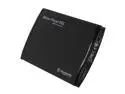
Thermaltake Silver River 5G ST0024Z Aluminum 2.5" Black SATA I/II/III USB 3.0 External Enclosure
Pros: Nice looking. Does 225 MB/s read, 145 MB/s write with SIIG JU-P40212-S1 USB 3.0 Controller (nice!) and a Crucial M4 256GB SSD. (Performance seems to be limited by current USB 3.0 Controller technology, not the enclosure.) Uses a standardized connector that's readily available (USB 3.0 Micro-B). Extra power cable if needed. I had to use it with my USB 3.0 ExpressCard on my laptop - seems ExpressCard PCIe power specs are less than USB 3.0, meaning an ExpressCard slot can't supply full power per USB 3.0 spec.
Cons: Lots of work to fix mechanical issues, although very happy with it now: I used electrical tape on PCB to make sure solder on PCB wouldn't touch aluminum case. They're microscopically close to each other. I suspect this is the cause of the DOA and smoking issues. Foam in wrong place - was attached to aluminum, when should be at bottom of plastic end. Is held together with (4) #1-72 (fine pitch) x 3/8" long screws, which are too short. Need to be 1/2", or better yet M2x12mm. The metric screws are slightly larger - was able to thread larger screw holes with included screwdriver. Crucial M4 doesn't fit properly in far end. Pulled back flexible black plastic to get to 2 hidden screws (used pointed knife). Then snapped off ~1/4" of plastic flange and ground flat so Crucial M4 would fit. (Used needle nose pliers.) Sanded 4 "feet" so they're not so sharp - otherwise they tear up pouch.
Overall Review: Sometimes enclosure is recognized by USB 3.0 Controller as USB 2.0. However, this never occurred with SIIG JU-P40212-S1 PCIe card, only SIIG JU-EC0212-S1 ExpressCard. No issues with included screwdriver matching up to screws. Chip in mine was ASMedia ASM1051E. Pouch is nice, but doesn't protect corners if dropped.
7/15/2012See more detail
220/150MB read/write with Sata III/6Gbs SSD enclosure
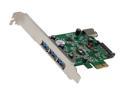
SIIG USB 3.0 4-Port PCIe i/e Model JU-P40212-S1
Pros: Read speeds are close to fastest available for a USB 3.0 Host controller chip at this time. (Intel controller chip recently came out, and IIRC does 270 read. All others currently around 230.) Great, well-written, no hassle driver and install. ATTO stats ("Overlapped I/O" set to "Neither") with Crucial M4 256GB SSD in SilverStone RVS02 enclosure: USB 3.0 (Read/Write): 4k - 38/43MB 256k - 223/149MB (I've seen reviews of RVS02 doing about 190 write - SIIG is bottleneck here.) PC's native USB 2.0: 4k - 8/8MB 256k - 35/31MB With Mushkin Ventura Pro 32 GB thumb drive: USB 3.0, formatted NTFS with 4k allocation size (Read/Write): 4k - 27/2MB 256k - 128/66MB PC's native USB 2.0: 4k - 8/1.8MB 256k - 35/28MB
Cons: Wish write speeds were faster, but good enough for now. Other chip controllers can do about 230 write at time this was written. However, TI may have reduced write speed to get compatibility with a greater number of devices. (Personally, I suspect there's a tweak/hack/driver update that could get around this at the sake of lessened compatibility.) Anyway, I'll take the compatibility over the speed for now, if that's the case.
Overall Review: I was initially disappointed in 165/90MB read/write speeds. After a LOT of research I came across a set of USB 3.0 host controller reviews where they put the controllers in a graphics card x16 PCIe slot to get max performance. Made no sense to me since card is x1. However, looks like many PC's x1 slots are only running at 2.5GTs, not 5.0GTs per PCIe 2.x max speed. Put it in my x8 slot and bingo, 220/150! PUT THIS BABY IN A PCIe x4, x8 or x16 SLOT! Ignored CD, downloaded 1.12.18 driver from SIIG's website. Bought a Sata power extension cable, but works ok without it (at least with only one SSD or thumb drive connected, didn't test multiple devices at same time). (I'm not using this with a HD in an enclosure, which requires more power than a SSD.) System: Windows 7 64-bit Ultimate, SP1 Dell Studio XPS 435T/9000, stock PSU, i7-980 @ 3.33 (stock) 24G (6x4G) Kingston HyperX PnP RAM DDR3 1600 @ 1066/CL6 Crucial M4 256G SSD Sapphire Radeon HD 7850 (non-OC edition)
6/11/2012See more detail
Sweet Switch with good video bandwidth
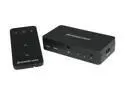
IOGEAR - 3-Port HDMI Switch w/ Remote (GHDSW3)
Pros: Works with a PC resolution of 2048 x 1152 @ 60Hz (24-bit color), so has a video bandwidth of at least 3.7 Gbps. Should be able to handle the new 1080p60 TV format. 2.25 Gbps "Data Rate" stated in Specifications might be per data channel (3 for RGB), so video bandwidth may be as high as 3 x 2.25 Gbps or 6.75 Gbps. Device seems to be purely an electronic switch - no messing with the signal, which is what I wanted. Did not test with HDCP.
Cons: May not be a con, but gets it's power from one or more of the HDMI input sources. In my case a certain one of my HDMI input sources by itself didn't have enough power for the device. Symptoms of this are LEDs are dimmer than normal and screen is blank even when the HDMI source is selected or screen contains horizontal lines and "snow". Powering up multiple HDMI input sources fixes it. I totally resolved my problem by powering the device with a 5V DC 1A A/C power adapter I wasn't using anymore. Note power jack polarity is center pin positive.
Overall Review: Using this with 6 foot DVI-D to HDMI input cables and 3 foot HDMI to DVI-D output cable to a Samsung 2343BWX LCD PC monitor. Used good quality cables (CableWholesale) to minimize chance of signal loss. Sapphire HD 3850 (AGP) graphics card was able to power the device, OEM ATI Radeon HD 4350 graphics card that came with Dell PC purchased this year was not. Switch time is immediate, but Windows (XP and Vista) takes about 2 seconds to "reconnect" the monitor. If using this with a PC, switching away from the PC is the same as pulling the DVI/HDMI cable out of the video card. You can test whether your PC will work properly with this by unplugging and replugging your cable in when your PC is running. It should properly detect that the monitor has been reconnected.
10/9/2009See more detail