

Your Browsing History


QUINN M.
Joined on 11/23/12
0
0
product reviews
- 1
LOVE IT (I FOUND A FIX FOR Windows 10 USERS!!!)
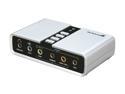
StarTech.com ICUSBAUDIO7D 7.1 Channels 16-bit 48KHz USB Interface Audio Adapter External Sound Card
Pros: -Sounds great -Works wonderfully (AFTER FIX)
Cons: -Did take a while to find the fix -None other than that
Overall Review: -FIX: Step 1: Install the Windows 10 drivers off of the website. Step 2: Open and extract the WIN-8-10 folder from the ZIP file Step 3: Run the setup application the bottom of the list (This is located inside the Win-8-10 folder) Step 4: Install it and make sure to restart your PC Step 5: After the restart, you should see an Applet that has appeared in your system tray (in the bottom right) Step 6: Open the USB multichannel applet and you should see a menu that pops up to show audio settings. Step 7: Set the appropriate amount of speakers that your system uses (if this works then awesome!) Step 8: Go into windows playback devices and select the Speakers (NOT the digital output) Step 9: Configure the Speakers to the same amount of speakers (2, quad, 5.1, 7.1) Step 10: Test the system. I hope this works for the rest of you!
6/26/2017See more detail