

Your Browsing History


Kyle Z.
Joined on 07/16/13
0
0
product reviews
- 1
Solid board with a blend of features and clean aesthetic
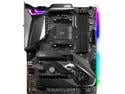
MSI MPG X570 GAMING PRO CARBON WIFI Gaming Motherboard AMD AM4 SATA 6Gb/s M.2 USB 3.2 Gen 2 Wi-Fi 6 HDMI ATX
Pros: + Neutral aesthetic with a touch of RGB + Included spread of accessories + Usable and useful motherboard software + Chipset fan has a silent mode + Wifi 6 and Intel LAN + Decent VRM
Cons: - No USB-C Front header - Some oddities with stock voltage, but this seems to be common to many boards - Dragon logo covered by GPU, which is a weird design choice - Nahimic 3 is exclusive to the Microsoft Store
Overall Review: This review is for the MSI Review Rebate Program. First, a bit of background. I recently upgraded from an aging i5-4670k processor and Biostar Z87 motherboard. The goal for my build is to have an aesthetically pleasing machine for gaming with a ton of background processes and potential for experimentation with other more demanding workloads. The 3700k was a fairly easy choice. The motherboard was not. So let's start by mentioning things NOT useful for differentiating between motherboards for third gen Ryzen for my use case: Overclocking (Ryzen needs exotic cooling to get meaningfully farther than PBO/AutoOC), Multi GPU (it's not a great solution), and extremely high speed memory support (IF makes 3600/3733MHz the sweet spot). So what else are we left with? - Chipset. Updating some B450 motherboards has been a popular option. However, it's been a bit buggy, lacks PCIe 4.0 whether it is needed or not, etc. X570 has out of the box compatibility, along with the other features. I plan on keeping this build a long time, so I'm prepared if PCIe 4.0 becomes widely adopted and useful. - Wifi. Some cheaper boards use Wifi 5. In my case, I wanted the latest Bluetooth and Wifi standards, as I use these for various connections. For aesthetic reasons, I prefer a built in solution over an add in card. Related note, I find Intel LAN to be a bit more stable. - Aesthetics. This board has a very clean design, and I like MSI's logo. Nice RGB as well. - Audio. This board has the ALC1220 audio codec. Some boards use the slightly older ALC1200 or the budget ALC887. ALC1220 and good components gets you the full suite of audio ports and sound that's good enough for gaming and casual listening. - RGB, BIOS, and motherboard software. Gigabyte and Asrock are behind in this department. MSI and Asus do much better. - Power delivery and VRM heatsinks. This 12 phase design is definitely sufficient for a 3700x, and likely higher core counts as well. - Rear I/O. This board uses a slightly different configuration to some others, in that it has USB 2.0 ports. The advantage is that it has 3 Type A 3.2 Gen 2 ports, a Type C 3.2 Gen 2 port, and two 3.2 Gen 1 ports. I find USB 2.0 ports adequate for input devices, so having more Gen 2 ports in exchange is a nice bonus. USB flashback is also a nice feature which can be accessed through the rear I/O panel. - Layout. Boards generally don't get this perfect, but I like the overall locations of the pins and ports. This board may not have had a standout feature, but it doesn't have any major shortcomings in these areas either. That mix of features is what led me to pick this board. The motherboard was nicely packaged on arrival, and unboxing revealed a few extra accessories for someone interested in RGB. With the RGB off it is a remarkably clean looking board; the carbon fiber accents are appealing if not flashy. The build itself went smoothly (I do love right angle connectors!) and booted fine the first time. BIOS is certainly usable and has two different UI modes. XMP, PBO, make a few tweaks, away we go. The most surprising thing to me was how useful the motherboard software actual is. I usually hate motherboard software. Dragon Center has a usable monitoring tool alongside the RGB settings. I've had limited time to play with it, but there are more features I'll probably check into. So it looks nice, performs as expected, and has the list of features I wanted: Intel LAN, Wifi 6, out of the box compatibility with Ryzen 3000, decent audio, a mix of I/O ports including Type C 3.2 Gen 2, good RGB control, and a clean aesthetic. Comparing to the competition: vs Asus Tuf: The Asus Tuf is a great board, but is missing the Wifi 6, is not nearly as clean aesthetically, and it has Realtek LAN. While a good board at it's price point, it is definitely a lower spec. vs Aorus Pro: The Aorus boasts some excellent VRMs, an interesting mix of I/O including 4 USB 2.0 ports, and many similar features to the Carbon. The downsides are the worse BIOS and software, and in my opinion a worse job at the RGB and aesthetics. At the time of purchase the Carbon was a little cheaper. vs Asrock Extreme4: Slightly cheaper, includes Type C front panel header, but a much less neutral colour scheme, worse software, and worse power delivery. Conclusion time! This is a solid X570 offering. It may not have a killer feature, but it blends most features I wanted with a nice neutral aesthetic and suprisingly usable software. The biggest areas for improvement would be the addition of a front panel type C header, potentially moving the dragon logo to not get covered the instant you put a GPU in (very odd design decision), a diffuser for the RGB strip for more even glow, and offering Nahimic 3 through another avenue besides the Microsoft Store. I'm quite happy with this board and would recommend it to people also looking for that blend of features.
8/1/2019See more detail