




 here!
here!
I’m your shopping assistant for PC builds, upgrades, and everything tech.
Got questions? Ask away!
Start a conversation
here!
I’m your shopping assistant for PC builds, upgrades, and everything tech.
Got questions? Ask away!
Start a conversation

Joined on 04/11/03
Simply amazing!
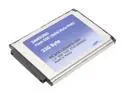
Pros: Fast, fast, FAST! My tablet PC powers on to login in less than 30 seconds now - less than half the time with the hard disk! Overall usability is immensly improved, with applications loading in less than 5 seconds (vs. 15-30 previously). Power jury is still out, although power consumption seems to be better on battery (I need to replace the battery, though, as the one I'm using is a "deader" that I keep for 100% mains powered use - can't find my "good" batteries...hiding somewhere...)
Cons: Only one, and it could be a show-stopper to some. The 1.8" form factor package is a "fat" package: there is a bulge on the back of the unit that increases the thickness to double that of the single-platter MK2004GAL drive. This means that any device that has an inflexible opening for the original drive will NOT be able to use this SSD. The NEC Versa LitePad has just enough "play" in the disk compartment and the 50 pin connector to accept this package and still operate, although it does require some "stuffing" to keep the drive seated while moving it about.
Overall Review: An incredibly fast 32GB disk that works in my ancient NEC Versa LitePad tablet. I have been trying to upgrade the original 20GB Toshiba 1.8" drive since I bought the tablet new in 2003: unfortunately there is a BIOS problem in recognizing any disk with more than 2 heads. Since the geometry of the SSD is a single platter drive, I thought this would solve the problem. And it DID! Not only does the table work with the new SSD, and work FAST, the performance improvement has eliminated my preceived lack of memory (512MB max installed) as an application performance issue. Apparently I/O request queuing was killing my performance - this has eliminated the performance lag that has frustrated me for the past 4 years! (BTW, this is truly and "apples-to-apples" comparison: I dd copied my old disk to the new, so everything was EXACTLY what the hard drive had before the exchange. All performance gains are directly attributable to the new disk.)
Limited Useability, but good idea
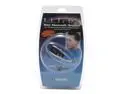
Comments: RECOMMENDATION: Wait for the next generation. While the concept of a phone/music BlueTooth (BT) headset is ideal for today's mobile world, the ULTRA headset comes up short - litterally and and technically. If your head is larger than a hat size 6 or you have long hair the behind-the-head non-adjustable headband will position the earmuffs off-center, and the over the ear loops are uncomfortable. Bending the headband is out, as the wiring will pop out if you do. Technically the headset is nearly useless - not Ultra's fault, but thanks to DRM restrictions in available A2DP profiles (the stereo headphone profile in Bluetooth) the headphone cannot be used, as the ULTRA headphone does not incorporate DRM - and most vendor stacks will not pair without DRM in the headphone. The headset supports HFP (hands free profile) and HSP (headset profile) = standard for phones; however, these paired but did not work with a RIM 7520. The SD playback works flawlessly, and the FM radio seems to work as well. As the ULTRA headset does accept updates via a mini-USB port future drivers may be available that will add DRM support and more specific HSP/HFP support. Link to the ULTRA FORUM is listed below - more info is being posted there on updates and work-arounds.
For Old Guys too...
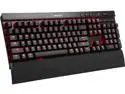
Pros: If you grew up using mechanical keyboards (like the IBM 3270) and are tired of slippery keys that feel like typing on butter, the K70 is for YOU too. This mechanical keyboard uses those famous Cherry microswitches - the same ones you got used to back in the 1970s on Hazeltine ot ADDS terminals. The MX Brown switch gives small amount of positive feedback when the switch activates, making for fewer mistyped words and faster writing. Definitely about as Old Skool as you can get without owning an HP mini computer. The K70 is also backlit (this model with red LEDs) behind each key. If you're using Windows, you can program backlighting on any key you want, making for come cool combinations. Or just leave them on: writing letters to the editor late at night just got easy! And it has very nice audio controls on the keyboard: a roller volume control, plus the STOP/PAUSE/PLAY/FF/REW buttons for controlling you media player or Spotify session. These are dedicated mechanical keys, not overlays on top of the F-keys or some sticky up/down volume buttons where you can't find them. It also has a pass-through USB port, allowing you to connect a mouse - or a hub - directly onto your keyboard, removing one more set of wires from your desk. Oh, and if you're into PC gaming, this is a pretty good gamer as well....
Cons: If you are NOT an Old Guy - or a gamer - using a mechanical keyboard is...different. Cherry keys require more travel than a laptop or other non-mechanical keyboard. If you've never used mechanical keys before, go visit a friend that has one and try it out before buying. Mechanicals are NOT cheap molded plastic keyboards. These are rock-solid metal boxes with many individual components inside. If you are looking at cheap, don't look here. This keyboard will last for DECADES...you're paying for quality.
Overall Review: Anyone that wants a superior typing - and gaming - experience should seriously consider the Corsair K series of mechanical switch keyboards. While not cheap, this may very well be the LAST keyboard you ever buy.
A good laptop for your mom...
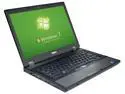
Pros: Cheap and easily modified for a Dell laptop. This is a business-class Latitude E5410...meaning it comes with a dock slot and easy access to the "user serviceable parts" on the inside.
Cons: For the price, none.
Overall Review: I needed a quick replacement for my mother's aging desktop system (8+ year old VIA EPIA system). I spotted this as one of the weekend deals and it fit the parameters perfectly for a quick replacement. Because this is a Dell Latitude E5401, I was able to crack it open and do a "parts-bin" upgrade with 8GB of RAM, a 240GB SSD and a ABGNbt WiFI card that were sitting around the house. Plus, I was able to find a used dock also cheap. A couple of hours later and I had my mom's complete system dd'd over (she runs Ubuntu LTS releases) and shipped back out to her. Now she can just plug her monitor, keyboard and mouse into the dock and she has a desktop replacement. Undock and she can take it with her. Again, a great deal as a base system to give to a family member that needs a good email and web cruiser!
Works great with Ubuntu too!
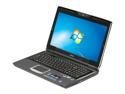
Pros: This is pretty much an awesome, full-power piece of hardware. Pretty much identical to the Alienware M5 for a LOT less. The 15" screen is absolutely awesome: while the width is a bit (like 3") wider than my old Twinhead latptop, having the 1080X1920 screen in a "reasonable" package is fantastic. The LED backlight is amazing - instant on with no "warm-up" even when the PC is cold-cold. Accessing all the "user replaceable" parts is a few more screws than I'd like, but EVERYTHING is right there. A pity that the second disk drive slot has memory sockets in it now, but a small price to pay. If you're looking for a business/development platform that will have enough features and horsepower for a 4 year refresh cycle, this is the machine you need. Truly as close to a desktop replacement as you're going to get.
Cons: As other reviews have pointed out, this is not the most rugged machine out of the box. NOT something to sling around the airport unprotected (like the old Twinhead MIL-SPEC laptop), but the horsepower and high-res screen offset this drawback. The Atheros WiFi card and the Nvidia graphics require a bit of fussing to get working with Ubuntu 9.10 (the Nvidia card is recognized and a proprietary update is offered, but the Atheros required doing a bit of research to find the backports needed), but they do work perfectly once set up. I was initially disappointed that the keyboard illumination didn't work, but while testing Ubuntu 10.04 beta, the keyboard lights turned on and have been on ever since. While it does have a "rocket exhaust" out the left side vents, the keyboard/touchpad deck stays cool even without a cooler under it. And the rubberized palm rests are very, very nice indeed.
Overall Review: Ubuntu works wonderfully on the machine, once you get past the minor glitches with the Nvidia driver and the Atheros WiFi. However, the Lucid Lynx beta is unstable on this platform, so wait for the final release. (It DOES turn the keyboard light on, though...) While most people will be getting this for gaming, I bought these for our corporate technology refresh. This machine has been serving as an excellent day-to-day desktop replacement and development machine, for a price that makes it a viable alternative to the usual corporate "clunkers" from Dell or Lenovo.
Works better than expected
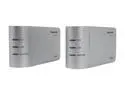
Pros: Works even where other major power line bridges do not. The separate power cord makes it easy to plug into already crowded wall outlets, The Panasonic unit also seems to be more immune to poor power line conditioning and impedance problems - it works fine on 80 year old post-and-tube wiring. And a 2 meter extension cord does not effect it at all.
Cons: ALL powerline bridges are sensitive to RF noise on the power mains. Make sure the bridge modules are connected directly to the wall socket or through a heavy (16 gauge), short, dedicated extension cord. Other devices such as computers, televisions, DVD players, etc. that incorporate switching power supplies should be connected through a good RF-filtered power strip (>20dB attenuation at 20kHz and above). Also, be aware that most US homes have two phase mains feeds, with different circuits on different phases. This can cause problems if the bridge modules are on different phase circuits: a special bridge circuit (see X10 home automation products for this) is needed to connect the two phases correctly. (If the units work when the electric dryer is running and don't otherwise, this is your problem.)
Overall Review: I installed a pair of these in a motor home to link my EVDO router and an ethernet switch in different areas of the vehicle. Note that this motor home has a HUGE AC power inverter/isolator between the mains and the actual outlets, so there is virtually no noise from the power line on the internal circuits. However I have also used the Panasonic HD-PLC connection in a 150 year old house with 80 year old wiring, where it also works beautifully. Note that the distance between the units is also limited to about 30 meters, so getting a connection in the barn may not work. Finally, any inductor - like a power pole transformer - in line between the units blocks the signal - so no sharing with the neighbors!


