




 here!
here!
I’m your shopping assistant for PC builds, upgrades, and everything tech.
Got questions? Ask away!
Start a conversation
here!
I’m your shopping assistant for PC builds, upgrades, and everything tech.
Got questions? Ask away!
Start a conversation

Joined on 08/02/09
Cool Colors...Good Burner
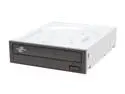
Pros: Two hundred LightScribe DVDs & a burner for less than $100!! The drive is fast, and the tech reviews I've read have been very favorable. It does a good job "printing" LightScribe labels. The DVDs are pretty cool. Five different colors! I'm used to the khaki color that is the standard, but the colors are a nice touch (still black printing...just the color background).
Cons: The word "retail" that is in the item title is a bit misleading. It's placement after the the word "Burner" lead me to believe that I was getting a drive with screws & a SATA cable included (as opposed to an OEM drive that comes with nothing else). This drive is delivered just like an OEM drive (no cables or screws or trial software).
Overall Review: Luckily, I had an one extra SATA cable around, and was able to hook the drive up right away. To be fair, the photos show an OEM drive & do not show any cables. Still, this is a great deal.
Great Drive So Far
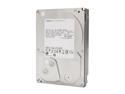
Pros: Low price, free shipping, and large capacity (along with a free dock as a combo deal) made this the lowest price that I've ever paid for the amount of storage. I also think that this is a pretty quiet drive. I am using it in the dock until I mount it internally, and it seems that if there was going to be a lot of noise, it would be most noticeable when the drive is in the open air. However, I actually had to put my ear close to actually hear the heads working. This is certainly not my definition of a loud HDD.
Cons: None unless it happens to crash...it is still fresh, so I haven't put the crucial data on it yet, but so far so good!
Overall Review: This is a great deal even without the bundled dock. Also...NEWEGG ROCKS!!!
Very useful gadget!!
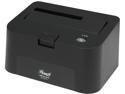
Pros: Ease of installation of both dock to PC and any SATA Hard Drive to the dock. I've used it with a 2.5" and 3.5" drive with great ease. It has a pretty fast transfer rate considering that it USB 2.0. It also seems to be reasonably well constructed (at least the one that I got). Last but certainly not least is the biggest pro...this came FREE with a bundle purchase (that sold out fast). I probably would not have purchased one of these on its own, but I would buy one now, after having seen & used one. I've seen this one on sale so keep an eye on it.
Cons: The drive is unprotected in the dock (except for the inch or two that is below the base), but I can easily remove the drive & store it safely between uses. Also, as some others have said, the USB cable could be a bit longer, but I was able to find a spot by the PC that was close enough.
Overall Review: I can see this being a very useful tool for assisting my friends after a hard drive crash or virus infection as it will allow me to take their drive to my PC for the work without having to mount it in an external case. That function offsets the lack of protection for the Hard Drive for me. Last Thought... NEWEGG ROCKS!!!
Reliable Hard Drive
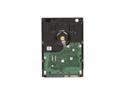
Pros: I bought one of these about a year ago as a second internal drive in my (then) new desktop PC. I must say that this has been a very solid HDD. It catches all of my downloads, DVD rips, my video editing work, and anything else that I want to throw at it. Although I am not using it as a system OS drive, I would not hesitate for one moment to do so. I haven't got the testing results that I did, but it clocked in at a slightly higher speed than my WD 500GB / 5200RPM system HDD, and it runs reasonably cool according to the S.M.A.R.T. monitoring report (43 deg. Celsius). All in all I have been very happy with this HDD and would (maybe will) buy another.
Cons: It is not the fastest 1TB / 5200RPM HDD that you can find, but I think that most users will find this more than adequate for their needs. Also as with any electronic device, there is always a chance that you can get a bad drive, but this can happen with ANY HDD from ANY vendor. Remember that a good back-up is worth its weight in gold.
Overall Review: As a safety practice, I usually try to use any new hard drive that I get for a few weeks before I really start to rely on it faithfully. This may seem idiotic, but it has been my experience that most bad drives fail in the first month or two (although there are exceptions...this is just my personal experience). I currently have 2 external drives that are 5 years old & still going strong. I expect that this Hard Drive will last as well. Final thought... NEW EGG ROCKS!!!
The BEST Enclosure I've Bought
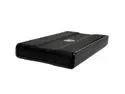
Pros: Cooling!! This enclosure has the best cooling capabilities for a fanless that I've ever seen. Easy assembly and solid fit (no drive sliding around or cheap screws).
Cons: The only thing that I can pick at is the carrying case. It isn't padded at all, but you can tell that it is water resistant. I just bought a low cost padded case for traveling. The carrying case should NOT be a deal breaker for anyone looking for a high quality enclosure.
Overall Review: I put a 160GB drive that I harvested from a dead laptop. The instructions say that you may need the 2nd power cable (see specs) for drives larger than 120GB, but I've never had to use the 2nd (power) cable. This may be due to the fact that when this item was released (2007), the larger drives did require more juice. Recently manufactured hard drives use less power in most cases than their predecessors. Hope this helps someone.
Great for the $$$
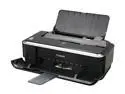
Pros: Great price, moderate footprint, affordable ink cartridges, very nice photo print quality (at best settings), good general print quality (at normal settings), and Windows 7 compatibility make this a good value for someone looking for a simple printer instead of the All in One monsters. It is very easy for anyone to install, regardless of your technical skill level. Canon's website provides support (drivers, etc) that is easy to access.
Cons: I haven't got anything bad to say about this printer so far. I've been using it for 5 days now with no problems. If that changes, I will comment then.
Overall Review: I'm using this with a dual-boot (XPpro/Win7 Ultimate x-64) system, and the printer installed & works very well on both operating systems. One peculiar note: I downloaded the updated driver extension for W7 (to be installed after the initial drivers are done), and it gave the message that it did not find the printer. The printer was working, and showing in the control panel & devices. This is most likely an issue with the Canon update as it does not affect the printer's performance when the Vista drivers on the included CD are used (that's what is working for me right now). I intend to check the Canon site for a fixed version of the driver extension. It was just released in mid October, and I'm sure that I'm not the only user that will encounter this problem. This should not prevent you from getting this printer if you are interested. It has been very good so far.


