
Your Browsing History


Christopher R.
Joined on 01/23/02
0
0

product reviews
- 20
A 30C load temp drop over low-profile cooler!
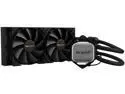
be quiet! PURE LOOP 240mm AIO CPU Water Cooler | All In One Water Cooling System | Intel and AMD Support | Low Noise | BW006
Pros: I replaced a low-profile cooler with this AIO on an Ryzen 7 2700 @ 3.7GHz OC and the MSI Tomahawk X570 motherboard. Saw idle temps drop from 45C to 36C and load temps (transcoding 4K video) drop from 85C to 55C. It's a lot cooler underneath my desk and my kneecaps are no longer toasty.
Cons: Expect one or two parts to go flying off into the carpet. Takes forever to find the missing part. There are no extra parts included. If you can't find a missing part, customer support will send out a replacement.
Overall Review: A tight fit in the Cougar MX-330 ATX case with 5.25" Blu-ray burner installed for front mounting. I wanted to put the fans in the front panel recess for a push configuration but the long screws weren't long enough. I put the fans inside the case for a pull configuration. Good airflow from front to back. I doubt I could have top mounted the AIO with the burner installed. I was initially confused on how to plug everything. Fans should plug into the fan headers on motherboard. Make sure to readjust the BIOS settings for the fans. Light and pump connectors plug into the SATA Y-splitter. Since I have a SATA power cable running to the burner, I had an extra SATA connector to plug into. All the cables were long enough to run where they needed to go.
10/13/2020See more detail
Drop In Replacement for An Older SATA-2 SAS Card
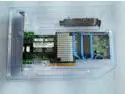
IBM M5110 6Gbs PCI-E HBA FW: P20( LSI 9207-8i IT) Mode For ZFS FreeNAS unRAID US
Overall Review: I received what I saw in the picture. A drop in replacement for an older SATA-2 SAS card in a TrueNAS file server. The system booted, recognized the hard drives, and worked as if nothing had changed. Looking forward to adding hard drives larger than 2TB in the future.
7/10/2023See more detail
Perfect for fixing a tight spot!
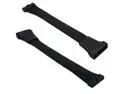
2 Pack Small Mini USB 3.0 19 Pin Internal Extension Header Adapter Cable for Motherboard 5.9-Inch(15cm)
Pros: The Cougar MX330-G has a blocky USB3 connector for the motherboard and the MSI Tomahawk X570 motherboard has a right-angle USB3 connector. That made for a really tight spot that risked snapping the connector off the motherboard. This extension cable fixed that tight spot, moving the case cable connection to behind the motherboard tray.
Cons: I didn't realized that these shipped direct from China and took a week. Something to consider if you're on a tight schedule.
Overall Review: Don't expect to bend this cable in a tight loop. I got it to form a U at the motherboard to go through the cutout and behind the case. No issues with any of my USB3 devices plugged into the front of the case.
3/29/2021See more detail
Interesting experience with Ryzen 7 2700 and Asrock B450M Pro4 mainboard...
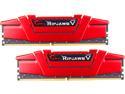
G.SKILL Ripjaws V Series 32GB (2 x 16GB) 288-Pin PC RAM DDR4 3600 (PC4 28800) Desktop Memory Model F4-3600C19D-32GVRB
Pros: I got 32GB at a good price over the holidays. I wanted to future proof myself by getting a 3600 kit since I'll probably get a Ryzen 3 processor and X570/B550 mainboard in the next year or two.
Cons: I wished it was black. The red is always on sale and/or available than the black.
Overall Review: My previous memory was two G.Skill 2 x 4GB 2666MHz kits (16GB total) that ran with the 2700 @ 3.9GHz. Initially, I could only run 32GB 3200MHz with the 2700 at stock (3.2GHz). I was able to overclock the 2700 to 3.4GHz. Despite a reduced processor speed, the faster memory made up for the difference. A five-minute 1080p video in Davinci Resolve that took 120 seconds to render with 2666MHz memory rendered in 90 seconds with 3200MHz memory.
1/9/2020See more detail
Works great with Athlon 200GE and Asrock B450M Pro4 motherboard!
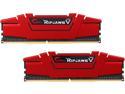
G.SKILL Ripjaws V Series 8GB (2 x 4GB) 288-Pin DDR4 SDRAM DDR4 2666 (PC4 21300) Desktop Memory Model F4-2666C15D-8GVR
Pros: Set profile in BIOS to get max speed at 2666. Due to limitation with the Athlon 200GE, couldn't overclock higher than 2666.
Cons: Would have preferred black over red, but red was cheaper than black and the color didn't matter.
Overall Review: When setting up the motherboard for the first time, you may need to boot up with one stick, set the BIOS to safe values, and boot up with two sticks. If your BIOS ever gets into a serious funky state, reset the CMOS and boot up with one stick.
6/4/2019See more detail
Blows air onto the motherboard!
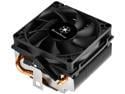
SILVERSTONE SST-KR01 80mm Dual ball bearing CPU Cooler
Pros: Blows air onto the motherboard to circulate air among VRMs and nearest RAM socket. Also the M.2 card on the Asrock B450M Pro4 mainboard. Those components stayed at ambient temparture (30C/86F). Kept overclocked Athlon 200GE (3.85GHz) at 60C/140F under 100% load from Prime95. Covers 100% of processor surface area.
Cons: Fan cable is multicolored. Would prefer black cable and/or sleeve.
Overall Review: This cooler was a replacement for a budget version of a popular tower cooler that only covered 2/3 of surface area and couldn't prevent thermal shutdown with fan speed at 100% on overclocked processor. The SST-KR01 exceeded my expectations.
3/27/2019See more detail