
Your Browsing History


Charles W.
Joined on 06/27/05
0
0
product reviews
- 7
Great to update your system
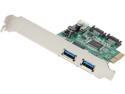
SYBA Combo USB 3.0 + SATA III 6Gbps, v2.0 PCI Express, x4 Slot Controller Card Model SD-PEX50055
Pros: A great solution for upgrading older motherboards. After installing latest drivers from SYBA website, both USB 3.0 and SATA III work flawlessly. I used this SYBA board with an older Intel i5-650 CPU and Asus LGA-1156 motherboard.
Cons: Driver disk included is littered with many drivers for other boards SYBA makes. The fine print in the manual included with the board mentions the two type of chips used on the board. That information allows selection of the correct drivers to install from the mini-CD. A much better solution is to go to the SYBA web site, search for the product type, and download the identified drivers.
Overall Review: I used this to allow use of SATA 6.Gig interface with a new Intel SSD. I was getting disk corruption and CHKDSK scan requests on bootup. Loading the latest drivers for the SYBA board solved that problem. Will boot straight from BIOS with no special considerations. Highly recommend installing new SYBA drivers as soon as possible after loading the OS.
9/14/2013See more detail
A great monitor for Windows 8
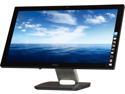
Dell S2340T Black 23" 8ms HDMI IPS-panel LED Backlight multi-touch Monitor 270 cd/m2 DCR 8,000,000 : 1 (1,000:1)
Pros: Completely flat front allows touch swipes from the side with ease. Articulating stand allow use as touch monitor or traditional keyboard/mouse. Base acts as speaker housing, 4 port USB 3.0 hub, headphone and microphone jacks. Excellent video quality and a great OSD control panel. A really great monitor for Windows 8.touch mode.
Cons: Ethernet port in base not available unless you install DisplayLink drivers on your computer which in my case interfered with normal usage of my video adapter. The monitor has no direct support for VGA, only HDMI and DisplayPort.
Overall Review: Overall, this is a superb monitor, especially if you want to mate it with an ultrabook which can easily be detached for use on the road. It has two operating modes. The basic mode is where video & audio is transported via an HDMI or DisplayPort cable and other devices such as touch panel, webcam, and USB hub spliter are transported with a USB cable operating in USB 2.0 or 3.0 mode. A more advanced DisplayLink mode allows a single USB 3.0 cable connection for all signals. A 6 ft USB 3.0 cable is supplied with the monitor and the maximum length for USB 3.0 is 3 meters or a bit under 10 ft. The DisplayLink mode also activates the Ethernet port on the base. I found the DisplayLink software and associated driver for the additional electronics in the monitor base to be clumsily designed and written. Once installed they proved almost impossible to uninstall. In the end I disliked DisplayLink so much I re installed Windows to get rid of it. I operate in the basic two cable mode and am quite happy with the result. The basic mode does require installation of a separate Dell monitor driver package included with the monitor. That driver package has caused no problems.
9/14/2013See more detail
Worked out of the box
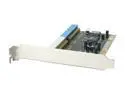
MASSCOOL PCI Card, 2 internal IDE Model XWT-RC020
Pros: Great card for the price. Only does hard drives. CD/DVD use requires a re-flash of BIOS. Requires drivers for use with Windows. Supplied CD contains latest driver versions. Drivers and latest BIOS and flash utility for disk or CD/DVD available at http://www.ite.com.tw/EN/products_more.aspx?CategoryID=3&ID=5,91. Raid chip is ITE IT8212F, flash memory is SST 39SF010A. Can be set for normal IDE controller mode, hardware RAID is optional. Can install and boot Windows by specifying driver from supplied CD-ROM at Windows install time. I installed Windows Server 2008 R2 using the supplied Vista 64 bit driver on CD.
Cons: Requires BIOS re-flash for use with CD/DVD devices. The IDE RAID BIOS supplied is version 1.6.1.8, whereas the latest BIOS on the ITE website is version 1.7.1.96. I had no problems with the older BIOS, so did not re-flash to the latest version. The pause during BIOS Post at boot time should be a couple of seconds shorter.
10/5/2011See more detail
Great printer/scanner/copier
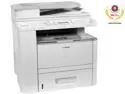
Canon imageCLASS D1120 3478B001AA MFC / All-In-One Up to 30 ppm Monochrome Ethernet (RJ-45) / USB Laser Printer
Pros: If you understand its limitations, this is a great unit. The scanning is via a locally connected USB 2.0 cable only and is thus useful for a single computer. The printing function can be networked via TCP/IP Cat 5 cable LAN connection, or locally via the USB 2.0 cable connection. The USB 2.0 data transfer for scanning is fast. The automatic sheet feed and USB connection works great with the Microsoft Fax & Scan utility in Windows 7. I have had zero problems with sheet feeding and the ability to duplex and de-duplex documents for either copying or scanning is superb. Unit is very quiet, starts up in a few seconds, and idles consuming only 4 watts of power. Both print and scan drivers are excellent for Windows, 32 & 64 bit. Both 32 & 64 bit drivers can be loaded simultaneously for network printing servers. Its mechanical engine is excellent and appears to be the basis for other Canon printers at ten times the cost.
Cons: No FAX capability, no network scanning ability. Although the print & scan drivers are well done, the utility programs provided by Canon are of marginal use, use the Microsoft Fax & Scan utility and Windows printing utilities instead. Canon toner modules are expensive, but lower cost generic equivalents are available. No Linux drivers could be located.
9/28/2010See more detail
Great Value
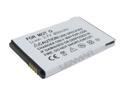
Lenmar White Battery for Motorola Cellphone (CLM5766)
Pros: Completely compatible with my cell phone. Long lasting before charge required. Appears to be a genuine new battery, unlike some of the cheaper recyled salvage batteries on the market.
Cons: None to mention.
8/12/2010See more detail
Tips, Tricks to Getting to Work
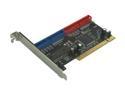
Rosewill RC-208 PCI IDE (ATA) Silicon Image Host Controller un-RAID Card - Also Supports Window Vista Ready
Pros: Inexpensive, especially when on sale. Great addition to modern motherboards which only have one ATA socket. Works well with Win XP, Windows 7, Windows 2008.
Cons: Can appear to be DOA, when it is not. Will not boot from harddrive, boot drive cannot use this controller. See notes below.
Overall Review: Works fine with cable select, even when instructions talk about master/slave installation. Cannot mix WD drives with CD/DVD drives on the same cable. This is also true for other ATA controllers. CD/DVD works, WD drive appears dead. Two WD drives on same cable work fine. This board is PCI slot sensitive. Some older network, SCSI, or video boards installed between this adapter and the CPU will block signals, allowing recognition of adapter by OS but blocking data transfer. Solution: rearrange PCI boards on motherboard, place this adapter in slot electrically (usually physically) nearest CPU. I could not get this adapter to boot from hard drive on two different motherboards. This may be due to back revision BIOS on adapter. The Silicon Image website has newer rev BIOS but I could not get the BIOS installer to work for this board. The Rosewill site does not provide a way to update the BIOS on this adapter. Solution: place boot drive on the ATA adapter built into motherboard.
4/16/2010See more detail