

Your Browsing History


Joshua M.
Joined on 08/22/05
0
0
product reviews
- 8
excellent, but has some glaring weak spots
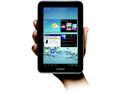
Samsung Galaxy Tab 2 (7", Wi-Fi) GT-P3113TSYXAR - Dual-Core 1GHz - 1GB RAM - 8GB Internal Memory- Android 4.0 (Ice Cream Sandwich) - Silver
Pros: All the hardware features (wifi, bluetooth, IR, HDMI, decent stereo speakers, nice screen/touch, size, weight, battery life, etc). It's rootable, and is already running Android 4.0 ice cream sandwich. The G/F had a nook color before, and likes this much much more. It's lighter, brighter, faster, sounds better, has more apps, etc etc etc. It's just a great little tablet.
Cons: The "peel" universal remote app is, sadly, useless for me. It doesn't support any of my devices so far (a sceptre 32" lcd tv, viewsonic pjd5523w projector - no viewsonic projectors are supported, pioneer vsx-521-k receiver). This was one of the major features that sold me. There is a chance that their support may help out, but there's no manual way to add devices or codes (why not?!?). I did find an alternative app, TouchSquid, but haven't tried it out yet... so there is hope, but it's not as polished as you may assume, and "98% of devices" is probably based on total volume in the market - ie. fair chance you might have an unsupported device. The macromedia / adobe flash support is there, but didn't work on the one site the G/F needed (weightwatchers.com). Again, I haven't thoroughly tested alternatives (opera, firefox, etc), but it was an instant downer. Finding a pretty case that is nice is difficult, unlike more common tablets.
Overall Review: Got it for the girlfriend, so I haven't had a lot of time to work with it. Overall, I think it's an excellent tablet. It runs much faster than my phone (HTC evo shift 4g), and we were both impressed by the speed (ex. loading web pages, apps, etc). Looking forward to getting it integrated into our environment - media center control, file shares, blutooth audio, etc. It's already pretty slick on its own, and should only get better. Feel forced to mention the connector for data/usb/power. It's nonstandard, as everyone else has noted. However, I found knock-offs elsewhere for just over a dollar. Long term, I'm concerned about availability of these, so I picked up several of them.
6/23/2012See more detail
great value, but leaves a lot to be desired
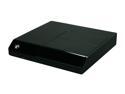
Seagate FreeAgent Theater+ USB 2.0 / Ethernet HD Media Player Only STCEA201-RK
Pros: Great picture quality Netflix Access stuff on local network (samba or DLNA media servers) Wireless (optional, I'm using Zonet ZEW2546 : MUST have compatible chipset - Zonet ZEW2545 does NOT work - if you get one that works, it simply works... just be careful to pick a supported adapter. There's a list buried in this thread: http://forums.seagate.com/t5/FreeAgent-Theater/WiFi-Adapter-Does-it-have-to-be-Seagate/td-p/42319 Small, quiet, low power Picking a movie and playing it works very well. Netflix is limited to the watch instant queue (no way to modify it via this device), but I don't mind this. It plays well.
Cons: Interface for music is simply AWFUL. You pick a directory, and it'll play it (can do shuffle/repeat, but does not recurse to subdirectories). Playlists are barely supported (must be in same directory as files - so unless you have all your music in one directory, you're hosed). Same issue with picture slideshows. "internet" channel is a joke. Text and Video RSS feeds are statically controlled by seagate. Apps are similarly locked (weather uses yahoo, and you get what limited info they give you, and that's all). Recent firmware updates are AES encrypted and modification is quite difficult, though root telnet access is open in 2.2. "optware" packages can run on it, but they don't include an /opt directory, and that filesystem is readonly. The latest kernel requires "secureboot", so it may not be possible to roll your own firmware once you've updated.
Overall Review: For the price, it makes a great little netflix player, and can stream my movies from my NAS or desktop. While it's worth the price, it's given me a taste of what could be, and now I want more. Seagate's needlessly imposed limitations annoy me more than the hardware or software itself. There is a firmware hack (http://code.google.com/p/fatplus/) but it's limited to the old 1.45 firmware, so it doesn't include netflix. This thing has a lot of potential that is unfortunately locked up. It'd be trivial for them to include samba server, for example, and there's plenty of room to add it, but they don't. Their source even has commented out developer stuff and you can tell they had it on there. If you buy it, you'll probably be disappointed, but you'll still use it because it does stream movies and netflix just fine.
12/10/2010See more detail
mixed feelings, bad bios (I think)
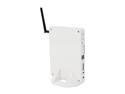
Foxconn nt-A3500-0h0WWAEQB AMD A45 (Hudson D1) White Mini / Booksize Barebone System
Pros: Form factor is great. The price is right, even when it's not on sale. Great features (though I wish the wifi was centrino, and wish it had esata). It's quiet, even when the fan comes on, but you can hear it when you're within a few feet of it. Once it's running, it runs pretty well. I haven't had any issues with video nor with flash (running xubuntu 12.04 with catalyst 13.1 drivers, xbmc runs well (search for "Howto Install XBMC PVR Xvba" - it'll be in xbmc forums), and it supports hardware h264 decode and xvba)
Cons: It doesn't boot reliably. When it doesn't boot, it doesn't post, neither hdd nor usb get power (no hdd light; no light on usb thumbdrive; no keyboard lights), but cpu fan spins up and it just sits there. On the original bios, it would only post once every 10 - 20 times. I saw similar posts about this, so I kept at it until I could get the bios flashed. I've tried 2 other bios images (03 and 10)... 03 seems to work the best for me, but I haven't tried others because it takes forever to get it to post to where you can fix it if it goes flakey again, and 10 was just about as bad as 01 for me. With bios 03, it boots (posts) about 4 out of 5 times. My guess is that it's picky about the memory. Bios has no way to change the timings, so I can't try that. I know it's not simply bad memory, because it works far more reliably with the bios 03 update. I also had an issue with the HDMI out, but it worked reliably with a different HDMI cable, so I'm chalking that up to a bad cable. Who knows though, maybe it's picky about that as well.
Overall Review: This is my second unit. The first one was even worse, and I was never able to get the bios flashed. I did get it to post and boot into freedos on usb thumb drive twice, but didn't have the bios image in the right spot, and never got it to post again. Tried everything (except new ram, because I don't have any other ddr3 so dimms). I also had a shipping issue, which has nothing to do with the product, but I don't know where else to say this. I got the first unit, RMA'd, spent the extra money for UPS (as opposed to fedex+usps via smartpost), but the replacement was shipped fedex smartpost, and I never got it. It bounced around, and I couldn't track it down, so it got restocked eventually, which cost me money. I didn't knock any eggs off for shipping. I just think the bios issues deserve the loss of 2 eggs. This isn't a very new product... they should be shipping them with updated bios.
4/18/2013See more detail
worked with seagate freeagent theater+
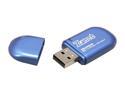
Zonet ZEW2546 Wireless Adapter IEEE 802.11b/g/n USB 2.0 Up to 300Mbps Wireless Data Rates
Pros: Plugged it in and it worked. Got good signal. Using 802.11g (no n router here).
Cons: none
12/10/2010See more detail
Quirky eSATA setup, but works great
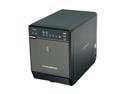
Mediasonic HF2-SU2S2 3.5" Black SATA I/II USB 2.0 & eSATA Pro Box 4 Bay Enclosure
Pros: eSATA, small, quiet, worked.
Cons: Lights are very bright. It supports hotswap (supposedly) but I wouldn't trust trying it because it's touchy trying to get drives in and out (you're likely to turn it off or disco another drive). To get eSATA to work, I had to connect via USB first, and once it's running hit the switch to change to eSATA, then turn off, then reboot PC with it on, and eSATA worked from then on. IE - quirky to get that working, as I couldn't simply start with eSATA. I found another comment mentioning that, and that pointed me in the right direction. Maybe this will save you a call to their support :-)
Overall Review: Used a SATA to eSATA cable to connect from GIGABYTE GA-MA770-UD3 to eSATA, which supported the SATA port multiplier needed to see multiple drives on it. Running Linux, Ubuntu 10.4. It may be a "me" thing, but if my PC is already running and it's turned off, and then I plug it in via eSATA, it isn't recognized. Have to either use USB, or reboot the PC to have it see it. I was hoping to be able to turn it on only when I wanted to do a backup. I think this is more a BIOS/AHCI/Linux thing, so I won't knock them for it.
10/12/2010See more detail
Worked great for me!
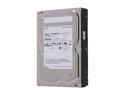
SAMSUNG EcoGreen F4 ST2000DL004 2TB 32MB Cache SATA 3.0Gb/s 3.5" Internal Hard Drive Bare Drive
Pros: Quiet, cool, and not DOA. Packaging was decent (shipped from NJ) - got two, came in plastic shell boxes, with lots of paper around that in the shipping box.
Cons: Not *super* fast, but still quite decent.
Overall Review: Got it with Mediasonic HF2-SU2S2, and they've been working great once I got eSATA working.
10/12/2010See more detail