
Your Browsing History


Rick W.
Joined on 01/13/06
0
0
product reviews
- 38
Update
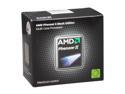
AMD Phenom II X4 980 Black Edition - Phenom II X4 Deneb Quad-Core 3.7 GHz Socket AM3 125W Desktop Processor - HDZ980FBGMBOX
Pros: Very smooth, and after an overclocking modification, it is even smoother. I'm running at 4.181 ghz without breaking a sweat. It took my performance past a level where my old 965BE was laboring. When overclocked as I have done, I think it functions as well as a standard clocked Intel Sandybridge i5. Unless you want to buy a new mb and pick up the first bulldozer release, or visit the Sandybridge camp, this will get the job done for you. I might add an Intel SDD for further performance and keep my system a few years longer. Newegg's delivery and product packaging is always excellent.
Cons: none The last chip in a series is usually the best.
Overall Review: I was very happy at the cpu performance at my overclock of 230 fsb. When I took the fsb down to 226 and upped my nb from 10 to 11, and finally adjusted my ddr voltage to 1.5 for my Gskill Ripjaws 1600 mhz 8gb ram, my ram WEI went to 7.9, even though it is running at a little over 1500 mhz. I replaced 8gb of 1866 mhz Gskill Ripjaws that wouldn't boot after 1 month. Gskill was happy to swap them out for ram for my laptop, since I had already replace the 1866 with 1600. If I'm getting a ram WEI of of 7.9 while running cool and stable at 1500 mhz, why go for the extreme speed ram? I run the cpu multiplier on auto with my MSI 790fx-gd70 mb, and it idles at a multiplier of 4 with a voltage of 1.05 at about 25 C. When it kicks into gear, and the voltage rises to 1.425. The temperature still hangs around 27C for stock trading, music and CNBC in the background. It will run up to a max of 42C with my Cooler Master Hyper 212 plus push and pull fans kicking in during a performance test.
10/16/2011See more detail
Adequate
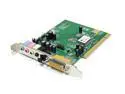
Turtle Beach RIVIERA PCI Sound Card with 5.1 Surround Sound
Pros: Is better than my onboard audio, and freed up my cpu for better overall performance.
Cons: It's better than the $6.00 card I just put in another machine, but its still not great sound, and doesn't have an equalizer. Its "mixer" provides very little control, and is the same software used by the $6.00 card.
Overall Review: It installed easily. If you're not running XP, you may need to reinstall your preferred media software so it plays music cds when inserted instead of being displaced by Windows 2000 CD player. If you're looking for very good sound, invest in a more expensive card.
4/15/2006See more detail
I am very happy with this monitor
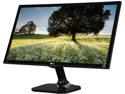
LG 23.6" TN LCD Monitor certified refurbished. A grade, Manufacturer refurbished. 5 ms D-Sub, HDMI 24M47H-P
Pros: Nice size...biggest I've every had...quick, good color/light. Great value. I have 2 smaller lg monitors that have been very reliable.
Cons: comes with an EGA cord
Overall Review: I would recommend this monitor to a friend, and purchase it again.
3/22/2017See more detail
Its a great SSD
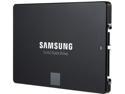
SAMSUNG 850 EVO 2.5" 500GB SATA III 32 layer 3D V-NAND Internal Solid State Drive (SSD) MZ-75E500B/AM
Pros: Very Fast. Samsung Magician is excellent support software. I've had this in a 7 year old desktop for a year. My only problem is my motherboard is still using SATA II at 3.0, so I'm not getting the most from it. Still, it was a big improvement.
Cons: Not a Samsung con, but if you are trying to switch to AHCI while in Windows 7, you'll need to first get into regedit, and then reboot and change to AHCI in your bios. Otherwise it will crash when it tries to boot. 1. Startup "Regedit 2. Open HKEY_LOCAL_MACHINE / SYSTEM / CurrentControlset / Services 3. Open msahci 4. In the right field left click on "start" and go to Modify 5. In the value Data field enter "0" and click "ok" 6. exit "Regedit" 7. Reboot Rig, enter BIOS, change to AHCI and save.
Overall Review: I like these drives, and just put a 250 gb in a Dell e-6420 and am very happy with the result.
12/29/2015See more detail
Everything I expected
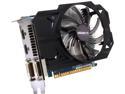
GIGABYTE GV-N750OC-2GI G-SYNC Support GeForce GTX 750 2GB 128-Bit GDDR5 PCI Express 3.0 HDCP Ready Video Card
Pros: Replaced my two MSI GeForce 450 GTS cards. It is faster, cooler, and now my pc runs 3C cooler. WEI of 7.6. Really improved the performance of my system that has an MSI 790FX- G70 mb with a Phenom Ii x4 980 running at 4.0 ghz. Complements my new Samsung SSD. I just ordered the new MSI 990 FXA gaming board, which will be a little quicker and give me SATA III speed to my SSD. After adding this card, I probably didn't need the new mb.
Cons: none
Overall Review: Doesn't like to overclock. Accepted my old Nvidia Afterburner software. Some strange things happened in Google Chrome when overclocked at 3%. However, it is now stable running 2% faster with a fan response curve that I have created. That has made a difference in performance. It is running so cool that I set the max fan setting at 50%. Most of the time the fan runs at 40%, and the GPU runs at 30C. That's with 2 monitors simply surfing the web or watching 12 graphs on my stock trading software. I ordered the wrong HDMI cable, and am waiting for a new one to be able to run my third monitor.
7/17/2015See more detail
Overclocking well
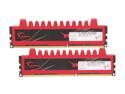
G.SKILL Ripjaws Series 8GB (2 x 4GB) 240-Pin PC RAM DDR3 1600 (PC3 12800) Desktop Memory Model F3-12800CL9D-8GBRL
Pros: Very stable....running overclocked with nb x 12, fsb 212 ram multiplier 4, ram mhz 1696 ram voltage 1.5, timing 9.9.9.24
Cons: none
Overall Review: I tried to run the 1866 mhz with my Phenom II x 4 980. Gskill said I could run it at 233 fsb, nb x 12, but I hit the wall at 2600 nb speed. I had to run it at 1728, with a fsb of 216. It was also unstable, causing hard drive errors and mouse inconsistencies. It was not made for my mb and cpu, so I can't complain. I'm overclocking this ram without a problem. I have tried a fsb of 228 and a nb x 10, but like the overall performance of a faster nb. My cpu temp rises with a fsb faster than 228. Gskill says to divide your nb speed by 3 to get half your ram speed, and keep that ratio. I would have to drop my cpu multiplier to 17 to accommodate a 240 fsb and a 10x nb multiplier to run this ram at 1600 mhz with a 3.33 multiplier. My way, the cpu runs cool, and this ram easily overclocks the extra 6%.
5/22/2012See more detail