

Your Browsing History


Jacob B.
Joined on 04/27/05
0
0
Born in 1984 and been building PCs since I was 8. Studied/Practiced Computer Science/ Fundamentals of Electronics. I pride myself on Problem Solving ... With enough time and enough resources ANY problem can be solved with the proper engineering minds. NEVER "plan" to fail.
product reviews
- 28
Butter Smooth Performance under HORRIBLE Conditions without even Breaking a Sweat.
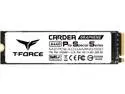
Team Group CARDEA A440 Pro Special Series M.2 2280 2TB PCIe Gen 4.0 x4 NVMe 1.4 Internal Solid State Drive (SSD) TM8FPY002T0C129
Pros: "Double Compacity / Double Speed" ***Buy 2TB (FASTER than 1TB)*** PURPOSE: Video Game/ World of Warcraft/ 40 Person Player vs. Player/ RAID and Battle Grounds. CRUSHES Blizzards In-Game Load Screens while CHEWING thru MASSIVE amounts of Data with ZERO Thermal Issues or Lag. TESTED: P.C. / Win11Pro / (Was NOT used in Play Station 5) (SAVED: Spare Graphene Heatsink for Future Play Station "5" Install) Installed inside a "WELL Ventilated/Circulated" Set-Up: Case: Antec 1200v2 and Motherboard: ASUS TUF X570 WiFi6 Pro TEMPS. W/O Spare Graphene Heatsink: Idel: 53'C Work: 53'C Gaming: 55'C (Barely Increases 2'C while Gaming W/O Spare Heatsink)
Cons: Absolutely NONE
Overall Review: Best Bang for the Buck Price to Performance. Unbeatable. Period. Save your money up and GET 2TB model. Butter Smooth Performance under HORRIBLE Gaming Conditions without even an issue. BEST FOR: Gaming/ Data Streaming/ and Photo/Video Editing.
6/24/2023See more detail
CM Storm SF-19 V2 - 19"
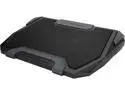
CM Storm SF-19 V2 - 19" Gaming Laptop Cooling Stand with 7 LED Backlight, dual 135mm Fan, and 4-port 2.0, mini and micro USB
Pros: NONE. Didn't work since the second day. Haha.
Cons: I owned it for less than 2 days... mini usb power port broke off INSIDE! BRAND NEW had it since. Computer shop says it cant be fixed and they don't want to touch it. told me to send it back since it is under warranty. Fans are WEAK... this is NOT a gaming cooling pad. It just LOOKS cool. YOU WERE WARNED READ OTHER REVIEWS!!!!! I'm not the only person complaining on same issues READ THE REVIEWS!!!!
Overall Review: They don't answer your calls. You leave MULTIPLE voice messages on their answering machines. No one returns your calls. Cant do an RMA on their webpage. No calls were ever returned in 8 months to this date (Novemeber 2016) My Warranty is about to run out.
11/20/2016See more detail
Waited on PRICE DROP FIRST... Amazing Case !!!
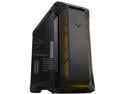
ASUS TUF Gaming GT501 Mid-Tower Computer Case for up to EATX Motherboards with USB 3.0 Front Panel, Smoked Tempered Glass, Steel Construction, and Four Case Fans (GT501 TUF GAMING CASE/GRY/WITH HANDL)
Pros: Front Panel: ZERO SCREWS /Front TUF Facia "pops" Out/In Gently for Lowering temps while Bench Testing. Surprisingly the "TUF Facia" Intakes/Exhausts Cold/Hot air GOOD! Removing Front Facia is about a 5'C-10'C drop or MORE depending on Tasks. Light emits ARGB colors Brighter than I expected!!! So pleased. Top Panel: Mounting 240/360 mm AIO is no issue. The Ventilation is Rear Panel: Absolutely LOVE the "NON" (A)RGB stock black rear fan. Moves ALOT of Hot Air Efficiently and Quietly. Eyes can focus on [ROG] ARGB CPU Logo. Tempered Glass Panel: Screws Require ZERO tools and Stay-In-Place. Back Panel: 2x space gap for Air flow and Cable Management *This case comes with the Capacity to "Vertical Mount" GPUs!!! (Future Proofed)
Cons: MAJOR DESIGN FLAW: *LAN STRAPS WHILE TOP INSTALLD BLOCK 2/3 INTAKE/EXHAUST FANS. [LMFAO] -LAN STRAPS NEED "QUICK DISCONNECT or THUMB SCREWS" [GLASS SIDE] AFTER GT501 CASE SET IN-PLACE. SEEMS "Cheap". -LAN STRAP WITH VELCO IS SILLY WHEN THE WEAKEST LINK IS THE PLASTIC CASE IT LOOPS INTO ANYWAY. Tempered Glasses Panel "Air Gap" at the Rear of the Glass/Cass. This COULD create Changes in "Case Pressure(s)" leading to sucking in DUST/LINT eventually Overheating components Long Run. Gap Specs: *FILL Gap with 3M Foam/Rubber "strip" when NOT Vertical Mounting. THICK: 1/8in (Glass to Case GAP) WIDE:1/3in (Surface for 3M) LONG: 17in (Bottom to Top NEEDED Length) *However, the "Gap" CAN HELP with "Vertical Mounting". COLD Air INTAKE. Serious GPU temp drops! I CAN NOT WAIT TO TEST THIS THEORY.
Overall Review: Front Mount A.I.O.: *ASUS "ROG" LC ii 360mm (Tubes "UP" ONLY) ASUS "TUF" LC 240mm (Tubes UP/DOWN) *FRONT Mount AIO: CPU is COLD Warming "Components" SLIGHTLY. TOP Mount AIO: "Components" are COOLER BUT CPU OVERHEATS "SENSELY". Compared: OLD CASE: Antec 1200v2 -13lbs. Lighter -ZERO Front fan Restrictions -1.5 Inches Wider (Better Intake Air Options) -1.5 Inches shorter (Better Exhaust/Mobility)
9/20/2023See more detail
Lightweight and READY TO DO WORK!
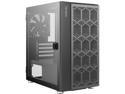
Antec NX200M Micro-ATX Tower, Mini-Tower Computer Case with 120mm Rear Fan Pre-Installed, Mesh Design in Front Panel Ventilated Airflow, NX Series, Black
Pros: This thing is STRONG for its Compact and light weight. It fits anywhere and EASY to move around the house. Installed ASUS RTX 3090 O.C. Edition jus' fine!!! (BIG HOT BOY GPU) Cooled an AMD 3900X 12C/24T 4.6GHZ jus' fine!!! (Can get HOT) Installed Non-Modular ASUS 650W PSU and CRAM ALL THOSE WIRES The Magnetic Swinging Glass Door made INSTRANT internal case ACCESS to: Antec STORM PWM Fan and RGB Control Hub (Purchased SEPERATELY) ZERO ISSUE Air Flow for an "EXTREME Gaming P.C. builds. Flows GREAT!!! Period.
Cons: Will NOT hold a 3x fan GPU. PSU Bay is shared with 2x HDD Bays... Non-Modular PSU will be TOUGH to CRAM excess WIRES. *Upgrade PSU to a "Modular Cabale" PSU... Clip in ONLY the Cables YOU NEED to save room and Thermal Obstruction Flow.
Overall Review: I LOVE this case! The Magnetic Door... MADE THIS BUILD SOOOOO FUN!!! Thin metal construction doesn't feel "Cheap" with the THICK Layered paint coating at!!! HIGH End Feel Quality at a Reasonable Price. NO LIE. Respect to Antec.
9/20/2023See more detail
Beautiful and FAST!!!
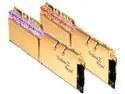
G.SKILL Trident Z Royal Series 16GB (2 x 8GB) 288-Pin PC RAM DDR4 4800 Desktop Memory Model F4-4800C17D-16GTRG
Pros: This is by far the Clearest and BRIGHTEST ARGB RAM Compared to my other builds. PERIOD. It looks like REAL Shattered Glass. The Gold looks GOOD in a Black Motherboard.
Cons: None.
Overall Review: I bought this for almost 50% off so...
6/24/2023See more detail
Best Bang for the Buck. Quality and Utilitarian
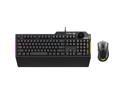
ASUS TUF Gaming Keyboard Mouse Combo | K1 RGB Keyboard, M3 Lightweight Mouse, Aura Sync RGB Lighting, Comfortable & Rugged Design, Armoury Crate Software, Programmable Buttons for PC Gamers
Pros: *Built in Macro capability. Making Operating your Applications and Games Attack Rotations EASY. *Volume button is an ACTUAL TURN KNOB. This is sooooo AWESOME if you have a surround that needs minor adjustments or mixing music or editing videos... jus' spin the KNOB. EZPZ. *Reduced Layout Size. Keyboard length and width are both about 1 inch smaller than most gaming keyboards. I have MORE options to store keyboard because it is a LIL shorter and skinnier. Reviewer Stated: Keyboard is not bright... ABSOLUTELY not the case. During the DAY I held a LED lamp 10 inches above keyboard. Everyone around me told me they could SEE all colors/letters/numbers. *The ARGB is absolutely BEAUTIFUL with Programable colors! *Everyone loved how ASUS went with clear "smoked" plastic as an extra accent on outer edges. Smoked also looks "Classy" instead of obnoxious "BRIGHT" flashing at late at night. Reviewer Stated: Mechanical keys are LOUD... Keys are not silent but they are not LOUD like normal mechanicals keys are. *Both keyboard/mouse keys/buttons have a semi-soft clicks *Buttons depress slightly SOFTER and QUITER than MOST mechanical boards. PERIOD.
Cons: If I HAD TO find one... ASUS should BRIGHTEN the TOP TWO rows better... Sitting normal they LOOK faded until you lean forward and LOOK DIRRECTLY DOWN then NOTHING looks faded... This is due to the THICKNESS of the matt black key paint and the angle of the KEYS. NOT A COMPLAINT AT ALL... It is what it is... LOL.
Overall Review: I have TRUELY enjoyed beating on this thing for a week playing World Warcraft testing macros. Its so gentle to the finger touches. I find myself enjoying gaming better with this upgrade. I compared this ASUS TUF K1/K3 Combo to my OLD Cooler Master CM Storm Octane... ASUS TUF K1/K3 is... THE BEST BOARD SO FAR. I game late/early, never have I woke up guest in living room on my PC at 4am jamming these keys and clicking mouse. Not silent but not LOUD.
1/16/2023See more detail
seller reviews
- 3
A++ Better than expected...
Experience: A++ Newegg Shipping and Orico Products *Although sealed inside Aluminum with no vents or exhaust fan THIS CASE maintains EXTREMELY LOW THERMALS WITH PROER EXTERNAL AFTERMARKET COOLIN SOLUTIONS. Price: Under Valued TBH. "Cheap" Great Range! Quality: Casing: Aluminum w/ Replaceable Plastic end caps. Install: EZ/PZ. Common Sense. No Instruction Manual needed. Updates: No Drivers/Downloads required. Hardware Included: 2x screws and 1x screw driver (Supplies MIGHT be "Limited") System: (C:) NVMe: [WD Black SN850] Read: 7,000 MB/s Write: 5,300 MB/s (D:) HDD: [WD 8TB HC320] Read: 260 MB/s Write: 260 MB/s 41'C: Idle/Web Surfing/Movies 48'C: Gaming (4K UHD @144 Hz) STRESS TEST: 4TB/24 Hours/Non-Stop 56'C: (Without Fan) 39'C: (With Fan) [COOLING SOLUTION: Artic Air Ultra] Test Platform: CPU: AMD-R9-5950X AIO: ASUS-TUF-LC240 GPU: ASUS-TUF-RTX-3090-OC-24GB RAM: 32GB (2x16GB) 3600MHz @ CL18 PSU: 1200W 80+ Platinum
On-time
Delivery
Product
Accuracy
Customer Service
Satisfactory
11/29/2022See more detail
Best Cooler for the Performance to Price rations... PERIOD. Quality is SOLID for
LAPTOP: ASUS FX 504GD (Horrible Thermal Throttle Issues) CPU: (2018) 8th Gen. i5 8300H (4C/4T Boosted UPTO: 3.9 GHz) ("Virtualization" (UNLOCKED) GPU: (2018) GTX 1070 *20GB ( 4GB GPU GDDR5 + 50%*32GB VRAM) RAM: (2022) 32GB 3200MHz CL15 (Win11 Pro64 = 50%*32GB VRAM) SSD: Samsung 1TB (R: 550MB/s W: 520MB/s) System Accelerator: Intel Optane 16GB (R: 900MB/s and W: 145MB/s) BIOS: (2022) Latest Update Stress Test: Cinebench R23 BOTH: Single/Multi Cores Test Beat BOTH: R7 1700X and Ryzen ThreadRipper 1950X in "Single Core Gaming" Performance: 18'C DROP!!! (90'C to 72'C = 64.4'F Decrease!!!) CPU Throttle: Single Core: 1Ghz Increase @ 88'C (3.9 GHz to 4.825 GHz) Yes... After BIOS Update... CPU "CAN" Auto-Clock UPTO: 4.825 GHZ before reaching 90'C Thermal Throttle limits. Understand my "intellectual knowledge" of "configuring ASUS BIOS" and installing SPECIFIC RAM and Intel Optane lead to Cinebench R23 auto clocking to 4.825 GHz. C0: @ 4.625 GHz C1: @ 4.775 GHz C2: @ 4.775 GHz C4: @ 4.825 GHz Disclaimer: This CPU is not "Unlocked", nor can it be "MANUALLY" overclocked in ASUS BIOS.
On-time
Delivery
Product
Accuracy
Customer Service
Satisfactory
11/18/2022See more detail
A++ Service
FAST Shipping and GREAT Prices on ALL products.
On-time
Delivery
Product
Accuracy
Customer Service
Satisfactory
4/14/2022See more detail