
Your Browsing History


Jonathan F.
Joined on 12/29/05
0
0
product reviews
- 10
Stunning!
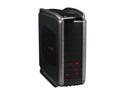
Cooler Master COSMOS S RC-1100-KKN1-GP Black Aluminum ATX Full Tower Computer Case
Pros: I have owned many a case, this is by far the best. EASY installation with the push button system. I like having the option of screwing in my drives on the other side or leaving them with just the push button while I test and configure. HDD bay has it's own dedicated fan. 240mm fan is nice, bigger is better and quieter. Thumbscrews on the back panel for IO cards is also a nice touch. Easy to clean and remove filter for the PSU. Front panel easy to re-arrange. Bars are handy for moving it around. you can tuck extra long cables behind the motherboard via the 6-7 large holes meant for cable management. Comes with zip-ties and sticky wraps for wire management.
Cons: If you plan on Overclocking, Swap out all the 120MM fans for something nicer. I like the thermaltake ones with individual temp sensors. The ones that come with it are very slow and inadequate for gaming. If you add a fan to the bottom of the case, you can no longer remove the air filter from under the PSU easily.
Overall Review: Overall I really like this case. It's not perfect and the cost of 6 new 120mm fans came out to around $30. So all in all it's a bit pricy, but if you see this case, you'll realize the craftsmanship is just phenomenal. If you can afford it, buy it.
7/16/2008See more detail
Dead on Arrival
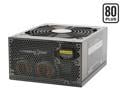
Cooler Master Real Power Pro1000 RS-A00-EMBA 1000 W ATX12V / EPS12V SLI Ready CrossFire Ready 80 PLUS Certified Active PFC Power Supply
Pros: Length of Wires reached everything inside my FULL ATX Tower.
Cons: Arrived DoA. Ended up buying an ULTRA 1000W from a local shop. Actually the wires length was nice but they were so numerous and since the PSU was on the bottom of my Coolermaster Cosmos S case they got all bunched up and looked pretty ugly.
Overall Review: All in all I can't give this a fully bad rating because it sounds like I had bad luck. FYI a good way to test to make sure it's your PSU is before you mount your Mobo, plug in the power switch, the CPU power and MOBO power. If the mobo doesn't beep at you, it's prolly a bad PSU. I had the EVGA 132-CK-NF78-A1 LGA 775 NVIDIA nForce 780i which has a built in speaker and onboard power and reset switches for diagnostics. Very nice board BTW, working great now!
7/16/2008See more detail
Great Memory
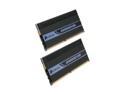
CORSAIR DOMINATOR 4GB (2 x 2GB) DDR2 1066 (PC2 8500) Dual Channel Kit Desktop Memory Model TWIN2X4096-8500C5D
Pros: Memory clocks were listed on the manufactures website so it was easy to setup. I had no trouble adjusting timings on my PNY 780I Board. I really like the fan enclosure.
Cons: After 5 months, one of the three fans in the enclosure started to whine. I tried cleaning but didn't work. Called Corsair shipped me a new one at no charge. Had to pay return shipping for the defective one. Enclosure made the fans hard to clean.
Overall Review: I'd easily recommend this memory, but I can't lie and say it's perfect. I think the fan enclosure needs a bit of tweaking.
3/1/2009See more detail
Great Card
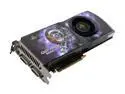
XFX PVT98FYDDU GeForce 9800 GTX(G92) XXX 512MB 256-bit GDDR3 PCI Express 2.0 x16 HDCP Ready SLI Supported Video Card
Pros: Flawless installation, Cards were HUGE and made me a bit nervous but the Coolermaster Cosmos S case swallowed them no problem. I never use software for video cards out of the box, I went to nVidias website and grabbed the latest drivers and installed directly from there. This is a good idea for novices because it's hard to install drivers over old driver some times. SLI worked fine as I own a PAIR of these cards. Haven't been able to get Crysis installed to test the DX10 but only because my DVD Burner took a dive. Call of Duty 4, Age of Conan, Unreal Tournament 3 all look fantastic and run smooth.
Cons: None
Overall Review: Make sure you have a 1000w power supply for these cards if your buying 2, and if you buy three you may want to get a 1200w PSU.
7/16/2008See more detail
WOWSERS!
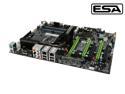
EVGA 132-CK-NF78-A1 LGA 775 NVIDIA nForce 780i SLI ATX Intel Motherboard
Pros: Lots of Pro's so I'll abbreviate them. IO Plate was a perfect fit, Appreciated the extra cables, fan on chipset was sweet, on board Power and Reset came in handy, LED Troubleshooting readout is nice, SLI worked flawlessly, Autodetected my memory and CPU at a lower, safer voltage, Audio sounds great for on-board, driver disk loaded easily, BIOS was a breeze to use.
Cons: NOTE: check compatibility on EVGA's website to ensure the memory you pair is compatible. The CPU and Memory were detected below their default voltage. Make sure you know your voltages before you even start building, you'll save yourselves alot of headache. A quick change in bios moved memory and cpu up to normal voltage.
Overall Review: Paired with Intel E8500. Worked flawlessly after adjusting voltage. Paired with Corsair Dominator 4GB (2GB x 2) in Dual Channel. Had to adjust voltage but I had researched the CPU and Memory voltage and timing before I began the installation.
7/16/2008See more detail
great fans
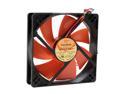
Thermaltake A2029 120mm Case Fan
Pros: Easy to understand directions with a CASE FAN!? Inconceivable! Well, not with these fans. Loved the optional fan controller Currently I'm using the temperature sensor which comes in big handy.
Cons: A bit loud at full RPM, but they move a lot of air so it's justified noise. The color is kinda nasty?
Overall Review: I'd buy them again for sure.
7/16/2008See more detail