
Your Browsing History


Ole L.
Joined on 07/24/02
0
0
product reviews
- 7
solid and versatile
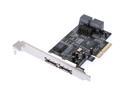
Rosewill RC-218 PCI Express SATA II Controller Card w/ 4 internal SATA with 2 external eSATA Design
Pros: This was ideal for expanding this machine's storage subsystem (now with 9 internal drives!) Also have a 2-drive eSATA dock (StarTech SATADOCK22UE) which pairs with it nicely for hot-swapping additional drives. Reliability and performance have been great.
Cons: Minor issue: BIOS only displays first two drives (see below). Looks like the price has gone up significantly.
Overall Review: Contrary to what the other reviews said, I was able to activate a single eSATA port (3a) and use the other three as internal ports (0,1,2). It's important to note that during POST the BIOS only ever shows devices connected to ports 0 and 1, which probably gave the impression this wasn't working.
3/21/2011See more detail
overheating kills ethernet ports
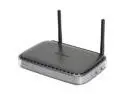
NETGEAR DGN2000-100NAS Wireless-N Router With Built-in DSL Modem Ethernet Port WAN (ADSL): ITU 992.1 (G.dmt) Annex A, ITU 992.2 (G.lite), ITU 992.3 ADSL2 (G.dmt.bis), ITU 992.5 ADSL2+
Pros: This would be a five-star product if not for a design flaw that kills the ethernet ports. Everything else about it is ideal for a small network: integrated DSL, great management features, solid uptime, and excellent bridge/repeater support. If you're only connecting wirelessly, I can strongly recommend this product.
Cons: I've had to exchange three of these for different clients, all exhibiting the same symptoms. It runs very hot, and eventually an ethernet port stops working. Switching to another port works for a while, then that one dies too. Eventually all ethernet ports are unusable and you're stuck doing a warranty return unless you're 100% wireless.
Overall Review: These units were all purchased more than 3 months ago, so it's possible Netgear has caught their manufacturing problem by now, but there's no way of knowing for sure until they release a v2. Since the replacements are running cooler, I figure Netgear is at least aware of the problem. Meanwhile, if it's running hot try positioning it vertically for better airflow. (Ironically, this is the first model of this form factor that didn't include a vertical stand in the box.)
10/21/2009See more detail
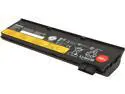
Lenovo ThinkPad Battery 68+ (6 cell) Lithium-Ion Notebook Battery, 72Wh, 10.8V, 0C52862
Pros: As advertised! Genuine Lenovo battery with recent manufacture date. More than doubled the runtime of my ThinkPad X240 (and this model allows you to hotswap batteries without interrupting power).
Cons: Quite large and heavy, but that's to be expected with the additional capacity. Instead of fitting flush like the standard 3-cell battery, it adds height to the back, so it puts the keyboard at a bit of an angle, which isn't a bad thing.
Overall Review: Arrived in sealed Lenovo OEM packaging.
2/22/2015See more detail
types, mouses
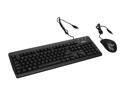
Pixxo KB-9AA1 Black 104 Normal Keys 3 Function Keys USB Wired Standard Keyboard + Optical Mouse Combo
Pros: It gets the job done, and looks good doing it.
Cons: Cheaply made, but no major issues. The keyboard does have an annoyingly-placed (and useless) Fn key, which can make you think the left Ctrl key isn't working if you're used to touch typing.
Overall Review: Worth the sale price for a low-end USB keyboard/mouse solution.
2/13/2010See more detail
The last word in mice. Meow.
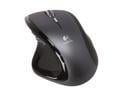
Logitech MX Revolution Black 7 Buttons 2 x Wheels RF Wireless Laser Mouse
Pros: This is one sexy mouse. One touch, and your other mice are instantly obsolete. I thought I'd never give up wired mice, but after using the undersized VX Revolution, I had to give its big brother a try. Where the VX can be a bit uncomfortable for long-term use, the ergnomics of the MX accommodate a larger right hand perfectly. Beautifully designed mouse. Even its charging stand is attractive.
Cons: Only real complaint is that while mapping the middle mouse button to the wheel works, it's a little awkward to use if you also have the wheel's left/right nudge assigned to another function. It's too easy to trigger the left/right function when you meant to hit mouse3 instead. Not quite as "transparent" as a wired mouse. When it drops the odd packet once in a blue moon I'm reminded that I'm using a wireless mouse. If the same mouse were available in a wired form factor I might switch--maybe. In every other way this mouse is ideal.
Overall Review: Make use of those application-specific customizations, and you'll realize the real power of this mouse. Common actions can now be realized effortlessly. Some suggestions: (1) map the "search" button to [Esc]--it's incredible how handy this can be (2) get used to the wheel in "always free-spin" mode; you adapt to this quickly and it's a huge time saver (3) map the wheel's nudge left/right to previous/next tab to make multi-tab navigation a breeze.
10/21/2009See more detail
use your spare SATA drives like floppies
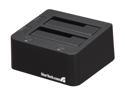
StarTech.com eSATA USB to SATA Hard Drive Docking Station for Dual 2.5” or 3.5” HDD
Pros: A solved problem! Simple, elegant solution for making your extra SATA drives easily accessible on demand. Clever "toaster" design couldn't be simpler to use.
Cons: Newegg's price isn't competitive on this one.
Overall Review: I didn't expect it, but each drive's power buttons light up blue when powered on and red for disk activity. I've been migrating all of my old media to SATA drives... this is just so much more convenient than managing hundreds of CDs and DVDs.
9/25/2009See more detail