

Your Browsing History


Ryan L.
Joined on 05/04/10
0
0
product reviews
- 27
Really is an 8GB 570 that works just fine, here's what you need to know.
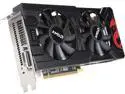
PowerColor Radeon RX 570 DirectX 12 AXRX 570 8GBD5-DMV3 8GB 256-Bit GDDR5 PCI Express 3.0 CrossFireX Support ATX Cryptocurrency Video Card - Brown Box (Only Comes with Driver + Manual)
Pros: - This card is identical physically to the Red Dragon edition, with the exception of only having DVI output and the addition of a tiny BIOS switch for mining vs. normal use. - After a full round of testing with current AMD drivers (not the ones on the disc, from the website), I can confirm that this card performs identically to a reference model 570, with a clock rate of 1245Mhz, not the 1108MHz listed in description (that is when using mining BIOS)
Cons: - Included instructions are for the consumer model and do not even mention the BIOS switch (long sigh). - Driver CD should be immediately discarded. If you are mining, use a recommended set of drivers from a forum. If you are gaming, get current drivers from AMD site. The drivers on this disc are both outdated and generic.
Overall Review: MOST IMPORTANT: The BIOS switch is located on the top side of the card (that would be facing you if you are looking into the case) and is right next to the I/O panel (the metal part in the back where you plug in the DVI). It has 2 positions, marked "1" and "3". 1 is for mining, 3 is for general use. The 3 setting is the side closest to the I/O panel. Mine was at 3 when it shipped. If it's stuck in the middle (which I guess would be 2?) it will do nothing and black screen. I would also recommend ignoring most of the other reviews. They are filled with inaccurate information. This card is EXACTLY like a normal 570 besides the things listed above. 1245MHz is the correct speed for a card with an unmodified BIOS and that is what it reports with official drivers. It has only a single 8-pin power connector because it is not a factory OC card like most you would buy. Those models have an additional 6-pin requirement, but that is not AMD's stock reference design. Also like AMD's reference, this card only draws a maximum of about 255W, making the listing correct requiring a 450W PSU minimum. Most consumer cards are once again factory overclocked and peak at over 300W, requiring a 500W minimum PSU. Here are some benchmark results on current games, so you can check against reviews and see that this card is in fact on par with a stock 570: Strange Brigade (because it came with it): In-game benchmark @ultra 1080p, 80fps average, 93high, 67low. We Happy Few: Gameplay session (20mins) @ultra 1080p, 47fps average, 62high, 35low. Vermintide 2: Gameplay session (25mins) @extreme 1080p, 62fps average, 78high, 49low. I definitely recommend this to save a few bucks on a second card for xfire, or even a primary card for gaming if you can get by with a single DVI. Since it's DVI-D and the card supports both sound and HDCP, you can convert it to HDMI and get those features. There is no way to convert it to anything else like displayport with higher resolution support though, so you will be limited to the resolutions supported over DVI, regardless of the card supporting 4k 60Hz on a hardware and driver level.
9/10/2018See more detail
My goto for cheap SSDs.
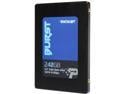
Patriot Burst 2.5" 240GB SATA III Internal Solid State Drive (SSD) PBU240GS25SSDR
Pros: - The only drives in the low price tier that I have never had fail early. - Specs for speed are accurate.
Cons: - Not listed as being as fast as some of the other cheap drives, but see above, the numbers are accurate.
Overall Review: As someone who builds a lot of systems, these are the only "budget" SSDs I use anymore. Even though a lot of the other ones will claim crazy speeds in line with the fanciest drives, they rarely actually hit those speeds. Patriots drives are honest with their claims and have universally met those expectations exactly when I installed them. Most importantly, they still function identically with many read/writes on them. I've only started using Patriot drives about 3 years ago, but all of those systems are still functioning at peak speed and no disk software reports errors with any of them.
6/1/2020See more detail
Best cheap lighting for OEM and boring cases.
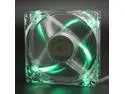
Autolizer 80mm Green LED Cooling Fan for Computer PC Cases, CPU Coolers, and Radiators
Pros: - Comparable to other non-lighted fans in the price range. - Lighting is even and clear. - Green is very bright and dynamic compared to other colors.
Overall Review: These are the absolute cheapest way to add visible lighting to a PC. Especially for an OEM case that lacks glass panels, replacing the intake or output fans will create a visible glow right next to the largest vents. Gives you visible lighting, with very low investment.
6/1/2020See more detail
Best cheap lighting for OEM and boring cases.

Autolizer 80mm Purple LED Cooling Fan for Computer PC Cases, CPU Coolers, and Radiators
Pros: - Decent fans overall, comparable to non-lighted ones in the price range. - Lighting is even and clear. - Purple is a less common color as purple LEDs are slightly more expensive.
Cons: - Purple LEDs are the dimmest per voltage, so this color is dimmer than the others.
Overall Review: These are the absolute cheapest way to add visible lighting to a PC. Especially for an OEM case that lacks glass panels, replacing the intake or output fans will create a visible glow right next to the largest vents. Gives you visible lighting, with very low investment.
6/1/2020See more detail
Cheapest way to get a good chassis.
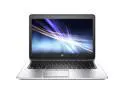
HP EliteBook 725 G2 AMD 1900 MHz 128Gig SSD 8GB NO OPTICAL DRIVE 12.0" WideScreen LCD Windows 10 Professional 64 Bit Laptop Notebook
Pros: - The Elitebook 7/800 series are some of the best business laptops you can get in the sub-$150 price range. - The keyboard will remind you what we lost for these slim new MacBooks and Ideapads. - These are very, very tough compared to newer ultrabook-ish things.
Cons: - The AMD versions are about $50 less for a reason. The battery life is literally half that of the Haswell and Broadwell Intel versions. - Just as when new, ships with a single RAM module. No dual-channel RAM will slow down the GPU significantly. Only important if you are trying to do modest 3D work or casual games.
Overall Review: If you want to use this as intended, as in for light business or student work, you can save a lot with these refurbished systems. Just to be clear off the bat, this generation of AMD CPUs was a horrible, horrible time. If you only have experience with the now awesome AMD, you will quickly realize why the AMD versions of these laptops are cheaper. The battery life is seriously, honestly half that of the Intel models that came out at the same time. So expect 3-5 hours, not the 8-10 hours most EliteBooks get. It also gets quite hot and can throttle CPU performance significantly if you try to do any really heavy duty computing. That all aside, you are getting a really solidly designed business laptop for a lot cheaper. If you are sitting on your couch or at a coworking station and pounding out documents on even the most modern office software, it will do just fine. The keyboard will handle your sausage fingers for about 3 million more keystrokes than a new MacBook and if it somehow doesn't survive a fall off your desk, you can order another one for less than $150.
12/10/2018See more detail
You get what you pay for.
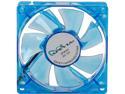
APEVIA CF8S-UBL 80mm Case Fan
Pros: - Cheap - Decent airflow
Cons: - Bought 2, one of them will occasionally hum a little. If I tap it, doesn't happen again for a long time. Securely installed, it's the fan bearings.
10/24/2018See more detail
seller reviews
- 1
Excellent quality, selection and pricing.
Buying refurbs, even Microsoft authorized ones, is dubious business most of the time. I've had a lot of bad experiences, but I've bought twice now from Arrow because they get it right in all the most important ways. Techs who lay hands on a lot of systems will laugh and know what I mean when I say I hate opening up a system and wondering what this strange goo is? Or why is this RAM stick loose? Every refurb has been wiped down on the outside, it's what's inside that counts. You would think it would be a simple thing to not leave stickers, tools, small insects or band-aids inside computers, but that must not be the case. Long story short, these systems are clean, neat and in proper order. I had a small concern on one of my orders and Arrow's service department responded immediately. If you're going to save as much as possible by buying a refurb that is a few years old, do yourself a favor and check the reviews to make sure they do it right.
On-time
Delivery
Product
Accuracy
Customer Service
Satisfactory
12/10/2018See more detail