

Your Browsing History


Cory O.
Joined on 07/06/12
0
0


product reviews
- 21
As Awesome as the Box it Comes in
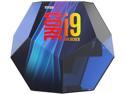
Intel Core i9 9th Gen - Core i9-9900K Coffee Lake 8-Core, 16-Thread, 3.6 GHz (5.0 GHz Turbo) LGA 1151 (300 Series) 95W BX80684I99900K Desktop Processor Intel UHD Graphics 630
Pros: -Fast -Really Fast
Cons: -Price
Overall Review: I keep this cooled with a Noctua NH-D15S Air Cooler. I'm idling at around 35 Degrees. Under gaming loads (with an RTX 2070) it's usually between 55 and 65 degrees. Most people say you should liquid cool this only, I don't agree.
5/14/2019See more detail
Grab it on Sale!
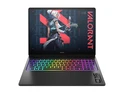
OMEN MAX Gaming Laptop 16" WQXGA Intel Core Ultra 9 32 GB memory;1 TB SSD
Pros: This thing will run most games without effort. I find that I enjoy running games in 'Balanced Mode' in the OMEN software, The CPU/GPU may not clock as high, but I still get pretty high frames (it IS a 5080 after all) and the laptop stays at a temperature I'm comfortable with without sounding like a turbojet. But, Performance mode is there, I'd just recommend using headphones and know that you'll run the risk of really annoying anyone around you. The thing actually seems to get hotter in performance mode, but with the benefit of additional frames. Surprisingly not a lot of bloatware comes with this laptop. I did uninstall a few things, but I've seen far worse. It's not an OLED panel, but the IPS is still smooth and vivid, especially at 240Hz
Cons: The laptop has some built in features that allow it to switch between Integrated and Discreet graphics depending on whether you're in game or not, which is nice on paper because it can save a lot of battery life if you're not gaming with it, BUT I had a few games freeze when trying to launch when the hardware switched to the GPU for video output (this was after I updated Windows, BIOS, Nvidia drivers). Your mileage may vary, and I could not adjust the setting in the OMEN software despite being an option, I had to do that through the BIOS at boot.
Overall Review: I caught this on a sale and am so glad I did! Such a sleek design, I love the RGB, I appreciate the relatively low amount of bloatware it came with, and I'd recommend keeping the OMEN software to control power profiles. Turn off Integrated/Discreet graphics switching settings in the BIOS if you have trouble launching games.
2/26/2026See more detail
A Real Chonker!
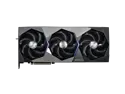
MSI Suprim GeForce RTX 5080 16GB GDDR7 PCI Express 5.0 Graphics Card RTX 5080 16G SUPRIM SOC
Pros: Runs Cool. Runs well. Turn your settings up and enjoy sweet sweet frames.
Cons: Some instability. Certainly nothing major and no doubt will get better with driver updates. Bummed that I can't change the color on the 'Suprim' lighting on the cooler (it can only be white), but oh well.
Overall Review: And I thought my EVGA FTW3 3080 was a unit. This thing is massive! Most of the volume of this card is taken up by the cooler, which clearly doesn't take its job lightly, as this card runs very cool (and quiet) even in demanding games. Definitely a big upgrade from my 3080, both in gerth and in frames. There do seem to be early adopter quirks (things that'll no doubt sort themselves out with driver maturity), but for the most part I'm happy. Absolutely double and triple check your case to ensure clearance, especially if you have smaller form factor cases.
2/13/2025See more detail
Fast! Passive Cooling Questionable...
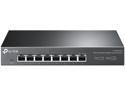
TP-Link TL-SG108-M2 | 8 Port Multi-Gigabit Unmanaged Network Switch, Ethernet Splitter | 2.5G Bandwidth | Plug & Play | Desktop/Wall-Mount | Fanless Metal Design | Limited Lifetime Protection
Pros: -Works as advertised. Not many of my end devices have the ability to go over 1Gbps, but the ones that do, this thing delivers some speed for sure! -Separate light indicating a 2.5Gbps connection -x8 full 2.5Gbps ports!
Cons: -This thing gets WARM. I would not feel comfortable relying on passive cooling. I have a small box fan near my networking equipment (as seen in my photo), but I was only prompted to do that cause of the heat this thing puts out. Having said that, a little bit of airflow does seem to make a huge difference.
Overall Review: I've had this for over two months now and it seems to be holding up. I'm a little wary because of the other reviews and the aforementioned heat, but I'm optimistic that keeping some active airflow around it will substantially assist with longevity.
11/16/2022See more detail
The first Step Into a Post 1 Gbps World!
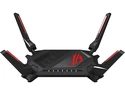
ASUS ROG Rapture GT-AX6000 Dual-Band WiFi 6 (802.11ax) Gaming Router, Dual 2.5G ports, enhanced hardware, WAN aggregation, VPN Fusion, Triple-Level Game Acceleration, free network security and AiMesh support
Pros: -x1 2.5 Gbps WAN Port -x1 2.5 Gbps LAN Port -Extremely fast for a residential application -Stable -Simple and Intuitive UI -I'm a sucker for RGB... Love the customizable lighting on the ROG logo. -Asus makes it SUPER easy to transfer all the settings and preferences from my old Asus router to my new one... Didn't have to reconnect any of my devices to the new router.
Cons: -Runs warm. I'm planning to get a small fan for some active cooling
Overall Review: This router is absolutely essential if you're getting more than 1000 Mbps down from your ISP. I have it paired with a Netgear Nighthawk CM2000 2.5 Gbps Cable Modem. I was in the market for a router that had a 2.5 Gbps LAN port since I'm paying for 1.2 Gbps (giving myself a bit of futureproof margin) from my ISP *and* so I could link it to an 8-port 2.5G Network Switch for my home (TP-Link TL-SG108-M2). This router absolutely delivered. Wifi 6 is awesome technology and important as ever with more IoT devices making their way into my household. Right now none of my end devices support anything more than 1 Gbps, but that's bound to change soon and having a router/switch/modem capable of more is probably the best first step.
9/28/2022See more detail
More USB 2.0 Headers!
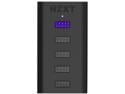
NZXT AC-IUSBH-M3 Internal USB Hub (Gen 3)
Overall Review: I have a pretty Corsair-minded ecosystem and needed two USB 2.0 headers for my fans and AIO pump. I recently bought a Wifi card with Bluetooth and didn't realize the Bluetooth needed a USB 2.0 header. With only two 2.0 headers on my MoBo, I set about finding a way to get it connected. This little guy did the trick! Everything now runs off this hub, connected to a single USB 2.0 header from my MoBo.
7/1/2021See more detail