
Your Browsing History


Samuel S.
Joined on 05/19/04
0
0
product reviews
- 17
Great Reliable and Stable Board
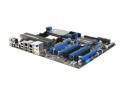
MSI 790FX-GD70 AM3 AMD 790FX ATX AMD Motherboard
Pros: This is just an amazing board. Way too many options in the BIOS than you'll probably never need, but if you need to make an adjustment it IS there. Plenty of room on the board, and it runs COOL. I'm still using the OE AMD processor fan. Easy overclocking, but tricky with RAM settings (as are most all AMD boards). I tested with 4GB and 8GB ... I prefer the 8GB RAM with mild overclocking. Be sure to MANUALLY set your RAM settings in the BIOS. MSI gives you everything you need with this board. They even included the correct length Crossfire straps (The XFX ones were too short).
Cons: If you want decent sound, buy a good sound card! DO NOT rely on onboard sound. Today I finally gave up on the Realtek ALC889. Every few days the driver would puke and sounds were distorted with pops and noise. I went and pulled the "ugh" Creative ExtremeAudio SD0460 card out of another PC, installed it with Vista 64 Drivers and the sound improvement with this older card is VERY obvious. It is pretty sad that claimed HD 7.1 out of the Realtek is not better than this ancient card. NOTE: Speakers are Logitech G51, and headset is Turtle Beach 5.1. I'll be getting a new 192KHz card soon to take advantage of the rest of this system. Maybe the HT Omega Claro 7.1, not sure yet. I do wish MSI's instructions were written by someone that explained things better. They provide an awesome board, but the instructions are written for a bare bones setup. The cover of the box has more details on some features.
Overall Review: So far my testing has not caught up to "other" competitive boards on certain tests. On some tests though I have exceeded competitive results. But, after having other brands in the past, my MSI boards have always been the most reliable. Current System: - MSI 790FX-GD70 - AMD Phenom II X4 955 BE - 4 x 2GB (8GB) Corsair (PC3 12800 1600 MHz) RAM - (3) WD RE 1TB 7200 RPM SATA … in RAID 5 - LG Super Multi Blu-Ray SATA #GGW-H20L - (2) XFX #HD-489A-ZDEC Radeon HD 4890 Xtreme - Corsair 1000w #CMPSU-1000HX Power Supply - Thermatake ArmorPlus Case I'm running smooth at 3.45 GHz, (had it at 3.9 but wanted to do RAM testing at lower CPU speed); RAM is at 1352 MHz (8-8-8-23) 1T, 3.1 FSB; I have both GPUs at 875MHz / 975MHz. I'm not typically in Crossfire mode because I have (3) monitors. Windows EI is maxed at 5.9 across the board. First run (no Crossfire) on 3DMark Vantage Pro (64-bit) was 10397. Next I'll test in Crossfire and with a few more tweaks I expect even better results.
6/24/2009See more detail
Not a Good Start
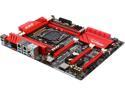
ASRock ASRock Fatal1ty Gaming Fatal1ty X99X Killer LGA 2011-v3 Intel X99 USB 3.0 ATX Intel Motherboard
Pros: Looks nice. Plenty of features. Easy assembly. Newegg's RMA process for DOA components is spectacular!
Cons: I assembled this new system a few days ago, and finally got a chance to power it up and begin OS installation. Immediately upon turning on the power the board popped and started smoking "literally" from the circuitry near the #2 CPU fan connector--with the lingering unmistakable smell of burnt circuitry in the air.
Overall Review: This is my first purchase of an ASRock motherboard. The last time I had a MB fail out of the box was another brand many years ago where the solder at one point extended longer than the standoffs and grounded out against the case. I have double-checked all connections, and everything is in proper order. I just hope none of the other components in this new system were damaged, and that I can update this to a much better review in the near future. I just completed the RMA. Now back to taking my new system apart and boxing up the motherboard.
2/8/2015See more detail
Great for Gaming. As a workstation monitor, eh!

SAMSUNG Odyssey OLED G9 QHD 2K 1440P 240Hz AMD FreeSync Premium Pro & G-SYNC Compatible 0.03ms HDR400 Built-in Speaker Smart Curved Gaming Computer Monitor Height Adjustable Stand LS49CG954SNXZA
Pros: - The picture quality when gaming is amazing, and the response seems good after upgrading from an older 34" Acer Predator. - It has only been a few days, but all the pixels are good. - It is a nice-looking monitor. - It is huge! - It arrived safely and undamaged!
Cons: - Expect configuration issues, especially in multi-monitor scenarios. This monitor offers numerous features. There are almost too many. There should be a way to disable all of the bloat that is not used. If I wanted a Smart TV, I'd have ordered one. If all you want is a gaming monitor, great. Suppose you want gaming and a large workstation monitor for multitasking (as I do); good luck keeping the frustration level down. - Must use the latest HDMI cable technology to reduce connection problems. Tried three different brands and versions of HDMI cables. I have an 8K cable on it now, with the fewest connection drops. All had connection issues. You will still experience connection loss between the PC and monitor. The behavior varies between the monitor showing a timer and the option to turn it off or go back to the home screen, and sometimes, it makes the computer unresponsive, requiring a forced restart if disconnecting and reconnecting the HDMI cable does not unfreeze the system. - Expect Windows 11 taskbar settings to change constantly. The monitor goes to sleep, and taskbar behaviors change. Change monitor parameters, game mode On to Off, or vice versa, and taskbar behavior settings will change. - Expect desktop icons to relocate randomly, and 3rd party software designed to restore icons to their locations will have difficulty performing their only job. This will occur when swapping between modes or when restarting the system. - If you have a nice sound system and turn off the sound from the monitor, expect an annoying icon bouncing around the left side of the screen, letting you know the sound is turned off until you turn the monitor sound back on to its lowest possible volume.
Overall Review: Everything listed in the pro and con sections addresses what I think about this monitor. In hindsight, I should have considered something else, but the Black Friday deal was too enticing. All cons listed disappear when swapping this out for a different monitor, including the one it replaced. Before someone suggests contacting Samsung for support or workarounds, I already have. The result was less than helpful.
12/11/2024See more detail
Too bad it's ASUS
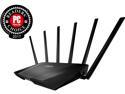
ASUS AC3200 Tri-Band Gigabit Wi-Fi Router, AiProtection Lifetime Security by Trend Micro, Adaptive QoS, Parental Control
Pros: The RT-AC3200 ASUS router offers a variety of beneficial features. It is extremely fast and easy to set up. Wireless speed at my location has never been faster (when it stays connected to devices--see below). Changing the configuration is very intuitive and does not always require full rebooting of the appliance. Many of the console tabs provide information on various settings. Some areas could use a little more info, but most other routers provide little or no information at all right there at the controls.
Cons: ASUS technical support is horrendous! They do not have the ability to listen, or understand in clear technical terminology or even child-like hand holding terms. They literally ignore what you tell them, and why my most recent PC build contained not one ASUS product (past experience). However, I questioned my negative opinion of ASUS support and decided to take a chance on this feature-rich router. Surprise-surprise, I had to contact them and the frustration begins. I've been waiting 5 days (so far) for a "Guaranteed 24-48 hour" reply from a Level 2 support tech. I spent a many hours diagnosing the problem myself using a variety of tools, utilities, and packet tracers. The one email reply I received (not a level 2 tech) as a macro pasted into the email as if the person did not read one word of the message I provided. This router has flaws. Some may be fixed with a proper amount of concern and development from ASUS engineers by either a firmware update, or working with third party suppliers. 1) Wireless connections drop "constantly." I can watch the device and router while tracking connectivity through a third device. The connection drops for no reason. If the device stops data transfer for a few moments the connection drops. This occurs with Android, iPhone, Tablets, and other wireless appliances. The connection usually comes right back up, but in one example I can see it affecting my mobile data plan. The device should be connected 100% wireless, but with the dropped connections it often switches back and forth. On tablets (or WiFi only devices), sometimes manually restarting wireless connectivity is required. I can watch the connection drop using a variety of the tools the router console provides. The easiest is traffic monitor. The device will disappear! 2) The Trend Micro (AiProtection) components of the router are nice -- if they worked properly. If you enable any of the Trend Micro components and need to use an FTP client to connect to an offsite remote server, you might not be able to authenticate. Modern servers often provide additional levels of security by sending a certificate request as part of the handshake. The Trend Micro components in the router block this from occurring. There is no way to contact Trend Micro regarding their database--and I'm still waiting for someone at ASUS who has any understanding to contact me. Yawn ... ASUS support techs could not grasp the fact that my server is NOT sitting behind this router, and that it resides thousands of miles away--no matter how many ways I tried to explain it. Simple English was ignored. I even tried to tell one tech, imagine that my server is sitting next to you on the floor--that is what I'm connecting to. The tech proceeded to tell me how to plug my server into the router port!?! I nearly lost all patience ... and a combined 40+ minutes on hold and NEVER moved to a higher level tech.
Overall Review: If you decide to purchase this router, the first thing you MUST do is update the firmware. The default "check for update" button does NOT work. You must go to the ASUS website and download the latest firmware (as of this writing there is only ONE) and manually update. With the fast processing power of the RT-AC3200, it is a quick update. Many standard features will not work until the firmware update is applied. If you have ANY issues you cannot correct yourself or within the online community, prepare yourself with some sort of anti-anxiety helper (or a stiff drink). Take a deep breath, and try not to lose your cool when contacting the clueless ASUS support staff. This activity will waste your time, test your patience, and have you question purchasing any future ASUS product. Other Router Notes: 1) It does run quite warm. Do not set anything on top of this router (even a small VoIP appliance) 2) It is a large device, so ensure adequate space. 3) The front panel activity lights will light up the room it is in. They are too bright and should be reduced in output or provide a way to dim them. I might make a small angled shield to slide in front of it. In comparison, I have a stack of Cisco routers and switches, and this one device puts off more light) 4) Quite expensive, but would be worth it if it worked properly. Unfortunately, if ASUS cannot get their act together I may have to return this router and go with another brand where product advertising meets customer expectations. The issues with this router could be addressed if ASUS tech support could provide responsible, educated, and prompt technical support. Fixing the connectivity issues and other problems can be addressed, but if ASUS front line response continues to be the people I have had to deal with, the engineers will never gain access to the real problems and be able to create solutions from that information.
2/16/2015See more detail
Avoid Like Ebola
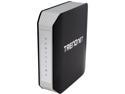
TRENDnet TEW-812DRU V1 AC1750 Dual Band Wireless Router
Pros: It turns on.
Cons: Garbage router. Nothing but problems. This is the second one, a Vers. 2 that was replaced under warranty--and worse than the original Vers. 1. I originally purchased a "version 1" router that never worked properly within the configuration parameters (I argued with the device for over a year, somewhat settling on its failings). A few months ago it started dropping DNS and dropping WiFi. Devices would show connected to WiFi, yet no data throughput would occur. This replacement appliance is now using the 3rd Beta software that TRENDnet provided to address a variety of problems. Their Level 3 techs have stopped replying to updates on the functionality of the router at this point, and seem to have taken a position of ignoring the problems (last response occurred January 6th, 2015, nearly a month ago) . I have been more than patient! I have many videos I may post links to that demonstrates various problems with this device. TRENDnet technicians have viewed every video. Examples of recurring problems: - Periodic loss of wireless continues (devices less than 20' away) - Enable QoS and Internet speeds drop 95% (yes, 95% - from over 113 Mbps x 5.72 Mbps to 3.01 Mbps x 0.65 Mbps). NOTE: This is a WIRED connection--not wireless! - Horrible latency (wired) - Periodic disappearance of DNS and WAN settings - Enable NTP (time) on the router and it destroys all WAN/LAN connections, and DHCP vanishes - Does not (Will Not) renew DHCP lease without reboot of EVERY network device, starting with the modem which must stay turned off until the TEW-812DRU decides to look for it. - Periodic ERROR: “failed to obtain IP address” on ALL wireless devices. Requiring forced restart of the router to reestablish connections. NOTE: The router showed that wireless was working, however no device could connect. Once I logged into the router interface and restarted the router, wireless devices were then able to connect. UPDATE: The latest BETA firmware has improved this issue. - Does not allow port forwarding of port 1500 at all. Response by TRENDnet, "can't duplicate" even though I have video proof. - Starting some games creates a "failed to connect" error. However, if you open and login to the router admin console, then the games will connect?!? Port forwards enabled for various software. - Has issues logging to the admin console. It never makes it the first try and requires F5 to access the login screen. - Good Luck setting up port forwarding. After entering and saving the starting and ending ports, if the end port is the same (single port), the router erases it, forcing you to RE-ENTER EVERY END PORT NUMBER. UPDATE: Latest BETA firmware has resolved part of this issue. NONE of these problems exist if I bypass the TRENDnet router.
Overall Review: I've used TRENDnet products for sometime, having exceptional luck with previous. However, that run of luck and quality of service has ended. My background includes Cisco Router programming (along the lines of a CCNA if I decided to take the tests) and I have various high end routers and other networking components in a personal lab. I'm asking for nothing more than a product that WORKS as advertised and expected. After contacting TRENDnet again today I am told a NEW Level 3 tech will contact me in 24 hours. I'm not holding my breath! My suggestion is to avoid TRENDnet products until they regain quality control, firmware development, and responsible (actionable) customer support.
2/3/2015See more detail
SamS - UPDATE
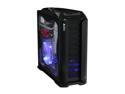
Thermaltake ArmorPlus(Armor+) VH6000BWS Black Aluminum / Steel ATX Full Tower Computer Case
Pros: Newegg provided shipping credit for the replacement case I purchased so I did not have to wait for the RMA process .... THANK YOU (see my full post below) This "IS" truly an excellent PC case .... !!!
Cons: 0
6/8/2009See more detail