
Your Browsing History


Peter C.
Joined on 02/09/06
0
0
product reviews
- 7
Works, not quite as advertised
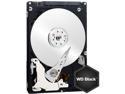
Western Digital Scorpio Black WD3200BEKT 320GB 7200 RPM 16MB Cache SATA 3.0Gb/s 2.5" Internal Notebook Hard Drive Bare Drive
Pros: Absolutely silent. Huge capacity. Very quick. Western Digital's best 2.5" drive (at the moment).
Cons: Contrary to description, this is NOT a 'Retail' package. I received the drive in a sealed plastic bag which was wrapped in bubble wrap. No documentation, no screws, no box. That's not 'Retail', that's 'OEM'. Not a fault of the drive, but I expect a little more from NewEgg. I'd take off half-a-star for this if I could.
Overall Review: I needed an upgrade from the 160GB 5400RPM drive that came with my notebook. I've always had very good luck with Western Digital drives, and was impressed with the specs. So this is the one I picked out. I'm glad I did. While I've only been using it for a few days while I re-build my system, it does seem a bit faster than the 5400RPM drive it replaced. Sure, it's a fresh install and those always run quick, but file copy operations seem better. Definitely an improvement over the old drive. Unlike some other reviews, my drive is *absolutely* silent. The only indication that I have that it's working is the HD access light on my notebook. I can't even hear it spin up. Absolutely no head-noise (ticking) either, which I did get quite a bit of with the old Toshiba drive. Oh, and in case anyone is curious, you'll get about 298GB of space when formatted. Nothing wrong with the drive, that's how it works. Buy it!
8/12/2008See more detail
Should have read the reviews more carefully....
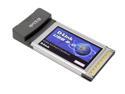
D-Link DUB-C2 USB PCMCIA Card 2 x USB 2.0
Pros: None.
Cons: Does not work with Compaq Presario 2100 series running XP SP2. Does not provide enough power to run a WD Passport USB drive.
Overall Review: Drivers load and the card recognizes successfully, but it completely locks up the laptop whenever I try to use it. Tried several USB flash drives, CF reader, and portable HD. None worked. Tried multiple drivers from CD and D-Link, with no success. Also, does not provide enough power to WD Passport portable HD. Looking through the reviews I see that I'm not alone. Should have paid better attention to them!!!
8/23/2007See more detail
A little pricey and hot, but works well
Rosewill RX82-MP-SUF82-BLK Aluminum 2.5" Black USB 2.0 & 1394bx2 External Enclosure
Pros: Bought this to compliment my new Macbook Pro. I wanted something faster than USB 2.0 for backups and external storage, and this fits the bill. I'm using a Western Digital 'Black Series' 320GB 7200RPM drive in it. A 35GB collection of JPG's takes 13 minutes to copy (FW800). A welcome improvement to the 40-45 minutes that the data takes to copy via USB 2.0. Slick. Oh, and it is self-powered from the FW cable - no AC adapter required (though it has a jack - though no adapter ins included).
Cons: It gets **REALLY** hot. After 20-30 minutes of data transfer, the metal chassis is nearly too hot to touch. Seriously, it's that hot. Hot enough to smell like hot electronics, if you know what I mean. Can't be good for the longevity of the electronics nor hard drive. Why did they put the heat sink on the underside? Not so smart design. I do sometimes have to verify the connection speed. About 10% of the time I use it, it connects at 400 rather than 800. An eject/disconnect/reject solves the problem, but it is a tiny bit annoying. An
Overall Review: It's a good device. As with other Rosewill enclosure's I've purchased, I'm content with it. I do wish it ran a bit cooler - it feels like they should have built a small fan into it. Or at least designed it with the heatsync on top. Or perhaps it would run cooler if I were using a slower 4200 or 5400 RPM drive.
7/3/2009See more detail
Maximum Dimensions
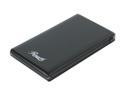
Rosewill RX81U-ES-25A 2.5" SATA to USB 2.0 External Enclosure
Pros: Works as advertised.
Cons: Thick drives need not apply.
Overall Review: This is a follow-up to my previous review. The absolute maximum thickness that the drive can be is 8mm. That's EIGHT mm. Any thicker and you can't slide the sleeves closed. I have a Toshiba 160GB that is *exactly* 8mm thick and it just barely closes. I have an older Seagate 60GB drive (from a dead MacMini) that is about 8.5mm, and it will not fit in the enclosure.
8/12/2008See more detail
Great!
Rosewill RX81U-ES-25A 2.5" SATA to USB 2.0 External Enclosure
Pros: Fast transfer speeds - noticeably faster than an old enclosure that was for IDE drives. Sleek case, carrying case & screwdriver a nice touch. Clever shell-mounting system. Only needs a single USB cable on some drives.
Cons: A tight fit for some drives.
Overall Review: I upgraded the 160GB OEM Toshiba drive in my Dell 1520 notebook. Since there was nothing wrong with the drive, I bought this enclosure so that I could continue to use it. It's a tight fit. If the Toshiba drive were any thicker (and I mean by 1mm) the sleeves of the enclosure wouldn't fit. But it does and I'm happy. I don't even need to use the 'power-doubler' USB end, as it works perfectly with just a standard single USB Cable. A good buy, and a no-brainer if you've got old SATA 2.5" drives lying around.
8/12/2008See more detail
Looks cool, seems to work as advertised
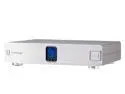
BELKIN PURE AV AP41300-12 Home Theater Power Console PF60 w/ Phase 6 PureFilter Circuitry
Pros: Built like a rock. Very informative screen, volts + amps. Lots of handy features to delay-start certain banks of switches. May improve sound and video quality. Very high 'geek' factor; looks like you're serious about sound/video quality.
Cons: Screen is impossible to read from more than a couple of feet away, especially at an angle. Questionable as to whether or not these things really do anything.
Overall Review: I found this on sale for an amazing price, so I bought one. It seems to work as advertised. It's hard to say if I notice any sound quality improvements, but it definitely changed my power a bit - lights no longer flicker in the room when my amps kick on. I did have to re-adjust my TV's settings a bit, so *something* is going on. It does appear to have improved the picture quality on my TV. It looks fantastic in the AV Rack and I can rest assured that my gear is getting clean and pure power.
2/16/2007See more detail