




 here!
here!
I’m your shopping assistant for PC builds, upgrades, and everything tech.
Got questions? Ask away!
Start a conversation
here!
I’m your shopping assistant for PC builds, upgrades, and everything tech.
Got questions? Ask away!
Start a conversation

Joined on 03/12/05

Excellent starter router
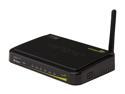
Pros: Installation was simple and I didn't even have to reboot or power cycle my cable modem. All I did was basically remove the old router and plug this one in using the same connections and turn it on. I wasn't really expecting much at first from this router because my other one is more expensive and has 3 antennas. To my surprise, this router is just as good even with the single antenna. Even at 30+ feet around the house all the way outside of my garage my connection isn't dropping. I tested this downloading some bittorrent files and did some online gaming and it still held itself well without dropping the connection. I was also able to connect to this router using my Android phone without problems and was able to get the maximum Internet speed that my ISP allows me. I noticed that it doesn't overheat like my other router--it isn't hot to the touch. Must be that power efficiency its boasting about using less power. The router's setup page loads fast and has a wizard that can help you configure it.
Cons: There are some things I wish this router had that my previous router did--the SPI firewall and an option to refuse replying on unknown ping requests to my WAN IP address. This router passed an extensive port scan test--it showed all the ports as stealth but failed on the ping test. But if you are just an everyday regular user, you probably have nothing to worry about. Another thing is while this router is more than enough to share your Internet connection at home, you might need a faster one if you transfer huge amount of data/files back and forth between your computers at home. Don't get me wrong, you can still stream videos no problem with this router, but if you want to save more time and transfer files faster, you probably will want to consider getting a faster wireless router or a Gigabit router.
Overall Review: If you are looking for a simple, affordable, and reliable easy to use router to share Internet connection among your computers or other devices at home, you can't go wrong with this one. I've only used Linksys, Netgear, Cisco routers in the past but Trendnet has a good contender here. In fact, since I've installed this router, I haven't had any disconnection yet that I have to reboot the router or the modem. For the price & features, this is just right.
I wish it worked
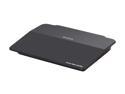
Pros: Can't really say much about this router as far as Internet connectivity goes since it didn't work for me. I wasn't able to connect to the Internet despite multiple attempts and configuration settings. On the bright side, the LAN works and is superfast. I was able to transfer files close the the max throughput my LAN allows me which is 270 Mbps limited by my Netgear MoCa setup connection. Streaming videos has no lag or freezing. Really wish the WAN also worked too.
Cons: As others have mentioned, there are no port indicator lights on this router. The setup was also harder compared to other routers that are basically just plug and play then modem reboot. I was able to get to the web interface and initialize the setup but it just can't connect to the Internet. It was able to get the information from my modem like DNS servers and everything but it just won't connect. I've tried this both with the included CD and manual setup--still no go. I may have gotten a defective unit.
Overall Review: I was really looking forward to reviewing this unit to validate what the poor reviews are saying and maybe prove them wrong but I guess there are some truths to all the poor reviews. I have a D-Link heavy duty 24-port switch that's been taking a beating and still works great so maybe I'm just unlucky with this one.
This is the RAM to get for your laptop & mini PCs!
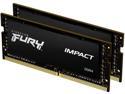
Pros: *System was able to recognize this RAM and run it on the advertised speeds of 3200Mhz CL20 without any tweaking unlike other RAMs where even though it advertises a higher speed, you have to tweak it first to get there. Some machines doesn't even let you tweak so you end up wasting money getting higher speed RAMs. *Dual ranks
Cons: *It further went down in price after I just bought it. 😭
Overall Review: I have this installed on a new mini PC (minisforum HX90) running at 3200Mhz CL20 dual rank! Benchmark scores is much higher with these RAMs compared to the reviews of the HX90 online running stock RAMs.
Wow... Still no review for this NVME SSD? Let me be the 1st then...
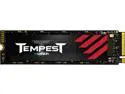
Pros: *PC was able to recognize the NVMe SSD without any problems *Very fast & snappy *Cheaper compared to other SSDs *1000TB TBW for the 2TB
Cons: *Not a lot of reviews online *1,500,000 MTBF instead of 2,000,000 *Only 3 years warranty instead of 5 years
Overall Review: I've been looking for another 2TB NVME SSD and waiting for the PNY 2TB CS2130 to go on sale again since that one has decent specs with 5yr warranty and I've been satisfied with the performance of this particular SSD on one my my machines but it never went on sale again. The PNY has good reviews and wasn't as expensive as the Samsungs or the Crucials P5 which is another reason I considered getting it. Well... Mushkin suddenly released a new NVME SSD out of no where. Its so new I can't even find a single review on it anywhere at all besides from some description of it on their website. I really need another NVME SSD soon and I can't wait for the others to go on sale so I took the chance and bought this during its promotional price. Once I got it, I put it on an external USB C enclosure to test it while I wait for the mini PC I was going to put this into to arrive. I loaded a live Linux distro on this and booted it up without any problems. This will be the intended use of this SSD later--to be the main boot drive of a Linux distro on a mini PC. So far it did very well and I encountered no issues... even more so compared to my PNY which seems to be a choppy at times when I was using a live distro on it but those went away once I installed it physically on the mini PC and installed the Linux OS on it. The Mushkin Tempest is no slouch and everything seems to run snappily---loading websites in a flash as well as different programs. The performance is on point and I can't find anything to complain about. It even feels faster than the PNY CS2130 I have. There's a point where you really won't be able to tell the difference in speed & performance when it comes to these types of SSDs unless you benchmark them. I have a Sabrent Rocket Plus 4 PCI Gen 4 NVME SSD on my main PC that cost about twice but this Mushkin doesn't feel any slower when it comes to normal usage. The only thing I'm worried about is its reliability but only time can tell. If you are looking a cheaper alternative GEN 3 NVME SSD that runs well and not looking to win any benchmark scores then you may want to give this new Mushkin Tempest a try. So far its running my new Linux distro like champ! 👍
Best looking RTX 3090 with high boost clocks!
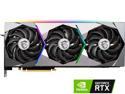
Pros: -Looks better than most 3090s (The RGB is tasteful and not exaggerated) -Boosts higher than most 3090s (Boosts to 1995Mhz on stock) -Excellent temps not going above 80°C (Mostly hovers low 70s°C) -Premium feel on build just like how it looks -No coil whine (I have a 1200w Platinum PSU)
Cons: -Expensive -Might not fit a lot of PC cases -Big power draw (400+ watts easy just the GPU alone) -Low availability -VRM can run toasty (around 86°C) even if the GPU itself is cool
Overall Review: I would highly suggest you get at least a 1000w+ PSU if you get this GPU if you have a lot of other peripherals attached to your PC. While the GPU itself draws around a max of 400+ watts, my whole power draw from the wall socket is around 700w+ while gaming and spikes at 870w+ on occasion. This is due to my monitor also that has almost 100w+ power draw and other PC attachments such as HDDs, SSD, 10Gbit ethernet card, DAS (Direct Attached Storage) devices, CPU, etc. Also if you want to enable Resizable Bar make sure you have done all of the following: -GPU supports resizable bar and have the latest GPU drivers -Above 4G Decode is enabled in the BIOS - CSM disabled in BIOS -Boot from a GPT partition -64bit Operating System -Windows running UEFI mode My PC Rig Specs: AMD Ryzen 9 5950X MSI GeForce RTX Suprim X 3090 64GB G.Skill Trident Z Neo 3600Mhz @ 14-14-14-34-48 CT1 Asus Crosshair Hero VIII X570
Pretty fast for a dual core Celeron!
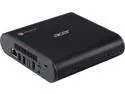
Pros: -Quiet -Power efficient -Very snappy (as long as you don't have too many apps open) -More secure than Windows OS or Linux (can be up for debate) -Can run android apps (has Google Play Store) -Can be placed vertically to save space -Lots of connections (USB-C, USB 3.0, HDMI, SD-Card slot, Ethernet jack) -Can do 4k@60Hz via USB-C to Displayport or HDMI (Just get the right adapter)
Cons: -Can't open too many apps due to lower amount of RAM (4GB) -Can't download too much stuff or install a lot due to small SSD size (32GB) -Harder to upgrade compared to the Asus Chromebox 'coz its harder to open
Overall Review: I have a very good PC gaming rig I built (Ryzen 3900X CPU, RTX 2080Ti, etc) but sometimes I feel if I'm not gaming and I'm just watching videos in Youtube or browsing sites... its overkill to use my main PC rig as it consumes a lot of power (180-190Watts idle at desktop). Compared to this Chromebox that only consumes about 40Watts and is more quiet and releases much less heat. So yea trying to use my main PC rig less if I'm not gaming, video/audio/image editing, or anything hardcore. I wish Ryzen can be supported for future Chromeboxes. I'll definitely get a more powerful one if they did.


