
Your Browsing History


Douglas T.
Joined on 03/06/12
0
1

product reviews
- 16
One day shipping was super fast
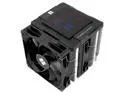
Thermalright Peerless Assassin 120 Digital CPU Air Cooler -Temperature Display | 6 Heat Pipes | 1850RPM PWM 120mm Fans, for Intel 1851/1700, AMD AM4/AM5
Pros: Once figured out how to put fan hooks on and latch em to the heat sink then installing moved along nicely. Temps seem to stay 30's idle 50-60c when gaming. Great heat sink for price, slightly bulky so yeah if dont got decent room in case that may be a problem.
Cons: Somewhat bulky goes over ram so had take fan off to get to the ram cause comp wasnt starting. Turned out that didnt have ram locked in from both sides. The asus z790 gaming wifi7 dimm slots had lock flip on one side but not the other so didn't realize until 20 tries later then lock ram in and everything booted up fine.
Overall Review: Would def recommend this heatsink for those getting cpu without fan sçc
5/10/2025See more detail
Cheap and dead on arrival
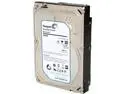
Seagate BarraCuda 7200.14 ST3000DM001 3TB 7200 RPM 64MB Cache SATA 6.0Gb/s 3.5" Internal Hard Drive Bare Drive
Cons: Dead on arrival lost 26 bucks. Oh well
Overall Review: Bad egg
5/3/2025See more detail
Great work horse when paired correctly
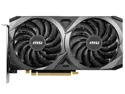
MSI Ventus GeForce RTX 3060 8GB GDDR6 PCI Express 4.0 ATX Graphics Card RTX 3060 VENTUS 2X 8G OC
Pros: Ultra always on 1080p
Cons: None
Overall Review: with intel i7 14700kf and 32gb ram, and Z790 wifi7 motherboard. Run all my games on ultra settings with 1080p and on title a decent 50-60 fps for War of Rights, Counter-Strike 2 with 200-300 fps. The GDDR6 vram is why i bought it and at about 200$ you wont beat this price and performance even when trying to by looking at AMD instead of nvidia. Temps are fine under 100% load fans aren't loud or nothing. Just turned on resizeable bar with just one change in bois. Oh ya and War of Rights can be 350-400 real players multiplayer. So yeah even with that many human card handles it all like a champ. Oh and SSD instead of HDD makes games and my P.C load up in a matter of seconds. So ya if looking for budget build you seriously cant go wrong here unless find something for around same price but you wont . And il wait probably forever until someone can find a better card for the price. Yes i know open box cheaper but yeah totally worth the risk.
6/26/2025See more detail
Worked out great!
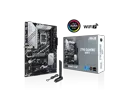
ASUS Z790 GAMING WIFI7 LGA 1700 ATX motherboard with PCIe 5.0, three M.2 slots, 14+1 DrMOS, DDR5, WIFI 7, Realtek 1Gb LAN, HDMI TM, USB 3.2 Gen 2x2 Type-C, front USB 3.2 Gen 1 Type-C, Thunderbolt USB4
Pros: Has everything needed for upgrade to windows 11 to be worth it since board features are mainly win 11 only. At first was just booting but not loading anything, turns out i needed to push both sides of ram down and put them in A2 and B2 slot. Got DDR5 6000 was worried cause intel i7 14700kf said 5600 max supported but the xmp for it to worked out and ram runs great with it. Also was worried was doing to much man handling of board cause i installed it then pulled it back out then back in. Anywho though just needed seat the ram snug down in dimm. Everything bought for it works great thank you
Cons: Was little confusing as to what was wrong cause beeps weren't happening. Took 16 hours to figure it was cause ram wasnt pressed in hard enough.
Overall Review: Perfect for my new intel i7 14700kf
5/10/2025See more detail
Works great. Low power Consumption A+
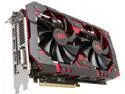
PowerColor RED DEVIL Radeon RX 580 8GB GDDR5 PCI Express 3.0 CrossFireX Support ATX Graphics Card AXRX 580 8GBD5-3DH/OC
Pros: Dont Need high price / power / PSU to run and still Runs All the new games on ultra graphics
Cons: Bought it a month ago or so and it was 400$ Now its 350$.. dangit. My Lost money atleast = your not lost money lol
Overall Review: wish could get that 50$ back lol.. feel kinda like over payed.. but o well. I got a high end graphics card that does everything i wanted it to.. ya it killed my old 585Watt PSU, And i just now had to buy a new one.. But got a 700Watt one coming so atleast i know the new PSU has plenty of power to run my rig an the card now. an wasnt but 50$ for the PSU atleast.
5/17/2018See more detail
Great size and image (UPDATED Capacitors dont last longer then year monitor Dies) {updated info in other}

Hanns-G 27" HD LCD Monitor (WLED) 2 ms D-Sub, DVI, HDMI HL273HPB
Pros: Screen is perfect upgrade from old 20" , Still very Clear sharp image.
Cons: none color is fine no problems yet .
Overall Review: UPDATED! This Monitor DIED on me Because of CHEAP Capacitors etc Cheap ones. that is only reason it died not even a year of having it probably. So i went with ViewSonic instead last year and it still is holding up strong no problems besides the 1 dead pixel when i got it. But ya this monitor the HANS will probably die on you after not to long
5/17/2018See more detail