
Your Browsing History


Michael S.
Joined on 03/05/05
0
0
product reviews
- 5
The reliable 12gb mid-range option
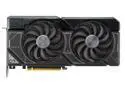
ASUS Dual GeForce RTX 4070 12GB GDDR6X, IP5X, Auto-Extreme Technology, 144-Hour Validation Program, HDMI 2.1a, DP 1.4a, DUAL-RTX4070-12G
Pros: - Probably the quietest card I've ever had; although I forget how loud my Voodoo Banshee was - Runs very cool; cooler than the FE - Short with only two fans - Only one 8-pin - Only 200 watts (less really) - TSMC silicon - 40 series features - CUDA for AI (Stable Diffusion)
Cons: - VRAM is the obvious downside with Nvidia cards. There is a reasonable chance Nvidia puts out new mid-range cards with more than 12 gigs at some point sooner than expected because the complaining is getting louder. - AMD cards are generally a better value for games. But if you think you may play around with AI apps at some point, go Nvidia.
Overall Review: I bought the non-OC model because I use my hardware a very long time, and if stuff dies on me before I'm finished using it then I feel ripped off. I've had a card die (an OC model made by a company that starts with S) on me mid-game before shortly after the warranty expired. My #1 buying concern after requirements are met is longevity and reliability and I'll pay extra or accept a slight loss in performance for this. I've had good luck with Asus in the past. The Techpowerup review made the choice even easier, with this card having the lowest temps, easily beating the Founders Edition. While benchmarking the temps matched the review values very closely however with Stable Diffusion the temps went higher but not by much. Since I use Stable Diffusion VRAM is a huge concern for me. (it's also a long-term concern for games if you run above 1080p) My options were basically limited to a 3060 12gb or the 4070 because everything else mid-range has less VRAM. (AMD disqualified due to no CUDA) I opted for the 4070 even when it's kind of overkill for me because I got twice the performance for less than double the price, I get next gen features and it uses about the same power.
4/21/2023See more detail
Do not buy
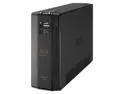
APC BX1500M Back-UPS Pro, 1500VA, Tower, 120V, 10 NEMA 5-15R outlets, AVR, LCD - Tower - 16 Hour Recharge - 3 Minute Stand-by -120 V Input-120 V AC Output -5 x NEMA 5-15R,5xNEMA 5-15R Surge Receptacle
Pros: Replacement batteries slightly cheaper than alternative brands, but don't buy this because of that like I did
Cons: Product absolutely failed to prevent shutdown of computer, router and modem during brief 2 second voltage dips (lights flickering) on multiple occasions. Product is significantly larger than competitor units of same VA class. APC software is inferior to the software of their chief rival. Customer support ignored my follow-up emails after asking me a few irrelevant questions. (I gave them two weeks before writing this)
Overall Review: After using another brand's UPSs for 10 years, I bought this one because it was on sale as my previous UPS battery is almost dead. (also slightly cheaper batteries) Rarely (if ever) have I been so disappointed in a purchase. Why? Because it fails to work during the same brownouts that my previous UPS does protect me from. (older unit protected a 2nd machine) This unit has a maximum voltage threshold of 88 volts. The competitor brand I also have has a maximum threshold of 100 volts. (meaning it will kick in if voltage drops below this threshold) I'm a layman, but apparently if the voltage drops to 89 during a brownout, then you're going to see a black screen, because this unit failed to prevent my devices from shutting off. I emailed support and they started ignoring me when I brought this up so I assume this is the case. Either way the product failed me twice in two weeks after purchase. Their chief rival units never failed me in 10 years. Note that the product DOES work when I unplug it or self test, so it's a sensitivity issue. Also really disappointed in review sites that don't test for this sort of thing to warn consumers and pressure APC to make something that functions well. If I want confidence that my machine won't randomly shut off on me, I am now forced to buy another UPS of a different brand. I don't know what I would do with this large brick of a device after buying something that works.
1/9/2021See more detail
Welcome to the future. Here are stupid problems your 386 didn't have.
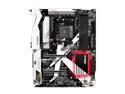
ASRock X370 Killer SLI/ac AM4 AMD Promontory X370 ATX AMD Motherboard
Pros: Price
Cons: Center channel audio is faint from speakers, and very faint + crackly in headphones making headphones unusable. How does a higher end chipset board have this problem in 2017? To be fair, I ask 'why does $issue happen in $current_year?' regarding computers a lot nowadays. Bought expensive 3000 14-14-14-34 Samsung b-die RAM (2x16) back in April (when I got this board) because everybody said that b-die was the most compatible. What it booted at when I got the board was 2133 and what it boots at today with the latest BIOS is still 2133 15-15-15-36. I paid more for the RAM than I paid for the mobo+psu+case combined and it's running at barely 2/3rds the advertised speed after half a year of BIOS updates on the high end chipset. I had expected that 16gb sticks might run slower, but this is ridiculous. How enthusiasts can tolerate running with only 16gb total RAM nowadays, I have no idea. Apparently not enough of us run with 16gb sticks to make vendors care.
Overall Review: I can only conclude that the current state of computer hardware reliability is further evidence of capitalism failing.
10/11/2017See more detail
Avoid

R.Horse Legend 800/1600/2400/3200 DPI Red Optical Light Wired Ergonomic Gaming Mouse - Metallic Black
Pros: Cheap
Cons: Buttons started having the typical double click/click drag issues after a mere month of moderate use. I can't imagine this thing lasting two weeks playing Diablo. It's flimsy enough that it 'creaks' somewhat.
Overall Review: I'm sick of paying $60 for 'gamer' mice that get double click issues after a year, and I'm not even an RTS player. This was my first attempt to find a cheap throwaway mouse, but even at $10 this was a bad investment.
7/26/2015See more detail
Had it up to here with this thing
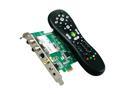
Hauppauge WinTV-HVR 1850 MC-Kit FM radio and MCE remote PCI-E x1
Pros: Price wasn't bad (at time of purchase)
Cons: Let me preface this by saying that I've never posted a bad review of any product before, ever. That is how fed up I am with this thing. First problem: the installer's splash screen refuses to lose focus, and covered up win7's dialog box asking me permission to allow installation the driver; I had no way of seeing or bringing that dialog box to the foreground, which forced me to cancel the process to click it because the installer hung. Second problem: WinTV kept crashing when executed for the second time after installation (after working once), complaining of a corrupt xml file. Upon inspecting the file, I saw that it was in fact correct XML. Amazingly replacing the file with a copy of it from a fresh install still did not resolve the issue. Multiple reinstalls after using their removal tool were required to resolve this issue. Problem 3: WinTV does not run well. It often maxes an entire core (on my i5 ivy bridge). It cashes occasionally. Otherwise I would like it. Media Center on the other hand ran quite well using very little cpu. Problem 4: The program included to learn the IR codes for your remote is awful and looks like some college kid's Visual Basic 6 program. It failed to work on my Comcast DTA remote. This prevents me from changing channels via computer. Problem 5: After working well enough with media center for about a year, one day the screen goes black. Reloading media center and rebooting failed to resolve the problem. It has never worked with media center since-- all I get is either static or media center just locks up. Problem 6: Since it stopped working with media center, I made the effort to get WinTV to stop crashing. (Which took awhile; never figured out why it did to begin with. Perhaps being forced to cancel the install process had something to do with it) It did still work with WinTV, so I started using that instead. Then one day it goes black again. Restarting WinTV, it says 'no tuner available'. A reboot was required to fix it. Three or four times now the tuner has died like this-- during the same TV program for some odd reason-- requiring reboots to restore functionality. I really, really do not like being forced to reboot my machine as I have a very full taskbar at all times. I regret this purchase.
Overall Review: should have just ate the $2/mo Comcast fee for a cable card
2/27/2014See more detail
seller reviews
- 2
Shipped me some noise isolating earbuds for $5, free shipping. Profit margin on this gotta be rather thin, so I guess I'll 5 star this seller
On-time
Delivery
Product
Accuracy
Customer Service
Satisfactory
12/25/2018See more detail
Was literally the first package to arrive during the busy season. Item was also lowest price compared to other merchants
On-time
Delivery
Product
Accuracy
Customer Service
Satisfactory
12/25/2018See more detail