


Your Browsing History


Matt K.
Joined on 12/24/03
0
0
product reviews
- 22
Initial Thoughts
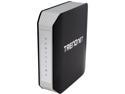
TRENDnet TEW-812DRU V1 AC1750 Dual Band Wireless Router
Pros: The initial setup was simple and the instructions easy to follow. In addition, more complex setup was completed without difficulty, and the documentation on the CD was surprisingly clear and complete. The router is about the same size as other devices, but I really like the vertical format. Since the unit resides on a shelf, it takes up very little space - a significant design improvement. The router has a large number of features and can accommodate a number of applications including gaming setup, NAT and VPN. My testing thus far indicates these features work without difficulty. The device itself appears sturdy and well designed.
Cons: The LEDs are a bit bright for my taste. (nit) Although technically possible, the bandwidth channels on the 2.4 and 5GHz frequencies do not automatically adjust and have to be set to one of these (20 and 40 MHz on 2.4 and 20, 40 and 80 MHz on 5GHz) There is no easy way to mount the mechanism on the wall if that is your preference.
Overall Review: I live in a 3 br two story house. The router is in the center of the house on the second floor as that is the location that works best. While I will not do direct comparisons, I will say that the router does produce a stronger signal than my previous device and does not drop out anywhere on the property. The lot is small, however, and I have not tested the signal off the property. There are three adults living in the house using Desktop PCs, one wireless printer, tablets and e-readers. All the devices connect and maintain a signal without any issue. I have separate SSIDs for each band and have turned off the guest access. The lower band works fine on most of my devices with the wireless g. I have tested the upper band only on wireless n as I have not yet installed the compatible wireless ac card in my laptop.
5/11/2013See more detail
Good Joke
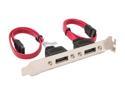
Rosewill RC-206 SATA to SATA 2 Port Bracket Cable 30cm (All SATA port)
Pros: Looks like it would work if . . . the cables could just . . . reach the connector. I laughed when I saw how short the cables are.
Cons: Cables don't extend the width of a standard ATX board.
Overall Review: Come on, add another 4 inches of cable so this device works with anything. I'll pay an extra buck for it.
2/27/2008See more detail
Very good hard drive
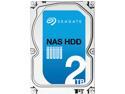
Seagate NAS HDD ST2000VN000 2TB 64MB Cache SATA 6.0Gb/s Internal Hard Drive
Pros: As others have mentioned, the drive is very quiet. Certainly enough to be used in a DVR or PC used for such. The drive is certainly quieter than other components in a computer or even the fan in my NAS enclosure. The drive is fast for a large storage device. I took a pragmatic approach and copied about 120GB from a drive array to the new drive. The average transfer rate using FastCopy in continuous transfer mode was 118.04 MB/s on the freshly installed drive. In testing my last purchase (equivalent WD Red NAS Drive), the same files transferred at 111MB/s. While not a huge difference, it is faster. In either case, used as intended in NAS, the speed is better than the potential transfer rate of about 100MB/s on a gigabit network connection. The specs are good, but based on this being a mechanical drive, are likely overkill, even in an array. I like equipment that is overbuilt. It tends to hold up better under regular use.
Cons: This is the first generation of this drive model. While not a true con, there is no historical data for this build. Other than this, I see nothing wrong with the drive or specifications.
Overall Review: While this is intended for NAS, I would suggest it is also a good candidate for a drive array (RAID 10, 5), either internal or external (say USB 3.0 or eSATA3)
6/22/2013See more detail
Drive worth having
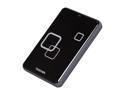
TOSHIBA Canvio Plus 1TB USB 2.0 2.5" Portable Hard Drive E05A100PBU2XK Raven Black
Pros: Small form factor Large capacity - Adequate to keep an image of my system drive plus additional data files with room to spare. Only requirement is a USB 2.0 port
Cons: None so far
Overall Review: This is the first Toshiba drive I have tried. Transfer speed is what I expect from USB 2.0, 30-35MB/s sustained write. It is comparable to the other USB 2.0 hard drives I have from WD. I don't use the software that comes with the drive, so I cannot make any comments one way or the other about that. I recommend care in handling - it is a hard drive after all.
6/9/2010See more detail
Info Correction
Intel Core i5-661 - Core i5 Clarkdale Dual-Core 3.33 GHz LGA 1156 87W Intel HD Graphics Desktop Processor - BX80616I5661
Pros: N/A
Cons: N/A
Overall Review: This is actually an 87W part. The i5-660 is the equivalent 73W part. The difference between the two is he built-in GPU clock which is 733MHz for the 660 and 900MHz for the 661.
1/7/2010See more detail
Not too stable
Microsoft Windows 7 Ultimate 64-bit 1-Pack for System Builders
Pros: Most of the time, apps are ready once the desktop comes up instead of having to wait til everything loads like older OSs As others have mentioned, mostly the same as Vista. I generally like the OS.
Cons: I have stability issues with external drives. Twice in the past two days, the file manager has simply dropped part of the file index so that files appear to be missing. I was able to recover the files by running the disk scanner, but have never in 5 years of using these and similar drives on an XP box so much as lost a single file in similar fashion. Curious, but I expected some glitches. When external drives are removed using safely remove, and then powered down, the system hangs when shutting down. It seems to work fine if I shut the system down then power off the drives. In addition, the system has temporarily frozen when loading some files. I look at task manager and there appear to be plenty of resources, so not sure what is causing this delay of up to a minute or two. File manager (explorer) window says not responding but eventually clears. Possibly more to come. This is only after a week of using the system
Overall Review: Fairly basic business system: E7600 Core-2 processor ATI 4670 GPU 4 GB RAM (DDR2-1066) 640 GB OS drive (using about 25GB now) Monitor is ASUS 25.5" 1920 x 1200 DVI. Printer is HP 1200 Windows 7 (actually v6.1) 64 bit with my resident applications (antivirus, etc) being optimized for Win 7. System rating is 5.9 (hard drive is the limiting factor) otherwise 6.4 Drivers are all Windows 7 64 bit drivers. External Drives are WD MyBook Pro 1394b (yes, the drivers are for Win 7 64 bit on the controller) and one older 1394a drive in a different controller hub plus a couple portable 2.5" USB drives. I don't care much for the file manager. I used to be able to set up folders with large icons however I wanted. 7 forces some kind of sort (name is of course the default) and I like to have a bit more control on some folders than this gives me.
1/6/2010See more detail